Prolint
Prolint is a tool for automated source code review of Progress 4GL code. It reads one or more sourcefiles and examines it for bad programming practice
When you are interested Prolint, you are encouraged to subscribe to this group where you find the on-line tools to collaborate and discuss Prolint. There is a discussion forum, you can submit issues (for bugs and enhancement requests), you can modify the on-line documentation. So subscribe, and then don't forget to go to your subscription details to enable the e-mail notification!
What is Prolint
Prolint is a tool for automated source code review of Progress 4GL code. It reads one or more sourcefiles and examines it
for bad programming practices or violations against coding standards.
Prolint does not change or rewrite source code, it is no beauty.p.
Rules
Prolint works with a customizable library of "rules".
A "rule" is a specific test that Prolint can perform on source code. Some examples:
- every variable should be defined NO-UNDO.
- variables that aren't accessed should be removed from the source
- every string literal should have string attributes.
- every internal procedure should have a comment
- the XREF file should not contain WHOLE-INDEX or SORT-ACCESS
These are just some examples, the complete current list on page "Prolint rules".
Every rule has a 'severity-level' ranging from 0 to 9 (0=informational, 9=severe violation).
You can easily customize the severity levels to your company preferences.
You can also switch rules on/off and save these settings in any number of "profiles".
A "profile" is a set of custom preferences.
Prolint is designed to make it easy to add or remove customized rules (one of the objectives of the Open Source Project is to improve the library of rules).
Output
The output of Prolint contains the following fields:
- compilation unit
- sourcefile
- line number
- description
- severity-level
- rule identifier
The output goes to a delimited text-file or to a result window.
A delimited text-file is convenient when Prolint works on a large amount of sourcefiles in batchmode.
The text-file is formatted in a way that makes integration with IDE's possible. For example, the file can be
formatted like a search-results file for the ED4WIN programmer's editor.
The result window is a Progress 4GL window with a browse widget.
The browse widget shows Prolint output in a temp-table.
The result window is convenient when Prolint works on a single sourcefile or a small set of
sourcefiles from within the Progress ADE.
A Help-button shows help about the rule on the current browse line.
Running Prolint
Prolint can be invoked in a number of ways:
- as a PRO*TOOL
- in Roundtable from the "Tools" menu
- in Roundtable during validation of a PCODE check-in.
- from with Ed for Windows
Customizations or user-preferences are set in a stand-alone program with a GUI interface.
This program can be added to the PRO*TOOLS menu.
How it works
Prolint is a set of Progress 4GL procedures, not using any smart-objects.
The core of all parsing is performed by a DLL: proparse.dll.
Proparse.dll reads Progress 4GL source code and represents the tokens as nodes in a treeview in memory, which can be accessed from the 4GL (much like the DOM in an XML parser).
Prolint is an Open Source project.
Proparse is also an Open Source project. You can download the compiled library from http://www.joanju.com
Download Prolint
The following release files are zipped executables of a setup-program. The setup program is a Windows executable, but Prolint itself can run on any platform (uhm, sorry that's not true anymore: release 74 needs .NET in other words Windows).
Prolint is distributed under the terms of the LPGL license.
If you want to know what has changed, read the revision history.
If this is your first time download, please read the installation instructions.
Prolint for OpenEdge 10.2B (and up)
Prolint release 74 is the latest release. It requires the "proparse.NET" assembly and therefore it requires at least OpenEdge 10.2B (on Windows). Proparse.NET supports the newest OOABL syntax.
Download Prolint 74: click here
Prolint for Progress 9 and OpenEdge 10
Release 73 is the last release of Prolint that uses the old proparse.dll and turbolint. Support for Proparse.dll ended when OpenEdge 10.1 was current and fails when you use the new OpenEdge 10.2 syntax elements, like "finally", structured error-handling and some more new OOABL syntax.
Download Prolint 73: click here
Prolint for Progress 8
When you are using Progress version 8, then Prolint release 63 is for you. The later releases of Prolint won't run in Progress 8.
Download Prolint 63: click here
Unix tarball
You can browse releases (including the latest release) and fetch a tarball using the WebSVN interface here:
websvn.oehive.org Prolint Tags
Installation
The pages in this chapter will guide you through the installation of Prolint.
the LPGL license
Prolint is free software; you can redistribute it and/or
modify it under the terms of the GNU Lesser General Public
License as published by the Free Software Foundation; either
version 2.1 of the License, or (at your option) any later version.
Prolint is distributed in the hope that it will be useful,
but WITHOUT ANY WARRANTY; without even the implied warranty of
MERCHANTABILITY or FITNESS FOR A PARTICULAR PURPOSE. See the GNU
Lesser General Public License for more details.
A copy of the GNU Lesser General Public License is
available online in file lpgl.txt and also available as file "license.txt" in the Prolint directory.
More information about this and other GNU licenses can be found at the GNU website.
Install Proparse first
Download Proparse
Prolint is based on Proparse, the parser for Progress sourcecode created by Joanju.
Prolint release 74 does not work with Proparse.DLL anymore, instead it requires Proparse.NET.
You can download Proparse.NET from www.joanju.com/proparse.
Proparse.NET comes as a zipfile with three .NET assemblies in it.
You need to put those assemblies in a location where the Progress session can find it, and you also need to specify the "proparse.net" assembly in the file "assemblies.xml" that is used by the Progress session.
If that does not make sense to you (it didn't to me, to be honest) then please read http://www.joanju.com/proparse/assemblies_notes.php for a detailed description.
Tip: if you installed Prolint release 74, then you can remove the old "proparse" directory that was required for Prolint 73. Unless you want to keep it, of course.
Where to install Prolint
Prolint must be a subdirectory of one of the directories in your PROPATH. If, for example, you already have an existing directory c:\p4gl\tools in your PROPATH you would end up with:
c:\p4gl\tools                  (existing directory, already in your PROPATH)

c:\p4gl\tools\prolint       (contains prolint sources)
This way you will not have to change your PROPATH to run Prolint.
If you have downloaded the setup program for Windows (prolint_nn.exe) simply specify the name of the basedir (in this example: "c:\p4gl\tools").
The setup program does not overwrite any existing files in prolint\settings, so your custom settings are preserved.
It has the built-in safety to abort entirely when you are trying to install an old Prolint release over a newer release: the setup program looks at help/release.ini to see which release is currently installed.
If you have downloaded the zip-file (prolint_nn.zip) it's all up to you to make sure that you are not overwriting anything that you would like to keep.
Extract adecomm.pl
Unless you are running Progress version 8 or TTY mode, you will need to extract adecomm.pl.
This is because the codepreview window contains an editor, which uses the same syntax-coloring editor as the Progress Appbuilder, and adecomm.pl contains the includefiles that makes this possible.
Instructions
Open a command shell and change directory to your DLC directory. In the following example I will assume this is directory "c:\Program Files\Progress" :
cd \progra~1\progress\gui |
Prolint Installation Guide (Windows)
This is a generic installation guide slightly modified from an actual installation. Please update as you see fit. Please keep in mind, we would like this to be generic enough so it can be used by all. The guide is written in MS Word.
Run Prolint for the first time
When you have installed proparse and prolint you are ready to run Prolint for the first time.
Let's take the quick tour:
run the following statement from a Progress procedure editor:
RUN prolint/desktop.w.
In the Prolint Desktop, choose button "Lint files...".
You will now see a dialog, titled "Prolint - select files to lint".
This dialog contains an editor widget where you can enter a list of sourcefiles that will be processed by Prolint. Each filename should be entered on a new line, wildcards are currently not supported.
The easiest way to populate the list is by using drag and drop: open a Windows Explorer, select one or more
Progress sourcefiles and drag/drop them into the dialog.
Please note that Prolint can only do its work on sources that are syntactically correct: the Progress compiler must be able to compile them without errors.
That's why we actually prefer the term "compilation unit" instead of "sourcefile": an includefile is a sourcefile but not a compilation unit.
For this first test, just select one or two files and press the OK button.
After you pressed OK, the dialog will immediately disappear and now you will see the "Prolint Results window" unless you are using a TTY-client.
Proparse will now initialize itself and show its splash screen (the frog picture). This may take a little while because proparse needs to read the database schema, but this only happens the very first time
in each Progress session. When you run prolint again (in the same Progress session) initialization will be skipped.
When initialization is done, Prolint will start inspecting the compilation-units you selected. After that you will get to
see a list of warnings in the Results window, unless Prolint didn't find anything in your source to warn about (in that rather unlikely case, the
status bar of the Results window will indicate "0 warnings").
When you double-click on a warning, an external text editor will open the sourcefile to the specified line number
(actually, this feature will probably not work for you yet, because it is by default configured to launch UltraEdit-32. We will change that later in "settings").
You can now press button "Lint current" - this will run prolint again for the compilation-unit on the currently selected browse row.
Or you can press button "Lint files" which will start the first dialog again, where you can select a new set of files to lint. Or you can open a popup-menu
on the browse (right-mouse button) and open a help file explaining the rule for the focussed line.
Prolint Discussion Forum
Visit the Prolint discussion forum
(but if you have an idea for a new rule, please use the Issue Tracker and use the combo-boxes to specify "component=rule" and "category=feature request")
When you are not subsrcribed to the Prolint group, you will not be able to post anything in the Forum.
Subscribing only takes a second or less, and you can unsibscribe whenever you want.
When you are subscribed, you can also opt to receive e-mail notifications for any group activity (like new Forum posts or other events in the Prolint group). This is however an optional step, that you can enable in menu option "my subscription".
Prolint Issue Tracker
Prolint reads your source code and looks for bugs and does suggestions for improvements. This Prolint project works in conjuction with the Prolint group
If you have an idea for a new rule, please use the Issue Tracker and use the combo-boxes to specify "component=rule" and "category=feature request".
But of course you can use the Issue Tracker for other issues too.
Revision history
prolint release 74, 14 march 2011:
- Support for Proparse.NET instead of Proparse.DLL. As a result Turbolint.DLL has been removed and Prolint now requires OpenEdge 10.2B and Windows as a minimum
- Bugfixes by Niek Knijneburg. Thanks Niek!
prolint release 73, 8 Februari 2009:
- several bugfixes
- new feature: community-contributed rules in directory "prolint/contribs/rules", as proposed in http://www.oehive.org/node/1150
- removed rule nopprsininclude, because it is now in "contribs/rules"
- if a c.u. doesn't compile then prolint will show the compiler messages, with line-numbers
- rule "do1" may be configured to have a skiplist, that specifies which statements are allowed to appear as only statement in a DO..END block
- added new rule "streamclose" to check if all streams are closed after use
- rule "varusage" can be configured to skip shared variables assuming that those variables are probably used in a different c.u.
prolint release 72, 12 April 2008:
- Added new rule andorparens to find logical expressions with a mix of AND and OR that have no parentheses
- Fixed every open bug report that was in the issue tracker.
- Regression tests were out of sync, now they are clean
prolint release 71, 9 march 2008:
Important: if you are upgrading to Prolint 71 and use Roundtable integration, you MUST change rtb_evnts.p to avoid errors. The change only takes a minute and is described at page Repair your Roundtable Integration
New in this release is support for Roundtable 10.1b, created by Thomas Hansen.
The old directory "prolint/rtb" is gone and replaced by a new directory "prolint/roundtable/" + version-number.
Also new are a bunch of rules created by Glen West:
- new rule nobreakby
- new rule noglobaldefine
- new rule nohardcodeemail
- new rule nolike
- new rule nolonglines
- new rule nonestedinc
- new rule nopprsininclude
- new rule nowait
- new rule release
prolint release 70, 2 september 2007:
The optional Prolint database (prolintdb) has undergone many changes. When you were not using prolintdb then it won't be an issue for you, but if you are already using prolintdb then you will have to upgrade its schema, either by creating a new prolintdb database or by importing de delta-df in file "prolint/prolintdb/prolintdb-v1-delta.df".
- "session-aware prolintdb", by Glen West
- new rule leavemodal by Tim Townsend
- new rule where-cando by Tim Townsend
- various other code improvements by Tim Townsend, see issues 907,914,915,925
prolint release 68 and release 69, 29 april 2007:
More OOABL syntax recognition and one new rule. To use Prolint with OO classes you must have Proparse 3.1a.
- new rule usingpkg discourages the USING statement with package globs
- many improvements and bugfixes related to inherited properties and inherited variables (from ancestor classes)
- added regression tests for OO class analysis
prolint release 67, 18 February 2007:
Bugfix release and also one new rule:
- new rule publicvar searches for public variables in classes.
- fixed a rather silly bug in rules bufdbmeth, bufdbproc and bufdbfunc.
- fixed a false positive in rule "tablename" when a variable (or property) was accessed that was defined in an inherited class. Prolint can now parse the superclasses of a class to help eliminate this problem.
prolint release 66, 11 February 2007:
Several changes to make Prolint work with OOABL classes (but don't worry Prolint still works in DLC 9 too):
- Prolint would only scan *.p and *.w files. This is changed to "*.p,*.w,*.cls" and you can override this filter in prolint.properties.p
- Fixed error reading XREF files when the parsed sourcefile is a class that inherits from another class
- Added support for METHOD and CLASS in several rules, like rule tableusage, endtype, nameconv, tablename, varusage, where-udf, noeffect
Several other enhancements, not related to OOABL:
- Added new rules bufdbproc and bufdbfunc and bufdbmeth: enforce the usage of DEFINE BUFFER in order to scope buffers to the ip/udf/method
- Give a hint when file protools.dat was not found, instead of silently fail
- Helpfiles removed!! All Help buttons now open live pages at http://oehive.org/prolint instead of static pages in the prolint/help directory
- fixed false positives in rule "tablename" related to the GUID function and for unqualified fields in the RELATION-FIELDS option in the DEFINE DATASET statement
prolint release 65, 5 August 2006:
- rule "findstate": fixed false positives that occured when the
unique index has a boolean field and the WHERE clause contains
something like "NOT thelogicalfield" - Hardened the regression test. The regression test now requires a
database named "prolintest.db" located in directoy
prolint/regrtest/db. A dictionary file is provided - tested with Proparse version 3.0b which was released this week
- drastic housekeeping in the directories. The root of prolint is
now almost empty: most stuff is now stored in the new subdirectories prolint/core and
prolint/launch, some stuff is simply deleted
prolint release 64, 14 March 2006:
Important: Prolint 64 does not run in Progress version 8 anymore.
If you are still running Progress 8, then please use Prolint release 63.
- support for HP-UX. By John Green
- prolint tries to compile with and without STREAM-IO option so a
sourcefile that was designed for GUI can be processed in a TTY batch
session. By John Green - rule "nobrackets": added some more methods to check for (BUFFER-
CREATE,BUFFER-RELEASE,QUERY-CLOSE). By John Green - desktop.w used to give a warning when adecomm.pl is not extracted.
This is changed: the warning only fires when desktop.w is not
compiled. By Carl Verbiest - added new rule "nameconv". By Carl Verbiest
- improved position of Prolint button in Roundtable desktop. By Carl Verbiest
- added Prolint menu-items to Appbuilder. By Carl Verbiest
- added new outputhandler "logexcel.p" for output to Excel (in
Office 11 only). By Carl Verbiest - improved rule "findstate": when a buffer definition is not found
in the current ip/udf, then search for it in the scope of the
compilation unit. By Carl Verbiest - added configuration file "prolint.properties.p" for more flexible
customization. The old file "customize.i" is gone. By Jurjen
prolint release 63, 25 Januari 2005:
- tuned function RelativeFilename in lintsuper.p some more.
- changed file location of the ini-file for Roundtable check-in validation, the new search order allows for better administration.
- added sources for turbolint.dll to the Open Source project
prolint release 62, 12 December 2004:
No new features but performance improvements. The overall performance improvement in my test was around 10%, but depends highly on the files you inspect, which rules you choose and how many warnings are generated.
- Added 4 rules to Turbolint.dll:
rules "colon-t", "maxchar", "strattrib" and "runname". - tuned function RelativeFilename in lintsuper.p
This function appears to be a performance bottleneck if Prolint generates many warnings.
prolint release 61, 12 December 2004:
- added new rule fnusage:
by Igor Natanzon.
looks for functions that are never called. - added new rule emptyblock:
by Igor Natanzon.
looks for blocks that are empty. - added new rule groupassign:
by Igor Natanzon.
looks for ASSIGN statements that can be combined to one single ASSIGN statement. - added new rule lexcolon:
by Igor Natanzon.
Looks for block headers that do not end with a colon. - added new rule tableusage:
by Igor Natanzon.
Looks for buffer and temp-tables that are defined but bever used. - added new rule ttlock:
by Igor Natanzon.
looks for EXCLUSIVE-LOCK and NO-lOCK options on temp-tables. - added new rule weakchar:
suggested by Greg Higgins, discussed on PEG.
Looks for IF conditions that forget to test if a string has the unknown value. - work-around for API-related bug in OpenEdge 10.0:
Prolint.p could not call Turbolint.dll in OpenEdge 10.0. It should work now.
prolint release 60, 23 September 2004:
- improved rule tablename:
rule "tablename" gives false poitives on function NOW or when a function has a table-handle parameter. Reported by Julian Lyndon-Smith. - imrpoved the Preview pane of the Results window:
A small bug in the code preview side of things. If you have code preview open, and press the "Lint this ccu again" an error appears with "CheckForChanges not found". Found and solved by Julian Lyndon-Smith - improved rule sharelock:
fixed a false positives in relation to PRESELECT. Reported by Thomas Hegedus
prolint release 59, 13 April 2004:
- the Code Preview window is now an editor! This makes it very easy to correct the problems found by Prolint.
Submitted by Ildefonzo Arocha. - Rules are now grouped in categories.
- new button "Rebuild Help" rebuilds help files, merging your help for your custom rules.
- bugfix in rule "abbrevkwd" in turbolint:
FORM is not always an abbreviation of FORMAT. - another bugfix in rule "abbrevkwd" in turbolint:
EXCLUSIVE is always an abbreviation of EXCLUSIVE-LOCK.
prolint release 58, 15 February 2004:
- added new rule runnotfound:
search for statements like "RUN test.p" and warns if file "test.p" does not exist. - added new rule runasnotfound:
search for statements like "RUN test.p ON hServer" and warns if file "test.p" does not exist. - added new rule undoretry:
"UNDO" without option behaves like "UNDO, RETRY" but RETRY is almost never desired. - improved rule abbrevkwd:
- keywordlist refreshed for OpenEdge 10 (used by rule abbrevkwd)
- accept NO-LABEL in ab-generated blocks. fixed by Sven Persijn.
- ignore com-handle properties and methods
- improved rule findstate:
false positive on "FIND customer OF order". fixed by Sven Persijn - improved rule nowhere:
the rule will not complain anymore when you used "OF" instead "WHERE". fixed by Sven Persijn - added new rule oflink:
compensates fixes in "findstate" and "nowhere" by adding a new rule that warns when
you link records using "OF" instead "WHERE". - button "Lint Active AB" now uses the most recently used profile by default (the old default profile used to be blank). Submitted by Dennis Hardy
prolint release 57, 8 december 2003:
- improved rule sharelock:
added test for the PRESELECT statement.
Submitted by Olivier FOUAN. - improved rule ifparens:
removed many, many false positives. - improved rule backslash:
removed warning for backslash in filename of WRX binary in procedure control_load.
prolint release 56, 1 december 2003:
- added new rule ifparens:
checks if every IF function to see if it needs parentheses. - bugfixes in processing of _proparse_ prolint-nowarn directives
- bugfix in outputhandlers/logwin.w regarding reading the system registry.
- added feature: window selectfiles.w remembers the most recently used profile.
prolint release 55, 25 november 2003:
The Results window (logwin) is completely rewritten by Ildefonzo. It now contains
a treeview and a listview, and a very convenient code preview pane too.
This new Results window is the default if you are using Progress 9.
If you are using Progress 8, you will automatically get the old
Results window which has been renamed to logwin8.
Features of the new Results window:
- User Interface redesign:
- Added a Tree View to display warnings by source file and ruleID.
Treeview nodes are displayed in colors depending on the severity
of the warning/error. - Added a List View to display details of each warning
ListView sorts upon clicking on column header - Replace Text buttons with Image buttons
- Hide/Display button of Tree View
- Added a Tree View to display warnings by source file and ruleID.
- New Functionality
- Added Code Preview Window
- Resize Possibility
- Delete Button only deletes warnings display in the List, node sensitive
- User Settings are stored to the registry
- Dropped Functionality
- Saved files are not saved using the same sort order as displayed
- Removed all version 8 compatibility stuff
prolint release 54, 27 october 2003:
- new rule: unquoted:
Warns if you use an unquoted string.
This rule requires proparse 2.0b. - refactored: existing filters are now filter plug-ins and you can easily add your own custom filters.
prolint release 53, 14 october 2003:
- new feature: exclude warnings based on file patterns and rule patterns. See last paragraph (about file exclude.lst) on page Suppress warnings
This exclude filter was submitted by Ildefonzo. - several bugfixes in rules "runname" and "tablename"
- bugfix "shared variable not yet created" when roundtable custom hook was started from within the roundtable API, instead from the roundtable desktop.
This bugfix was submitted by Ildefonzo.
prolint release 52, 28 September 2003:
- new feature: Roundtable Check-in Validation:
Prolint can validate objects before they are checked in into Roundtable, and can abort check-in when specified warnings are found.
This is highly configurable, see help on page Roundtable Check-in Validation - new rule: tablename:
Warns if you use a fieldname without qualifying it with a tablename (eg "cust-num" instead "customer.cust-num")
Based on an idea by Marlene La Varta - bugfix in rule: abbrevkwd:
"FORM" is usually an abbreviation of "FORMAT", unless it is used at the head of a FORM statement.
prolint release 51, 21 April 2003:
- new rule: abbrevtable:
Identifies abbreviated record names.
Submitted by Igor Natanzon on TWiki. - new rule: idiskeyword:
warns when you define a variable (or parameter, temp-table, field, buffer) with a name that is also a Progress keyword.
prolint release 50, 6 April 2003:
- New internet domain: www.prolint.org
Old homespace www.global-shared.com/prolint will no longer be used.
- Documentation changes: replaced www.global-shared.com/prolint by www.prolint.org.
Some more small documentation changes.
- No differences in Prolint programs.
prolint release 49, 5 April 2003:
- new rule: when:
warns about ASSIGN...WHEN... statements - new rule: errortext:
Warns when it finds a "RETURN ERROR." statement. RETURN ERROR should have a string argument.
Requested by Jay A. MArtin. - new rule: alertmessage:
MESSAGE not an Alert Box
Submitted by Igor Natanzon on TWiki. - new rule: endtype:
Type of END statement not qualified in PROCEDURE, FUNCTION, or CASE
Submitted by Igor Natanzon on TWiki. - added dialog prolint/dnewrule.w
This dialog helps you insert a new record into the list of rules (rules.d) - added procedure prolint/lintproglist.p, by John Green
runs prolint for all files that are listed in a text file.
- added procedure prolint/rtb/wspace-culist.p, by John Green
lists names for all compilable programs in a Roundtable workspace into a text file.
This file can be used with lintproglist.p to lint an entire workspace.
The program also generates .p for HTML objects into a temporary directory so these can be linted too.
prolint release 48, 27 Januari 2003:
- bugfix in rule: varusage:
should treat buffer parameters like table parameters: just ignore the identifier. - bugfix in prolint.p:
installation directory (on Windows) is now written in registry in HKCU, because HKLM may be write protected
prolint release 47, 15 December 2002:
- improved rule: strattrib:
the rule now ignores the Length specification in the string attribute; only looks at the Justification spec. - improved rule: noundo:
now allows "DEFINE INPUT PARAMETER TABLE-HANDLE" without NO-UNDO, because NO-UNDO is not allowed by the compiler. - proparse directives (prolint-nowarn) now also works for rules that don't rely on Proparse, like rules "wholeindex" and "sortaccess"
prolint release 46, 5 November 2002:
- added new rule obsoletenodes:
Searches for obsolete keywords in your source. You can configure the list of obsolete keywords to search for, in file "prolint/rules/persist/obsoletenodes.p"
this rule was submitted by Igor Natanzon. - removed rule "recid" because obsoletenodes can handle this.
- fixed a file locking bug in turbolint.dll:
turbolint used to crash when it had to read a sourcefile while it was locked by an other process, like ED for Windows.
Prolint.p and Lintsuper.p have been changed to support obsoletenodes:
- there is a new directory: "prolint/rules/persist". This directory may contain procedures whose names are identical to the names of rule procedures. These procedures in prolint/rules/persist are loaded persistently by prolint.p and their handles are passed to the actual rules.
- Lintsuper contains a new procedure PublishWarningSeverity. It is identical to PublishWarning, except it has an extra parameter that allows to override the default severity level.
prolint release 45, 13 October 2002:
- changed configuration for custom rules: the search order for each rule is now: first "prolint/custom/rules" then "prolint/rules". File "prolint/custom/rules/rules.d" can be used for overriding severities for non-customized rules too.
- help is not compiled HTML Help (chm) anymore. The problem with CHM was that it did not search for custom help in directory "prolint/custom/help".
- improved rule sharelock:
fixed false positive: work-tables should be handled just like temp-tables - improved rule use-index:
fixed false positive: should not raise a warning for the USE-INDEX option in the DEFINE TEMP-TABLE statement.
bug submitted by Arjen Hoekstra - removed warnings #201 and #203 from rule ifindent2
- added new rule messagetype:
checks if every "message... view-as alert-box" specifies a type (error, question, information, etc).
this rule was submitted by Igor Natanzon. - added new rule dbtrigger:
checks if there is any DISABLE TRIGGERS in sourcefiles
this rule was also submitted by Igor Natanzon. - added new rule matches
Reports every use of MATCHES, because MATCHES is often bad for indexing.
Submitted by Murray Hermann. - added new rule noerror
Reports every use of FIND without NO-ERROR.
Submitted by Murray Hermann. - added new rule uninproc
Reports internal procedures that are never used.
Submitted by Murray Hermann / Breck Fairley.
New rules to help you test if your source is ready to be used with an Oracle dataserver:
- added new rule allfinds
Reports every FIND that has a FIRST|PREV|NEXT|LAST qualifier. Oracle does not work well with those.
Submitted by Murray Hermann. - added new rule contains
Reports every use of CONTAINS, for Oracle compatibility.
Submitted by Murray Hermann. - added new rule create
Reports every use of CREATE buffer, for Oracle compatibility.
Submitted by Murray Hermann. - added new rule query
Reports every QUERY that is defined without SCROLLING if that query is used with GET PREV or GET LAST. For Oracle compatibility.
Submitted by Murray Hermann. - added new rule sequence
Reports every usage of sequences, for Oracle compatibility.
Submitted by Murray Hermann.
prolint release 44, 6 October 2002:
- new: statistics by includefile, from data in prolintdb. Note: this involves a dictionary change in prolintdb!
- added new rule: findstate-tt:
similar to existing rule "findstate", but findstate-tt ignores database tables and only reports temp-tables. The purpose of this split is that you can assign different severities for temp-tables and persistent tables. - improved rule: findstate:
This rule will not raise a warning when the FIND statement tries to find a temp-table record, because those are handled by new rule findstate-tt.
Also: suppressed many false positives, by comparing fields in the WHERE-clause with fields in unique indexes. This improvement only works in Progress 9 because there is no fast/easy way in Progress 8 to retrieve index definitions (well, unless there is only one database connected).
prolint release 43, 5 October 2002:
- new feature: save Prolint warnings in a database and query statistics. See help topic prolintdb.
prolint release 42, 3 October 2002:
- in Prolint Desktop, the buttons "Lint Active AB" and "Lint Open AB" are now functioning. Thanks to Martijn Voncken.
- added new rule: colon-t:
report strings that begin or end with whitespace and have the :T attribute.
prolint release 41, 9 September 2002:
- improved rule "ifindent":
Several false positives removed by Judy.
Added regression tests (also by Judy).
Turbolint updated accordingly by Jurjen.
prolint release 40, 1 September 2002:
- improved rule "findstate":
warnings are suppressed when you FIND by ROWID. - new: turbolint:
performance boost by using some more 3GL. (Windows only)
prolint release 39, 28 August 2002:
- changed new rule: "where-udf":
removed many false positives.
prolint release 38, 28 August 2002:
- added new rule: "where-udf":
This rule locates WHERE clauses that contain user-defined functions. Submitted by John Green.
prolint release 37, 5 August 2002:
New rules and improvements by Breck Fairley and Jamie Ballarin:
- improved rule "varusage":
The warning text distinguishes between variables that do not appear in
the source at all, and variables that are assigned although their values are never used.
Output parameters that aren't used are by default not reported, but this can be changed in customize.i.
The new version of this rule also finds more instances of local variables that are hiding large-scoped variables. - added rule "findstate":
Gives a warning when a FIND statement is not qualified with [FIRST|LAST|NEXT|PREC|CURRENT] and is not immediatey followed by an IF AMBIGUOUS test. - added rule "ttnoindex":
Gives a warning when "DEFINE TEMP-TABLE xxx LIKE yyy" does not contain index definitions, because all indexes of "yyy" are inherited even if those are not required.
Also:
- patched rule "backslash":
The source for this rule did not compile on Linux or Solaris. Reported by Jurgen Van Bouchaute. - fixed bug: {&_proparse_ prolint-nowarn()} just before a block-label did not work. Reported by Neil Barton-Greenwood, fixed by John Green.
prolint release 36, 7 July 2002:
- improved rule "ifindent":
The rule now uses the new function parserGetNodeColumn(node).
Submitted by Judy Hoffman Green.
This improvement requires Proparse version 1.0h: upgrade Proparse if you didn't already. - improved rule "i18nlength":
The "type" parameter is not only checked on LENGTH, but also on SUBSTRING and OVERLAY.
Submitted by John Green. - tempfiles: prolint creates a unique tempdir where it stores its tempfiles, and deletes the tempdir afterwards.
- Enhancements to the Results window:
- you can now specify a filter (where-clause) for warnings in the browse.
- the "Save log As" button saves only warnings that match the filter, and also uses the current sort order!
- you can also delete all warnings that match the filter.
The main purpose of this, is to copy warnings from the Results window to
the "Build"-window in ED for Windows (the editor), using the current filter and sort order.
This is by far the easiest way to correct your sourcefiles!
You will also need to download todays version of proed4w to do this.
See integration with ED for Windows for details.
prolint release 35, 30 June 2002:
- Added new rule "ifindent"
by Judy Hoffman Green.
The main purpose of this rule is to look at indentation in and after IF
statements and to warn for confusing indents. For example:IF ready THEN ASSIGN x = a y = b. z = c. - Removed win32-api calls from "Prolint Desktop" window for Linux compatibility, as requested by Murray Hermann.
prolint release 34, 24 June 2002:
- Added a new window: Prolint Desktop (run prolint/desktop.w).
It makes working with Prolint a bit easier.
- Added a new rule: "backslash".
Looks for backslashes (but ignores "~\") in strings and filenames, to ensure portability for Unix.
- improved rule "substitute":
Gave some false positives because it didn't consider empty strings as untranslatable.
- improved rule "nocomment":
Ignores comment before a procedure/function when it looks like it belongs to the previous procedure/function. For example:END PROCEDURE. /* end of procedure AA */ PROCEDURE BB :
prolint_33.exe, 22 June 2002:
- One little improvement in outputhandler pro4mfile.
prolint_32.exe, 22 June 2002:
- Added a new outputhandler (pro4mfile) and matching profile (pro4m) for integration with PRO4M by Yuriy Setko. These will be called automatically from within PRO4M if you installed 3PRO, see http://www.progress-plus.com for details.
- Using a Windows installer now. Please use it instead of the .zip format. The installer tests if you are attempting to overwrite a newer release, and does not overwrite your custom files in prolint/settings.
- Added a test to Prolint to see if it is installed in more than one directory.
prolint_031.zip, 19 June 2002:
No functional differences, added conditions for the GNU Lesser General Public License.
prolint_030.zip, 31 May 2002:
- improved rule "nocomment":
The rule used to raise a warning when a procedure/function does not begin with a comment.
Patrick Tingen improved this: a comment directly before the procedure/function is also accepted.
prolint_029.zip, 27 May 2002:
Bugfix: profile "<none>" failed.
prolint_028.zip, 26 May 2002:
New: the option to use "local profiles". The existing profiles in directory "prolint/settings" are from now on "shared profiles".
Local profiles can be convenient when:
- a particular Progress-project requires different Prolint-settings,
- a programmer in a development team wants his own private profiles.
The lists of Local profiles and shared profiles are merged at run-time, local profiles take precendence unless the shared profile is marked as "not overrideable".
See page "profiles" for more info.
prolint_027.zip, 16 May 2002:
Some minor changes for compatibility with Proparse 1.0f00.
Proparse 1.0f00 (or later) is required for this release of Prolint, see
http://www.joanju.com
Other than that, there are no changes in Prolint at this
moment.
prolint_026.zip, 28 April 2002:
Wouldn't it be great if "ED for Windows" had a toolbar-button to run Prolint for the source you're editing? Well, read on..
- bugfix in Roundtable integration
The compile-event would cause a local copy of a sourcefile to be copied to the central directory.
- added new rule: "do1"
Warns if a "DO ... END" block contains only one statement. Except if that one statement is an IF statement.
- added new rule: "maxchar"
Warns if a string constant is longer than 188 chars (unless it is marked as :U) because Translation Manager cannot import strings longer than 188.
- new feature: Prolint can be invoked from with ED for Windows!
- bugfixes for Linux compatibility
Judy Hoffman Green has tested Prolint on Linux and kindly submitted the necessary changes.
- bugfix in rule "runname":
The rule would say that filename is not unix-compatible when filename is enclosed in quotes and has a :U attribute.
Fixed by Judy Hoffman Green.
- bugfix with very long lines in outputfiles:
When a string is very long or contains linefeeds, it would cause problems to import an outputfile generated by Prolint. Bug found by Judy.
- bugfix in rule "sepdbui":
the rule assumed that "DEFINE something LIKE tablename" was a database access. It isn't, at least not at run-time. Bug found by Wilco Weultjes.
- bugfix in rule "nowhere" and "sharelock":
these rules raised false positives on "DO FOR tablename TRANSACTION:". Bug found by Wilco Weultjes.
- changed default setting:
setting "batchrun" now uses outputhandler "tabfile.p" by default instead of "logfile.p".
More about ED for Windows integration: see page "ed4win".
prolint_025.zip, 24 February 2002:
- improved rule "substitute"
There is no need to raise a warning when every string in
the statement has the :U attribute.
- added new rule: "dotcomment"
Warns when a statement begins with a dot (aka period)
because it makes the statement behave like a comment.
- added new rule: "recid"
Warns on every occurence of the keyword RECID, because
it should be replaced by ROWID
- added new rule: "use-index"
Warns on every occurence of the keyword USE-INDEX.
- Prolint used to accept only filenames. Now
it accepts filenames and/or directory-names in any mix.
Directories are (recursively) scanned for *.w and *.p.
- The results windows has an extra statusbar-panel:
percentage done. This panel is updated when multiple
files (or directories) are processed.
- added new outputhandler: "tabfile"
This outputhandler writes to a tab-delimited file.
- Buttons [Save log as] and [Import log] in the resultwindow are now functioning, at last, although quick
and dirty. [Save log as] sends the contents of the
resultwindow through outputhandler "tabfile". [Import
log] reads a tab-delimited file, previously written by
"tabfile" of by the [Save log as] function and populates
the resultwindow with it. Pretty simple but it may be
convenient.
prolint_024.zip, 22 February 2002:
- added new rule: "runargs"
This rule looks for RUN-statements with run-time
arguments. These are often the result of a simple
typo, like forgetting to end the RUN-statement with a
period, or closing the parameter-list with a parenthesis
too many, for example run something("")).
prolint_023.zip, 20 February 2002:
- new rule: "substitute"
This rule looks for concatenations of strings, like:
MESSAGE "customer " + custnum + " just ordered item " + itemnum.
and will advice you to use the SUBSTITUTE function
instead to help translation.
prolint_022.zip, 20 February 2002:
- Found and fixed a new bug in rule "noundo.p":
Prolint raised a warning that NO-UNDO was not used
with parameters, even if they actually were NO-UNDO, like:
define input parameter hBuffer as handle no-undo.
prolint_021.zip, 19 February 2002:
Gerry Winning has improved the integration with
Roundtable:
- Prolint can now inspect HTML objects (webspeed).
How it works: you first press "Compile"-button
in Roundtable so Roundtable generates a .w file and
stores it in the same directoy as the .html-file. Then
when you press the "Lint"-button in Roundtable it will
find and inspect this .w file. - bugfix: when an object was checked out to the
Task directory, Prolint would still inspect the
sourcefile in the Central workspace directory.
Note: you have to include {prolint/rtb/custom_evnt.i} in
roundtable/rtb_evnt.p and recompile it before these
changes are effective. The old {prolint/rtb/addmenu.i}
is now obsolete because it's name is not descriptive
anymore and can be removed.
Thanks Gerry!
prolint_020.zip, 12 February 2002:
This version requires Proparse 1.0e01.
Internal changes to Prolint by John Green for
compatibility with Proparse 1.0e01:
- noeffect.p
OBJREF is toast, replaced with OBJCOLON. Fixed the check for
Method_param_list,
which may be either two or three sibling nodes away from the OBJCOLON. - abbrevkwd.p
Added OBJCOLON as a node type to rule out.
Removed the workaround for node type OBJREF.
The colon (OBJCOLON) and the method/attribute name are no longer stored
in the text of that one node - they each have their own node now. - sepdbui.p
"child" nodehandle was unused? Changed its name to tempNode, and used it.
:-)
Changed name of FoundObjRef to FoundObjColon, searches for OBJCOLON instead
of OBJREF. Now checks the text of the next sibling after the OBJCOLON. - varusage.p
It is no longer necessary to create a query on OBJREF when the following is
found:
#(EQUAL #(Field_ref ... ) ... )
Removed those checks.
IMPORT doesn't seem to allow IMPORT into "widattr",
only into "field", so
there's
no need to check for that.
From "ProcessFieldRValue": /* TODO: perhaps not the _first_ child */
...done.
prolint_019.zip, 16 January 2002:
Prolint is tested with Proparse 1.0d.
Other than that, there are no changed in Prolint at this
moment.
prolint_018.zip, 5 December 2001:
This release of Prolint only has some internal changes to take advantage of new functions in Proparse 1.0c.
There are no functional differences but Prolint will probably run faster now.
Prolint will not run with Proparse 1.0b or older.
Prolint does not use any of the following functions anymore: ParserGetTopNode, ParserGetFirstChild, ParserGetNextSibling.
prolint_017.zip, 24 October 2001:
- Prolint is tested with Proparse 1.0b.
- improved rule "sepdbui" to take advantage of a bugfix in Proparse 1.0b. Also: sepdbui used to write a fully-qualified pathname in its warnings, this is replaced by a relative pathname.
- replaced a couple of backslashes by "~\" or "/", to help porting the prolint source to Linux.
prolint_016.zip, 4 October 2001:
- Prolint is tested with Proparse 1.0a.
- added new rule "sepdbui": User Interface should be separated from database access; this rule raises a warning when
a procedure contains both. I have to admit this rule is hardly tested. - Improved Results window: now shows contents of selected row in wide fill-ins, so it is easier to read in Progress 8 where browse columns are not resizable.
- bugfix: rule "nowhere" reported a warning on line 1 of AB-generated source.
- bugfix: drag/drop didn't work anymore in dialog "select files to lint".
prolint_015.zip, 9 September 2001:
- Prolint is tested with Proparse 0.5c.
- Prolint shows an hourglass-cursor while it is busy. Code submitted by Jeff Pilant.
- improved rule "strattrib": it will not raise warnings for missing string attributes on labels for sub-menu or menu-item widgets.
This new exception to the rule was necessary to work around a bug in UIB/AB: a menu with string attributes is not rendered at design-time. Bug reported by Jeff Pilant. - improved rule "abbrevkwd":
"COLUMN" is no longer regarded as an abbreviation for "COLUMNS". Bug reported by Jeff Pilant.
The rule is made 20-30% faster (so it is still slow).
Rule will (by default) suppress warnings for abbreviated keywords in UIB/AppBuilder-generated sections.
- Any individual rule can be switched to suppress warnings for code in UIB/AppBuilder-generated sections by changing
the last logical column in file prolint/rules/rules.d from no to yes. But I believe it is not wise to do so, in general. - Outputhandler "showhtm" now also produces hrefs to helptopics on each warning.
prolint_014.zip, 2 September 2001:
- Prolint now runs in Progress 8 or 9, GUI or ChUI (but unfortunately there is no visual UI for ChUI sessions yet)
It is tested with Progress 9.1B GUI, Progress 9.1B ChUI and Progress 8.3B GUI. - added outputhandler "showhtm": writes output to an HTML file and shows this file in the default browser. Just for fun and also to make up for the lack of UI in ChUI sessions.
- improved rule "runname": now simply ignores every run-statement inside internal procedure RTB_xref_generator. Bug reported by Hans Krukkert.
- improved rule "varusage": rule got confused if a sourcefile contains two event-handlers for the same event (like "on choose"). Bug reported by Wytze Vlasman.
prolint_013.zip, 26 August 2001:
- Prolint is tested with Proparse 0.5b01. This was easy: didn't need to change anything to Prolint to make it work with this proparse version.
- improved rule "runname": now ignores run-statements where filename contains "*RTB-SmObj*". Those run-statements are inserted by Roundtable only to help its XREF generator. Bug reported by Hans Krukkert.
- improved rule "blocklabel": now ignores LEAVE if it's an event instead of a statement (like "ON LEAVE OF widget"). Bug reported by Hans Krukkert.
prolint_012.zip, 21 August 2001:
- added support for custom rules, see how to create a custom rule.
- added new rule "shared": disallows all SHARED objects, but allows NEW GLOBAL SHARED procedure-handles.
- improved rule "noundo" again: fixed support for the undocumented UNDO option.
- initial value for combo-box "profile" in window "Prolint Configuration" is set to the current profile, sort of. Requested by Hans Krukkert.
prolint_011.zip, 19 August 2001:
- Prolint is tested with Proparse 0.5a01
- Prolint imports file "prolint/settings/dbaliases.d" if it exists. You can use this file to specify database aliases in case your program uses aliases. See page Settings and Profiles.
- Improved integration with Roundtable: added menu-items to the "Tool"-menu and also a Prolint-button to the Roundtable desktop window. See page Roundtable integration.
prolint_010.zip, 9 August 2001:
- Prolint is now compatible with Proparse 0.5a
Don't forget to upgrade to this version of Proparse if you didn't already.
(Fixes in Prolint posted by John Green)
prolint_009.zip, 30 July 2001:
- improved rule "noundo": should ignore parameters for DLL functions because NO-UNDO has no effect (reported by Tony Lavinio)
- if prolint needs to compile source, it will now compile without the 'save' option (will not produce or overwrite .r-code)
prolint_008.zip, 27 July 2001:
- added Roundtable integration in two different ways: see page roundtable integration
- removed file prolint/rtbtask.p, roundtable-related procs are now located in directory prolint/rtb
- improved rule "noundo": ignore buffer parameters as they cannot have NO-UNDO (fix posted by Chris Paulson. Thanks Chris!)
- improved rule "varusage": it now reads the IMPORT statement similar to the ASSIGN statement.
- internal changes in wholeindex.p and sortaccess.p, thanks to hint from Patrick Tingen
- added option to prolint/customize.i for specifying that you prefer to see the ldbname in warnings
- added some more HTML documentation. Not enough, but hey this is boring work
prolint_007.zip, 26 July 2001:
- serious bug fixed: rules running after "abbrevkwd" could report random warnings, caused by a memory-related problem in rule "abbrevkwd" (or actually: in procedure searchNodeTree in lintsuper.p).
- improvement: button "Lint again" does not clear all existing warnings from the Results window anymore. This is convenient if the Results window contains warnings for more than one compilation-unit.
- added input parameter to prolint.p: pClearOutput as logical.
- added input parameter to published event "Prolint_InitializeResults": pClearOutput as logical.
- renamed published event "Prolint_Status_Newfile" to "Prolint_Status_FileStart" and added new published event: "Prolint_Status_FileEnd"
- added button "RTB Task" to dialog selectfiles, but it doesn't work yet :-(
prolint_006.zip, 25 July 2001:
- Prolint is now compatible with Proparse 0.4d01
Don't forget to upgrade to this version of Proparse if you didn't already. - Added rule "noeffect", by John Green
prolint_005.zip, 23 July 2001:
- changed "COMPILE..SAVE.." statement in prolint.p, as requested by Michael Troelsen
- improved the way XREF files are analyzed in rules "wholeindex" and "sortaccess". The new method (using the IMPORT statement) works better
for filenames that contain spaces.
prolint_004.zip, 23 July 2001:
- added rule "message".
- improved rule "nowhere": it will not raise a warning anymore for "FIND CURRENT buffername" statements. This bug was found by Zane Appel.
- improved the handling of "PROPARSE prolint_nowarn" directives: the directive was applied to all statements inside a DO: block, which wasn't correct.
prolint_003.zip, 15 July 2001:
- first published version
New: Prolint release 66 is available
If you are using OpenEdge and Object Oriented ABL, then you definitely need to update Prolint to release 66. Until now Prolint did not know what a class or a method was, and would give all kinds of silly warnings.
If you are using Progress 9, you may also want to upgrade to Prolint 66 to take advantage of new rules that check if you didn't forget DEFINE BUFFER statements in the scope of internal procedures and user-defined functions. (and yes, in methods too of course). There was a long and lively discussion on PEG about this recently.
As always, you can download Prolint from page http://oehive.org/prolint/download and read the revision log here: http://oehive.org/prolint/history.htm.
If you want, you can also dive into the Subversion logfiles directly: tags/release 66 or monitor the trunk with your RSS reader.
Prolint 70 is now available
Prolint 70 is now available! Note: It requires ProParse 3.1a released in April 2007.
This release is all about the Prolint database. It provides a session identifier with any lint session, like Progress Profiler’s Profiler ID, so that you can compare sessions over time. This allows you to see the improvement (or the opposite) over time as people work on the code.
If you are not using the profiler database now, the prolint\prolintdb\prolintdb.df will get you the current database structure. If you are, you can apply the prolint\prolintdb\prolint-v1-delta.df to get the new table and column. In order to make use of the new session-based statistics, you must use the new version of the prolint database.
The major changes are:
1) In Select Files to Lint, there are 3 new buttons. These new buttons are only visible if the new database is connected with the new table, and one of the output handlers includes the database. If you want to start a new session to start gathering statistics, select New Session. If you want to add warnings/statistics to an existing session, select Find Session. If you want to place all your results in the “Zero” session for broader statistical analysis (a baseline), then select No Session.
2) The desktop, and the results window, now provide a button to get session comparison statistics. This is useful to compare two sessions against each other – usually for programs they have in common. Full documentation on this window can be found at http://www.oehive.org/node/945.
3) The results window now has the ability to load the results of a previous session out of the prolint database by use of the Load Results button (full documentation on this window can be found at http://www.oehive.org/node/944). Here you select a session and click Load, and all the results of that session are reloaded into your results viewer window where you can do filtering and analysis. In addition, it provides a link to the statistical analysis by session described in 2 above.
4) The existing statistical analysis programs accessible from the Desktop window, for subdirectory, include file, and rule, still function. They operate only on session 0, so to get the base data you need to run the lint process on all desired code with session 0 (or No Session) selected. The rest remains unchanged.I hope that the community finds these new features as helpful as we will.
Glen West
Prolint release 67 available
Only one week after release 66, so this must be a bugfix release...
Prolint learned some more about OOABL syntax. A new rule was added (publicvar) to search for PUBLIC VARIABLE statements in class files, because they have to be replaced by PROPERTIES in my humble opinion.
Not everything in release 66/67 is about OOABL.
The new rules bufdbproc, bufdbfunc and bufdbmeth are effective in "oldfashioned" procedural ABL too. But last week I made a silly bug in those rules and fixed it.To get your free copy..... go to the download page!
Prolint release 69 is now available
Prolint 69 is ready!
It requires Proparse 3.1a that was released by John two days ago.This release of Prolint could be aliased as "the OOABL release", because it can analyze every Object Oriented syntax construction. When it analyzes a class, it even looks in inherited classes to take inherited properties and non-private variables from those ancestors into the equation. Try that with grep :-)
But of course Prolint can still run in Progress 9 and analyze "traditional" procedural code as well.In fact there are some new rules that are usefull for procedural source:
- nestedfunc: it may be a matter of taste but I don't like it when functions are defined inside code blocks. This rule agrees with me.
- incslash and inclowercase: test if the filename in an include directive {dir/file.i} looks like Unix compatible, eg no uppercase and no backslashesSo regardless if you are writing classes or not, upgrade to Prolint soixante-neuf from the download page.
And don't forget to upgrade to Proparse 3.1a first.Prolint release 71 is available
At last! This release is way overdue because it contains rules that were submitted by Glen West months ago.
Big news: Prolint integrates with Roundtable 10.1b !! Thomas Hansen adapted the existing integration for Roundtable 9.1a-c and now it works for Roundtable 10.1b.
A little bit unfortunate for existing users, who upgrade to Prolint 71 and were already using the Roundtable integration, is that they need to update their "rtb_evnts.p" procedure. It is simple: just follow the instructions on page Repair your Roundtable Integration.
Download your latest Prolint from http://www.oehive.org/prolint/download
Enjoy!
Prolint release 74 is available
Prolint 74 is ready for download.
It includes bufixes and contributionns by Niek Knijnenburg.Release 74 does not work with Proparse.DLL anymore but with Proparse.NET. So if you upgrade Prolint to 74 from an older version, you can remove your old "proparse" directory and need to install the new Proparse assemblies. That's a bit of work (well not that much) but it gives you power over the latest ABL language constructs, so it's worth it.
Next stop: better support for OOABL, I believe there are some issues with inheritance of properties. And I would really really love better integration with Eclipse (oops I meant OpenEdge Architect).
Subversion (source control)
The source code for Prolint is managed in a Subversion repository, here at the OpenEdge Hive.
You can also find a Subversion repository at Sourceforge.net, but that one is outdated.
View the repository in your web browser:
http://websvn.oehive.org/listing.php?repname=prolint
or if you prefer to use a subversion client (like svn.exe or TortoiseSvn) then you can export the trunk from svn://oehive.org/prolint/trunk/prolint
Configuration
This chapter will explain the various configuration options for Prolint
file exclude.lst
# this file specifies which particular warnings should be excluded. The rules will
# still be executed, but warnings are intercepted if they match this file.
# You can also consider using {&_proparse_ prolint-nowarn(ruleid,ruleid)} directives
#
# format:
#    sourcefile|rules
#
# sourcefile : spell exactly as it appears in "Prolint result window",
#              wildcards are accepted. CAN-DO rules apply
# rule       : comma separated list of identifiers of the rules that gives the warning,
#              wildcards are accepted. CAN-DO rules apply
#
# empty lines or lines matching #* are ignored

# exclude everything from directories adm and adm2:
adm/*.i|*
adm2/*.i|*

# from file ifindent.i, allow rules ifindent1 and ifindent2 but exclude all other rules:
prolint/regrtest/ifindent.i|!ifindent*,*
file nowarn.lst
# this file specifies which particular warnings should be suppressed. The rules will
# still be executed, but warnings are intercepted if they match this file.
# You can also consider using {&_proparse_ prolint-nowarn(ruleid,ruleid)} directives
#
# format:
#    sourcefile|rule|linenumbers
#    sourcefile|_file-size|size
#
# sourcefile : spell exactly as it appears in "Prolint result window"
# rule       : identifier of the rule that gives the warning
# linenumbers: comma separated list of linenumbers where the warning would occur when not suppressed
#
# size : the filesize of the sourcefile, in bytes
# if _file-size is not specified, or if size doesn't match the actual size of the sourcefile,
# all lines for sourcefile will be invalid. So after you edit a sourcefile no warnings will be suppressed.
#
# empty lines or lines matching #* are ignored
# unfortunately when you lint prolint itself you will get a lot of warnings from proparse.i
proparse/api/proparse.i|_file-size|3179
proparse/api/proparse.i|varusage|8,10,12,14,16,18,28,30,34,36,38,40,42,44,48,50,62,64,67,70,72,74,76,78,80,84
proparse/api/proparse.i|nocomment|8
proparse/api/proparse.i|nocomment|10
proparse/api/proparse.i|nocomment|12
proparse/api/proparse.i|nocomment|14
proparse/api/proparse.i|nocomment|16
proparse/api/proparse.i|nocomment|18
proparse/api/proparse.i|nocomment|20
proparse/api/proparse.i|nocomment|22
proparse/api/proparse.i|nocomment|24
proparse/api/proparse.i|nocomment|26
proparse/api/proparse.i|nocomment|28
proparse/api/proparse.i|nocomment|30
proparse/api/proparse.i|nocomment|32
proparse/api/proparse.i|nocomment|34
proparse/api/proparse.i|nocomment|36
proparse/api/proparse.i|nocomment|38
proparse/api/proparse.i|nocomment|40
proparse/api/proparse.i|nocomment|42
proparse/api/proparse.i|nocomment|44
proparse/api/proparse.i|nocomment|46
proparse/api/proparse.i|nocomment|48
proparse/api/proparse.i|nocomment|50
proparse/api/proparse.i|nocomment|52
proparse/api/proparse.i|nocomment|54
proparse/api/proparse.i|nocomment|56
proparse/api/proparse.i|nocomment|58
proparse/api/proparse.i|nocomment|60
proparse/api/proparse.i|nocomment|62
proparse/api/proparse.i|nocomment|64
proparse/api/proparse.i|nocomment|66
proparse/api/proparse.i|nocomment|68
proparse/api/proparse.i|nocomment|69
proparse/api/proparse.i|nocomment|70
proparse/api/proparse.i|nocomment|72
proparse/api/proparse.i|nocomment|74
proparse/api/proparse.i|nocomment|76
proparse/api/proparse.i|nocomment|78
proparse/api/proparse.i|nocomment|80
proparse/api/proparse.i|nocomment|82
proparse/api/proparse.i|nocomment|84
optional: the prolint database
Prolintdb consists of an outputhandler to write warnings to a database, and a couple of programs to help you query the database.
the user story:
Suppose you have a pretty large software project and want to inspect it with Prolint. It will take a long while for Prolint to finish the job,
so you would like to run Prolint unattended and look at the warnings later. Since it is a large software project Prolint will probably find
thousands of warnings, so you need tools to help you generate an overview.
Setup / configuration
- Create a Progress database. Do not create the database in the Prolint directory or in one of its subdirectories, because
that might cause trouble with future updates of Prolint. I would suggest to create separate databases for each software project. - Make sure the logical database name is "prolintdb".
- Load the dictionary from file "prolint/prolintdb/prolintdb.df".
- modify your startup script or shortcut, so this database will be connected in the session where you run Prolint.
Using Prolintdb
Make sure the prolintdb database is connected with logical database name "prolintdb".
Run Prolint as usual, but select a profile that uses outputhandler "prolintdb.p". This outputhandler is responsible for writing warnings to the database.
When you do not want to write anything to the database, then just don't use outputhandler "prolintdb.p".
To query warnings that are stored in the prolint database, you can use the windows "Statistics by rule" and "Statistics by subdirectory".
These windows can be launched from the Prolint Desktop window.
These windows don't actually query the warnings that are generated by the outputhandler, but they query statistics.
These statistics are also stored in the database but need to be calculated manually: just press
button "Recalculate" in one of the statistics windows. Statistics are not automatically refreshed after you run Prolint, you just need to press the Recalculate-button.
From the two statistics windows, you can use button "Show Results" to see the actual Prolint warnings that were saved by the outputhandler.
This button launches the usual "Prolint Results Window" and publishes the selected warnings to that window.
Once the selected warnings are visible in the Results window, you can use all the features of that window including: open the sourcefiles at the specified line number, re-lint the selected compilation unit, etc.
Please notice that the "Prolint Results window" assumes that you have been using a profile named "prolintdb".
When you want to re-lint a selected compilation unit, the Results window will try to do that with profile "prolintdb".
So it is required to actually have such a profile, and to make sure that this profile uses outputhandler "prolintdb.p".
Profiles
You don't always want to run every rule. A "profile" contains a specification of the rules you want to skip and which outputhandlers you want to use. You can create as many profiles as you want.
For example, you may want to create a profile named "indexes" that only uses rules "nowhere", "sortaccess" and "wholeindex" and writes its output to HTML and to a tab-delimited file. Or you may want to ue profile "Ed4Win" that writes its output to the build-window in ED for Windows.
Each subdirectory in "prolint/settings" is a profile. Each of those subdirectories contains a couple of ascii-files to define the characteristics of the profile.
Local profiles vs Shared profiles
Profiles in "prolint/settings" are considered to be "shared" profiles.
In addition to "prolint/settings" you can also create a directory "local-prolint/settings" anywhere in your propath. Each subdirectory in "local-prolint/settings" is also a profile, and these are considered to be "local" profiles.
you can achieve two different goals with local profiles:
- Specific profiles for different projects.
Assuming you have different Progress products, each with their own working-dir or Propath, you can create a subdirectory "local-prolint/settings" in that Propath to override the default profiles in "prolint/settings". - Personal profiles for each user.
If Prolint is used in a larger development team, each individual programmer can create local profiles simply by creating a directory "local-prolint/settings" in their working-directories and avoid conflicts over shared profiles.
The list of profiles, available in a prolint-session, is merged from profiles in both "prolint/settings" and "local-prolint/settings".
A local profile overrides the shared profile, unless the shared profile contains a file named "no-local-settings.lk". The contents of this file is not important, but the existence of such a file notifies prolint that only the shared profile should be used and the local profile will be ignored.
for a GUI-window to modify the settings described here:
run prolint/core/lintcfg.w("")
See page "lintcfg" for features of this window.
files you may find in a profile subdirectory:
file severity.d
specifies which rules to run and allows to customize severities.
inherits prolint/rules/rules.d
each line has two or three fields:
- required YES/NO
if NO, the rule specified in field 2 will not be used by this profile. - rule id
- custom severity
this replaces the default severity.
if this field is missing, prolint will just use the default severity
file handlers.d
specifies a list of outputhandlers to start for this profile.
these are programnames found in directory prolint/outputhandlers.
Prolint 'knows' for each outputhandler if it requires a specific Progress version or GUI/ChUI mode. It will not run the
outputhandlers that don't match the current Progress session. This means you can safely select "logwin" even if you
are running a ChUI session, because in that case Prolint will simply skip "logwin".
If file handlers.d is missing, or if the file is empty, or if it only contains outputhandlers that are not supported
in the current Progress session, then Prolint will terminate with an error message.
file nowarn.lst
Same purpose as putting {&_proparse_ prolint-nowarn(ruleid)} in source, but may be more convenient if the source is
maintained by someone else (like sources in adm2/src)
See example nowarn.lst for details.
Settings and Profiles
for a GUI-window to modify the settings described here:
run prolint/core/lintcfg.w("")
Directory prolint/settings shows an example of how custom profiles can be used.
Each profile represents a subdirectory in prolint/settings.
Such a subdirectory may contain configuration files describing the behavior of Prolint.
The name of the custom profile is passed to Prolint as an input parameter. For example:
RUN prolint/core/prolint.p (sourcefile, ttemptablehandle, "relaxed", true).
tells prolint to look for configuration files in directory prolint/settings/relaxed.
The configuration files in this directory may tell prolint to skip all rules with severity<6, for example.
If the parameter is blank or points to a non-existing directory, prolint will
use directory prolint/settings instead because this contains the default settings.
Profiles can be attractive when prolint is called from other ADE-tools to specify the
context where prolint is called from.
For example, Roundtable might run prolint.p(.., .., "rtb check-in",..)
during its pre-validation on check-in.
The Application compiler might run prolint.p(.., .., "application compiler",..)
which might tell prolint to write results to a logfile instead of using the results window.
Note: directories are searched in PROPATH.
files in prolint/settings:
file exteditor.cfg
file exteditor.cfg specifies how a source file can be opened in an external editor, like for example Ed4Win or UltraEdit etc.
exteditor.cfg contains just two lines:
- commandline
- parameters
These two lines are passed to the operating system. Each of these lines may contain &1 and &2, which are substituted by
filename and linenumber respectively, using the Progress SUBSTITUTE function.
example (for UltraEdit-32) :
"C:\Program Files\UltraEdit\UEDIT32.EXE"
"&1/&2"
(in this example the double quotes are used for supporting long filenames.)
file dbaliases.d
If your program requires database aliases to exist before it will compile, then you must use this file to tell Prolint about your database aliases before that program can be parsed.
The file may contain several lines, each line contains two fields: aliasname and databasename. Example:
"demo" "sports2000"
"archive" "sports2001"
In this example, "demo" is an alias for database "sports2000" and "archive" is an alias for database "sports2001".
files you may find in a profile subdirectory:
See profiles
Suppress warnings
Sometimes Prolint may raise a warning you don't agree with.
For example, rule "noundo" might warn that a specific temp-table is defined without NO-UNDO while you are certain that not using no-undo
is intentional.
In such cases you may want to suppress the Prolint warning.
There are two separate ways to suppress warnings:
- mark the statement with a _proparse_ directive
- use filters
Finally, if you really completely disagree with a rule, you can put it in the "skiprules" list. In that case Prolint will pretend the rule does not exist at all. The "skiprules" list is file "prolint/custom/rules/skiprules.lst". Its format is simple: each line contains one rule-id.
_proparse_ directives
Let's begin with an example:
{&_proparse_ prolint-nowarn(noundo)}
DEFINE TEMP-TABLE tt_mytable
   FIELD code AS CHAR
   FIELD desc AS CHAR INIT "<description>"
   INDEX idx_code AS PRIMARY UNIQUE code.
|
When Prolint executes rule "noundo" it will simply skip the statement, the statement is invisible to the rule.
Prolint will still give a warning for rule "abbrevkwd" because INIT is an abbreviation for INITIAL, and a warning for
rule "strattrib" because "<description>" does not have any string attributes.
If you are sure you want to suppress these warnings too, you can extend the _proparse_ directive to:
{&_proparse_ prolint-nowarn(noundo,abbrevkwd,strattrib)}
DEFINE TEMP-TABLE tt_mytable
   FIELD code AS CHAR
   FIELD desc AS CHAR INIT "<description>"
   INDEX idx_code AS PRIMARY UNIQUE code.
|
Note:
There is no way to suppress all warnings.
There is also no way to suppress warnings for a larger scope than just one single statement.
This is intentional: adding _proparse_ directives is meant to be more work than fixing the cause of the warning.
Another note:
Please don't use the _proparse_ directive immediately after the ELSE keyword.
/* this does not work and confuses the parser: */ IF False THEN RUN first.p. ELSE {&_proparse_ prolint-nowarn(runname)} RUN Second.p. /* this is better: */ IF False THEN RUN first.p. ELSE DO: {&_proparse_ prolint-nowarn(runname)} RUN Second.p. END. /* or this is also fine: */ {&_proparse_ prolint-nowarn(runname)} IF False THEN RUN first.p. ELSE RUN Second.p. |
filters
Filters intercept warnings after they are created by a rule, but before they are published to outputhandlers. Filters can modify or hide warnings.
You can create new filters, or configure existing filters. See topic "filter plug-ins" for more information.
Turbolint
Note: This is history. Turbolint is removed from Prolint release 74, because Turbolint was not compatible with Proparse.NET
Turbolint is a Dynamic Link Library that contains 3GL versions for some of the rules. The purpose of Turbolint is to improve the overall performance of Prolint, by running the 3GL rules instead of the 4GL rules.
The rules contained in Turbolint are supposed to be identical to the 4GL rules, only faster.
Turbolint.dll does not contain 3GL versions of every existing 4GL rule.
By default, if a 3GL rule exists in Turbolint.dll, then Prolint will use this 3GL version instead of the 4GL version.
Obviously if a rule does not exists in Turbolint.dll then Prolint will use the 4GL version.
Turbolint.dll currently contains the following rules:
abbrevkwd,blocklabel,ifindent,ifindent1,ifindent2,noundo,nowhere,recid,runargs,sepdbui,substitute,varusage
The ultimate goal is not to have every rule in Turbolint, only the really slow ones.
What to do if you prefer 4GL?
Sometimes you may want to prefer the 4GL version of a rule, even if Turbolint contains a 3GL version. For example when you are modifying or debugging the rule.
There are different ways to force Prolint to use the 4GL rule:
custom rules always take precendence over standard rules. Just copy the rule from directory "prolint/rules" to "prolint/custom/rules". Because if Prolint can find a rule in "prolint/custom/rules" then it's a custom rule, and will be run instead rules with the same name in "prolint/rules" or turbolint.
If you don't want to make a custom rule, but still want to run a 4GL rule instead of a 3GL rule, then you can specify so in file
"prolint/custom/prolint.properties.p" :
For example:
RUN SetProlintProperty ("Turbolint.RulesToIgnore", "noundo,varusage").
will force Turbolint to NOT run its built-in versions of rule "noundo"
and "varusage", and Prolint will run the 4GL versions instead. See
file prolint/prolint.properties.p for more details.
Finally, you can simply remove or rename file "prolint/turbolint.dll" so Prolint cannot find it. Prolint will then simply fall back to its 4GL rules.
Customization
This book will teach you how you can customize Prolint.
Contributed rules
Traditional situation:
Up until Prolint release 73, Prolint supports two groups of rules: standard rules and custom rules. Standard rules are installed as part of the Prolint distribution. Custom rules don't come from the Prolint website; a custom rule is created by the Prolint user and never committed to the Prolint website and hence not available to other users.
When someone wants to share their custom rules, they have to be accepted by project admin (=Jurjen) and then wait until the next Prolint release.
New: Contributed rules
In addition to standard rules and custom rules, a new layer "contrib rules" was added. Everyone can contribute their rules to the website and everyone can decide to download any number of contributed rules. Contributed rules are not installed as part of Prolint distribution, unless a contributed rule is "upgraded" to a standard rule.
This is more attractive for people who have custom rules to share, because these rules do not have to wait for acceptance and are published immediately. It is also attractive to Prolint users to be able to choose from a public collection of custom rules, and it is attractive for myself because I won't have the burden to accept/review/reject rules.
Subversion:
In te subversion repository for prolint, a path "/trunk/contribs/rules" is added and user "guest" is authorized to read/write in this path. The password for "guest" is no secret: "OEHive", so anyone can commit their rules to this path. The guest user is not authorized to commit anything outside the "/trunk/contribs/rules" path.
When you commit something in the "/trunk/contribs/rules" as "guest" user, please please please write your real name in the subversion commit note.
Example: suppose you have a rule named "acme.p" that you want to contribute, your own name is "Willy E. Coyote" and you have a subversion command-line client installed on your pc. The full command to upload your acme.p rule would be:
svn import c:\p4gl\tools\prolint\contribs\rules\acme.p svn://oehive.org/prolint/trunk/contribs/rules/acme.p --username guest --password OEHive -m "Dont walk through a painted image of a cave. Rule contributed by Willy E. Coyote"
Personally I hardly ever use the subversion command-line, but prefer the TortoiseSVN program that nicely integrates with Windows Explorer. You can download the command-line tools or TortoiseSVN from http://subversion.tigris.org
Definitions:
Properties for normal rules are defined in a texfile named "rules.d" but that is simply not practical for contributed rules, because it would mean that users would have to download a new rule and also merge a new line into their existing textfile. We have a better solution. The sourcefile of a contributed rule contains its own properties as a structured comment in the sourcefile. Please have a look at existing contributed rules to see working examples. One warning: only the first comment in the sourcefile is parsed.
Help:
Someone who contributes a rule should also add a help page, which is a child-page of http://www.oehive.org/prolint/rules
That help page should describe the purpose of the rule and should also identify the rule as a contributed rule that can be downladed from the subversion contribs path.
In addition, the help page should be attached to the "contributed rules" keyword, so all contributed rules can be easily listed.
Here is a mini-manual how to write a help-page: http://www.oehive.org/node/1227
Shop for rules:
Visitors will be able to discover contributed rules in several ways:
- check subversion: http://websvn.oehive.org/listing.php?repname=prolint&path=%2Ftrunk%2Fcon...
- check the "contributed rules" keyword: http://www.oehive.org/taxonomy/term/462
- watch RSS on subversion: http://websvn.oehive.org/rss.php?repname=prolint&path=%2Ftrunk%2Fcontrib...
Search order:
Prolint will search rule definitions in the following order:
1. prolint/contribs/rules
2. extend and override the results from (1) by prolint/rules
3. extend and override the results from (2) by prolint/custom/rules
Execution order:
Prolint will search rule code in the following order:
1. prolint/custom/rules
2. when not found, search the rule in turbolint
3. when not found, search the rule in prolint/rules
4. when not found, search the rule in prolint/contribs/rules
Create custom rules
How to create a custom rule
You may want to create a custom rule to check for very company-specific things. If it isn't company-specific it would be nicer to create a new default rule instead and submit it to the Prolint Open Source Project.A custom rule is similar to a normal rule, but it is located in directory "prolint/custom/rules" instead "prolint/rules". The contents of directory "prolint/custom" (or its subdirs) is not maintained by the Prolint Open Source Project. In other words, this directory is not part of the Prolint installation and will never be overwritten when you install an update for Prolint.
How the "prolint/custom" directory is used by Prolint:
- directory "prolint/custom/rules"
may contain one or more rules and a file named "rules.d" - file "prolint/custom/rules/rules.d"
may list custom rules that are located in directory "prolint/custom/rules". Its format is identical to file "prolint/rules/rules.d". - directory "prolint/custom/help/rules"
may contain helpfiles (.htm) for custom rules or for overriding help for default rules.
If a rule in the custom list happens to have the same RuleID as a default rule, then the custom list wins: the description and severity from prolint/custom/rules/rules.d replaces the standard description and severity from prolint/rules/rules.d.
In other words: the total list of available rules is a combination of records in prolint/custom/rules/rules.d and records in prolint/rules/rules.d.
When Prolint executes a rule, it will search the rule in this order (regardless if the rule was listed in "prolint/custom/rules/rules.d" or not):
- in directory "prolint/custom/rules"
- in Turbolint.dll
- in directory "prolint/rules"
When the Prolint Results Window searches for help on a specific rule, it will first search in directory "prolint/custom/help/rules" for a HTML file and if it doesn't find it, then it will browse to The OpenEdge Hive for on-line help.
Create new rules
Each rule is a non-persistent procedure located in directory prolint/rules. A rule will be invoked by prolint.p if it is listed in file prolint/rules/rules.d.
Supporting files
file prolint/rules/rules.d
An easy way to insert a new record in this file, is to run dialog
prolint/core/dnewrule.w.
This dialog can be invoked from the Prolint Desktop window.
The file contains the following fields per record:
- rule_id (string)
must be unique, not too long, and identical to the filename of the rule procedure. - default severity (integer)
indicates how bad it is when a sourcefile contains a violation against this rule.
ranging from 0 (=not so bad) to 9 (=critical) - needproparse (logical)
yes if the rule needs proparse.dll to parse the sourcefile - needlisting (logical)
yes if the rule needs the outputfile from "COMPILE ... LISTING listingfile" - needxref (logical)
yes if the rule needs the outputfile from "COMPILE ... XREF xreffile" - needprocedurelist (logical)
yes if the rule needs to work on a list of all procedures and functions found in the sourcefile. If yes, then prolint.p will prepare this list in a temp-table. - ignoreUIB (logical)
yes if you want the rule to suppress warnings from statements in UIB/AppBuilder-generated code. - description (string)
a oneliner describing the rule, to be displayed in the configuration window - category (string)
if category is blank or missing, then "Custom" will be assigned
Set as many logicals to "no" as possible, this saves performance when the end-user doesn't run many rules.
help for end-users
Each rule should have help.
For standard rules (rules that are deployed with Prolint) these are topics at oehive.org. Simply create a book page as child of oehive.org/prolint/rules and it will work.
For custom rules (that you keep privately) you can create a .htm file in directory "prolint/custom/help/rules", see custom help for more info.
Test-scenarios, regression testing
Run prolint/launch/test.p often, to see if rules behave as expected.
See topic "regression testing" for more details.
It is often convenient to write test-cases in directory prolint/regrtest before starting to program your new rule, so you have immediate feedback while programming.
If you add test-cases please send them to me so they are included in the next Prolint release.
The rule procedure
File "prolint/rules/_template.p is a template for a new rule. You can use it as a starting point, if you don't want to start from scratch.
Each rule needs a couple of input parameters, which are defined by {prolint/core/ruleparams.i}.
I hope these parameters don't need introduction, although parameter "pragma_number" may be a stranger:
Pragmas are used for suppressing warnings. If the sourcefile contains a directive like {&_proparse prolint-nowarn(rule_id)}, then every node in the statement following the
directive will get an attribute. The identifier of the attribute is an integer named "pragma_number", the value of the attribute is 1 (to indicate that the attribute is "set").
Each rule_id has its own unique pragma_number. The procedures for searching through proparse nodes will skip each node where this pragma-attribute is set.
When the rule finds a statement or a situation where it wants to raise a warning about, you should run procedure PublishResult.
Procedure PublishResult is implemented in prolint/core/lintsuper.p which is
a super-procedure to every rule.
You should not
"publish" the warning directly to the outputhandlers using PUBLISH "Prolint_AddResult", because if you do you miss the extra functionality that lintsuper.p adds to it.
Searching nodes in the parsed source tree.
There are basically two ways to query nodes in the tree created by proparse:
- using the recursive procedure searchNodeTree (implemented in lintsuper.p). This procedure is, for most cases, too slow.
- using the proparse-queries implemented in procedure searchNodeQueries (in lintsuper.p).
Both procedures have identical parameter signatures, so they can be exchanged at any time - just pick the fastest one. Alternatively you can run
searchNode (also in lintsuper.p) which will choose to run either searchNodeTree or searchNodeQueries for you.
Parameters for searchNode* procedures:
- input startnode (integer)
proparse node, the search will be limited to children (and grandchildren etc) of this node - input callback (character)
name of an internal procedure in the rule procedure. This procedure will be called when a matching node is found, but nodes with the pragma_number attribute are automatically skipped. - input NodeTypesToInspect (character)
comma-separated list of nodetypes to search for in/under startnode.
Progress 8-9 compatibility issues
Prolint release 63 runs in Progress 8 and in Progress 9. Prolint release 64 (and up) does not run in Progress 8 anymore.
custom Help
When you create a custom Prolint rule you may also want to provide a Help file.
When your custom rule has id "xyz" then simply drop a file "xyz.htm" in directory "prolint/custom/help/rules".
When no custom help file is found, Prolint will try to open topic "xyz" at oehive.org.
This snippet from prolint/outputhandlers/logwin.w explains why:
  FILE-INFO:FILE-NAME = "prolint/custom/help/rules/":U + pContext + ".htm":U.
  IF FILE-INFO:FULL-PATHNAME<>? THEN
     fullpath = file-info:FULL-PATHNAME.
  ELSE
     fullpath = "http://oehive.org/prolint/rules/":U + pContext.

  RUN prolint/core/openhtml.p(fullpath).
I think this is a simple yet effective method, but differs greatly from Prolint release 65 and earlier.
In Prolint <66 all help files were deployed as static htm files in directory "prolint/help", and for custom help you would write ".htxt" files in the "prolint/custom/help" directory and use the "Rebuild help" button to merge those files into the static htm files.
The reason why I prefer to open a live page at oehive.org, is because of its "open" spirit: you and everyone else can easily add comments to the help topics for everyone's benefit and improve the existing help.
Filter plug-ins
Filters let you modify or delete warnings.
Directory "prolint/filters" contains 4gl procedure files, each .p file in this directory is a filter.
Each time when any rule creates a warning, the warning will first go through each filter before it is published to each outputhandler.
A filter can modify the description or severity fields, or it can mark the warning as 'filtered' in which case the outputhandler will probably ignore the warning.
Each filter has the same API which makes it easy to add your own custom filters. You can use the filters/_template.pp file as a boilerplate for creating a new filter.
The Prolint distribution already contains a couple of standard filters:
nowarn
Directory prolint/settings or each of its subdirectories can contain a nowarn.lst file. In this text-file you can specify
a list of warnings you want to suppress.
This is convenient for sourcefiles (especially includefiles) you can't modify to add _proparse_ directives, like third-party includefiles
or src/adm2, for example.
For more details about the nowarn.lst file, see example file
exclude
Each profile directory (prolint/settings/profilename) can also contain an exclude.lst file.
This file works similar, but slightly different from nowarn.lst
exclude.lst works with file patterns with wildcards, both for filenames and rulenames. For example you can specify that all rules except rule "backslash" must be ignored in all files matching "third-party/*.i"
For more details about the exclude.lst file, see example file
ignoreab
Some rules must ignore warnings caused by code in AppBuilder-generated sections. Filter "ignoreab" figures out if a line is inside an ab-generated section.
How to create a new outputhandler
An outputhandler must be located in directory prolint/outputhandlers, and has to be listed in
file prolint/outputhandlers/choices.d.
Columns in file prolint/outputhandlers/choices.d:
- programname.
- minimum required Progress version (integer).
only the main version, like 8 or 9, is supposed to be listed here.
The outputhandler will not be run if this value is less than the current Progress version - supported window-system.
possible values:"GUI" this outputhandler will only run in a GUI session "TTY" this outputhandler will only run in a ChUI session "*" this outputhandler will run in any window-mode "" this outputhandler will only run in batch-mode - short description (only one line)
Each outputhandler is loaded persistently by prolint.p, but prolint will never delete the procedure. The outputhandler has to delete itself when ready,
usually from within the event-procedure for event "Prolint_FinalizeResults".
The outputhandler subscribes to, and responds to (some) of the following published events:
PROCEDURE Prolint_InitializeResults :
   DEFINE INPUT PARAMETER pClearOutput AS LOGICAL NO-UNDO.
END PROCEDURE.
Event Prolint_InitializeResults is published when prolint.p starts.
This is the right moment to create an output stream or XML-document or temp-table, or whatever kind of output you want to create.
pClearOutput=TRUE indicates that the existing output (logfile) needs to be emptied or that a new output stream (logfile) should be started.
pClearOutput=FALSE indicates that new lint-results should be appended to existing output (logfile).
PROCEDURE Prolint_List_Rules :
  DEFINE INPUT PARAMETER pRuleList AS CHARACTER NO-UNDO.  /* comma-separated list of ruleid */
END PROCEDURE.
Event Prolint_List_Rules is published to let you know which rules are selected in the current profile. This is a comma-separated list, not including the semi rule-id's used for system warnings like "prolint,proparse,compiler". This event is published once, after InitializeResults and before the first Status_Filestart.
PROCEDURE Prolint_Status_FileStart :
  DEFINE INPUT PARAMETER pSourceFile AS CHAR NO-UNDO.
END PROCEDURE.
Event Prolint_Status_FileStart is published to notify you when prolint starts to work on a new sourcefile, or actually on a new compilation-unit.
Some possible uses for this event are: putting a break/header/paragraph in the output stream, start a new XML node,...
Logwin.w uses this event to delete old results for this sourcefile from the result list before new results may be added.
PROCEDURE Prolint_AddResult :
   DEFINE INPUT PARAMETER pCompilationUnit  AS CHARACTER NO-UNDO.  /* the sourcefile we're parsing          */
   DEFINE INPUT PARAMETER pSourcefile       AS CHARACTER NO-UNDO.  /* may be an includefile                 */
   DEFINE INPUT PARAMETER pLineNumber       AS INTEGER   NO-UNDO.  /* line number in pSourceFile            */
   DEFINE INPUT PARAMETER pDescription      AS CHARACTER NO-UNDO.  /* human-readable hint                   */
   DEFINE INPUT PARAMETER pRuleID           AS CHARACTER NO-UNDO.  /* defines rule-program and maps to help */
   DEFINE INPUT PARAMETER pSeverity         AS INTEGER   NO-UNDO.  /* importance of this rule, scale 0-9    */
END PROCEDURE.
Event Prolint_AddResult is published when prolint wants you to add something to the output (logfile).
I assume the parameters are sufficiently self-explaining.
PROCEDURE Prolint_Status_FileEnd :
END PROCEDURE.
Event Prolint_Status_FileEnd is published to notify you when prolint is done with the sourcefile that was earlier published in event Prolint_Status_FileStart.
You might want to use this event to write summary information, or close an XML node, whatever.
PROCEDURE Prolint_FinalizeResults :
END PROCEDURE.
Event Prolint_FinalizeResults is published when prolint is ready.
This is the perfect moment to close all opened resources, save the output (logfile) to disk,...., and finally to delete the procedure (this-procedure:handle).
PROCEDURE Prolint_Status_Action :
  DEFINE INPUT PARAMETER pAction AS CHAR NO-UNDO.
END PROCEDURE.
Event Prolint_Status_Action is probably only useful for logwin.w; parameter pAction is the text to show in the second panel of the statusbar.
PROCEDURE Prolint_Status_Profile :
  DEFINE INPUT PARAMETER pProfile AS CHAR NO-UNDO.
END PROCEDURE.
Event Prolint_Status_Profile sends you the name of the configuration profile that is used by Prolint.
PROCEDURE Prolint_Status_StopTimer :
END PROCEDURE.
PROCEDURE Prolint_Status_StartTimer :
END PROCEDURE.
Events Prolint_Status_StopTimer and Prolint_Status_StartTimer are used for finding out how long it takes to run rules: event Prolint_Status_StopTimer is published before compilation and parsing begins, Prolint_Status_StartTimer is published when compilation and parsing are ready which is also the moment that the loop "for each rule: run value(rule)..." begins.
How to create online help for a Rule
If you have created a rule you should also create an help page for it. Your rule will probably warn progammers that some code statement is not quite good, and then those programmers will probably wonder why you think it is not good and how they can solve it.
These are the steps how to create a help page:
1. go to http://www.oehive.org/node/11
This page, simply titled "Rules" is the parent page of all help pages for rules. The page contains not much but an alphabetic list of rules, and at the bottom there is a link "Add child page". That's the link we need: click it. You will now get to see an input form for a new page.
2. in field "title" you should enter the rule-id. That is, when your rule is "memoryleak.p" then the rule-id is "memoryleak" so the title of the new page is also "memoryleak". All lowercase.
3. field "navigation" : do not select anything please.
4. field "keywords" : you dont need to enter anything except when the rule is a so-called "contributed rule". In that case please enter "contributed rules"
5. field "Body": here you enter anything you want to explain the rule to Prolint users. What I usually do is: explain what the rule is trying to detect, explain why the detected code is considered bad, do some suggestions how to fix it.
6. field "audience" (the list of toggle-boxes for groups):
please please please select the "Prolint" group!!
Unfortunately you can only select the "Prolint" group when you sourself are a member of that Prolint group, so you might have to become a member first.
7. field "URL path settings"
Here is some magic.... enter "prolint/rules/" + rule-id.
So for example: if the rule-id is "memoryleak" then enter "prolint/rules/memoryleak"
This ensures that the "Help" buttons in Prolint can browse to your help page.
8. Press the "Submit" button.
That's all, you have now created a help page for a rule!
Prolint Source Overview
All tests are performed by "rules", these are programs in directory prolint/rules.
This is where the actual knowledge about Progress source code review is implemented.
Each test is implemented in one rule, one rule implements one test.
All output is handled by outputhandlers, these are programs in directory prolint/outputhandlers.
An output handler receives results from rules and writes them to something else: for example to a window, to a
textfile in arbitrary format, to a pipe, to a database, whatever.
Customizing prolint will most likely mean: adding new rules and/or outputhandlers. If you do, please submit your customizations to
this Prolint Open Source project.
The invocation of the rules is coordinated by prolint/core/prolint.p.
You could basically summarize prolint.p to something like:
   for each outputhandler:
      run value(outputhandler) persistent.
      /* each outputhandler subscribes to prolint messages */
   end.
   for each sourcefile:
      for each rule:
          run value(rule) (input sourcefile).
          /* each rule publishes prolint messages */
      end.
   end.
prolint.p is designed to run silently: it does not ask questions, it does not display anything.
It gets all its information from input parameters and configuration files, it sends all its output to outputhandlers using publish/subscribe.
Input parameters for prolint/core/prolint.p are gathered by prolint/launch/start.p, which has no input parameter by itself.
prolint/launch/start.p invokes dialog prolint/core/selectfiles.w where an end-user can select files in a GUI dialog.
If you press button "Lint files" in the Results window, you actually
just run prolint/launch/start.p. If you would run the dialog directly, the dialog
would stay visible during the execution of prolint/core/prolint.p.
Variations of prolint/launch/start.p are no-brainers, see for example
prolint/launch/test.p which tells prolint.p to run a regression test on itself.
An outputhandler is a persistent procedure, launched by prolint.p, that receives information from prolint.p or from rules, because it is subscribed to
messages that are published by prolint.p and by rules. An outputhandler typically writes messages to a logfile. Different outputhandlers
can be used to write different file formats, even simultaneously. The Prolint results window (prolint/outputhandlers/logwin.w) is really just an outputhandler.
Because most rules do basically the same thing in different
variations, they can all use a set of ip's in prolint/core/lintsuper.p.
Lintsuper.p is attached to each rule as a super-procedure, although it is not constructed such that lintsuper.p is
a base ancestor rule-class where rules are inherited classes - it's better to regard lintsuper.p as just a regular support library where the
'super' option is used for programming pleasure.
Regression testing
When you add of change something to any Prolint source, you can do a regression test to see if you broke something.
Before you can run the regression tests, you will first need to create a database named "prolintest.db" in directory "prolint/regrtest/db". A schema definition file for this database is provided: "prolint/regrtest/db/prolintest.df". Simply create a new database from empty and import this df file. This database does not need any data, areas are not important, it just needs to exist so the test code can compile. Prolint will automatically connect to this database in single user mode, and will automatically disconnect when the regression test is over.
Now, when the prolintest database is created, you can launch the regression test using:
RUN prolint/launch/test.p
In the end you should see a window containing the following text:
   Comparing files prolint.log and EXPECT.LOG
   FC: no differences encountered
This means that everything is still working as expected.
How it works:
prolint/launch/test.p launches a Prolint session that checks every sourcefile in directory "prolint/regrtest" and, when you are using OpenEdge 10, also directory "prolint/regrtest-oo" which contains OO classes.
The warnings from this Prolint session are logged to a text file (prolint.log) and this text file is then compared to the expected warnings in file "prolint/regrtest/expect.log" and "prolint/regrtest-oo/expect.log".
These files are simply proliint.log files from earlier sessions. Simple, but effective.
The split into two directories, regrtest and regrtest-oo, is to make sure that Progress 9 users can also run the regresssion test.
If you add a new rule, it would be great if you also add test-cases for this rule to directory "prolint/regrtest" (or "prolint/regrtest-oo" if it is object oriented code).
running Prolint
run prolint
run prolint/core/prolint.p(...) analyzes one or more sourcefiles, it is the entrypoint of all parsing.
Because prolint.p requires a couple of input parameters you will probably prefer to run a "wrapper"-procedure that first assigns those parameters and then passes them to prolint.p.
Let's first look at an example "wrapper", the parameters are explained later in this page.
"wrapper"-procedures
procedure prolint/launch/start.p is an example of a "wrapper", it first runs a dialog where you can choose values for all parameters and then it calls prolint.p.
start.p should work in Progress 9 and OpenEdge 10, GUI or ChUI (and Progress 8 if you have Prolint release 63)
Here is a simple example with no user interface: it scans the contents of directory "d:\myproject" and runs prolint
DEFINE VARIABLE fname    AS CHARACTER NO-UNDO.
DEFINE VARIABLE fullpath AS CHARACTER NO-UNDO.
DEFINE VARIABLE attribs  AS CHARACTER NO-UNDO.

DEFINE TEMP-TABLE tt_files NO-UNDO
   FIELD SourceFile AS CHARACTER.

/* find all sourcefiles in directory */
INPUT FROM OS-DIR ("d:\myproject").
 REPEAT:
   IMPORT fname fullpath attribs.
   IF NOT (attribs MATCHES "*D*") THEN
      IF (fname MATCHES "*~~.p") OR (fname MATCHES "*~~.w") THEN DO:
          CREATE tt_files.
          ASSIGN tt_files.SourceFile = fullpath.
      END.
 END.
INPUT CLOSE.

/* now lint all of them, send output to prolint.log (=profile "batchrun") */
IF CAN-FIND(FIRST tt_files) THEN
   RUN prolint/core/prolint.p ("",
                          THIS-PROCEDURE:HANDLE,
                          "batchrun",
                          TRUE).

/* You could simply pass the temp-table handle, but
 * that doesn't work in Progress version 8:
 *
 * IF CAN-FIND(FIRST tt_files) THEN
 *    RUN prolint/core/prolint.p ("",
 *                           TEMP-TABLE tt_files:HANDLE,
 *                           "batchrun",
 *                           TRUE).
 */

RETURN.
PROCEDURE GetFirstLintSource :
  /* purpose: prolint.p calls this ip to ask for the first sourcefile to analyze.
              return ? if you don't have any sourcefiles. */
  DEFINE OUTPUT PARAMETER pSourceFile AS CHARACTER NO-UNDO.

  FIND FIRST tt_sourcefiles NO-ERROR.
  IF AVAILABLE tt_sourcefiles THEN
     pSourceFile = tt_sourcefiles.SourceFile.
  ELSE
     pSourceFile = ?.

END PROCEDURE.
PROCEDURE GetNextLintSource :
  /* purpose: prolint.p calls this ip to ask for the next sourcefile to analyze.
              return ? to stop */
  DEFINE OUTPUT PARAMETER pSourceFile AS CHARACTER NO-UNDO.

  FIND NEXT tt_sourcefiles NO-ERROR.
  IF AVAILABLE tt_sourcefiles THEN
     pSourceFile = tt_sourcefiles.SourceFile.
  ELSE
     pSourceFile = ?.

END PROCEDURE.
|
Note that the above example is just an example, an easier way to get almost the same result is:
   RUN prolint/core/prolint.p ("d:\myproject",
                          ?,
                          "batchrun",
                          TRUE).
|
Two differences with the first example:
1. Prolint will scan directory d:\myproject and all its subdirectories
2. Prolint will not only look for .p and .w extensions, but all extensions specified in prolint.properties.p
parameters for prolint/prolint.p:
input pSourcefile (as character)
The filename of a sourcefile you want to lint. This parameter is convenient if you want to lint just one single sourcefile.
If you want to lint multiple sourcefiles it is recommended to set SourceFile="" and use hSourcefileList instead.
pSourcefile can also specify a directory. In that case Prolint will search every compilation-unit in that directory and all its subdirectories recursive. Compilation-units are recognized by file extension; the list of file extensions is "*.p,*.pp,*.w,*.cls" by default but you can change this using the prolint.properties.p file.
pSourcefile can also specify a comma-separated list of sourcefiles and/or directories.
input hSourcefileList (as handle)
The handle to a procedure or to a temp-table, or the unknown value. Set this parameter if you want prolint to analyze multiple sourcefiles in a single run.
If it is a PROCEDURE:HANDLE, prolint requires that this procedure contains two internal procedures: procedure GetFirstLintSource(output pSourceFile) and procedure GetNextLintSource(output pSourceFile). Prolint runs these internal procedures in hSourcefileList until one of them returns the unknown value.
If it is a TEMP-TABLE:HANDLE, then prolint assumes this temp-table contains one or more records, where each record contains the name of one sourcefile in a field with fieldname="SourceFile".
input pCustomProfile (as character)
The name of a profile, specifying which rules and outputhandlers to run.
input pClearOutput (as logical)
Specifies if you want to append warnings from Prolint to existing output, or replace existing output by new output.
if pClearOutput=TRUE, the outputhandlers will overwrite existing output.
if pClearOutput=FALSE, the outputhandlers will append to existing output.
Integrations with other tools
-
Appbuilder Integration
The Progress Appbuilder already has a menu-item "Check Syntax", you can also add a menu-item "Prolint" for the extensive code inspection of Prolint.
To create the new menu-item you will have to install a custom event. This is how: locate file "gui/adecomm/_adeevnt.p" in the DLC directory and add this single line to it:
{prolint/ab/custom_evnt.i} You may have to compile...save adecomm/_adeevnt.p and restart the Appbuilder before the change has effect.
Now, when you open a file in the Appbuilder and choose the Prolint menu-item, the currently selected file will be inspected by Prolint. You can configure a profile with the name "Appbuilder" to specify which rules and outputhandlers are used.
Notice however that only the saved file will be inspected, not the version in memory that may be different from the saved version!
Integrating Prolint and "ED for Windows"
Prolint integrates with "ED for Windows" in three ways:
- double-click in the "Prolint Results" window will open the conflicting source in "ED for Windows"
- while you are editing a sourcefile in "ED for Windows", you can press a custom toolbar-button to have this sourcefile inspected by Prolint.
- ED can import the warnings that you have filtered and sorted in the Prolint Results window.
1. double-click in Prolint Results window:
The first feature is configured in file prolint/settings/exteditor.cfg, see "settings".
2. Lint current file in ED for Windows:
The second feature requires proed4w, which is another free tool from global-shared.com. The following screen-shot shows proed4w in action:
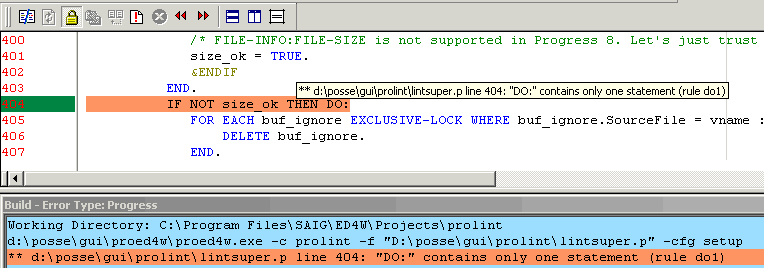
You see a new toolbar-button (the white document with the red exclamation mark), when you press it the blue "Build results" pane will pop up and show
results from Prolint. This "Build results" pane can be used for navigating through the sourcefile, but you can also use the "previous error" and "next error" buttons.
Surf to "ProED4W" for download and general setup-instructions.
After you have installed proed4w as outlined in its general setup-instructions, you have to make one final setting in Prolint:
make sure Prolint has a profile named "ed4win" which uses the special outputhandler (also named "ed4win").
3. Import warnings from Prolint Results window in ED for Windows:
This too requires the proed4w tool.
The disadvantage of method (2) is that warnings appear in the order by which they are discovered: "BY rule BY sourcefile BY line".
It may be more convenient to have them appear in a different order.
The Prolint Results window allows you to sort warnings on all columns, and also allows you to specify a filter.
When you import warnings from the Results window into ED, the order and filter will be applied.
In ED for Windows you must have created a build-title named "Prolint-logwin" once:
- choose menu "Tool | Build Setup..."
- Add a General (not extension specific) build title, using the following properties:
- title = Prolint-logwin
- command-line = c:\p4gl\tools\proed4w\proed4w.exe -c prolint-logwin
- error-track type = Progress
To run it, just make sure the Prolint Results window is running and that the "Proed4w Server" is also running in the same Progress session.
In ED, run the Build title we've just described. That's all!
Integrating Prolint with PRO4m
PRO4m is a commercial product that creates HTML reports about your projects, looks for unused database objects, and more.
You can find information about PRO4m at www.progress-plus.com.
PRO4m can call Prolint to incorporate the results from Prolint in its HTML reports. If you want to give it a try download "3PRO" from www.progress-plus.com.
3PRO combines PRO4m, Proparse and Prolint in a single setup for your convenience.
Prolint in OpenEdge Architect
Hot from the Prolint laboratory: the proof-of-concept work-in-progress alpha-prototype of Prolint inside OpenEdge Architect.
The purpose is to make it very easy and super-productive to use Prolint while you are working on your OpenEdge project in OpenEdge Architect. You need OpenEdge Architect 10.1C for this.
The toolbar gets a "run Prolint" button, somewhere close to the Run and Debug buttons, and when you press that Prolint button you start to lint the currently selected resource. That can be:
- the file in the active editor, or
- the file that is selected in the Resources treeview, or
- the directory that is selected in the Resources treeview, including all files and subdirectories, recursive.
The Prolint results are, as usual, displayed in a Progress window with a browse widget, but what's new is that this window is embedded in the OpenEdge Architect/Eclipse IDE. As shown in the following image:
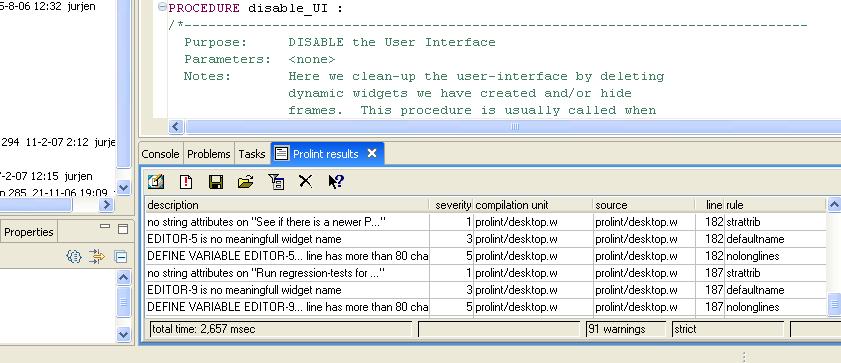
You want to give it a try? There is no automatic setup yet, you need to do a couple of simple things manually. Here they are:
- 1. Download the most recent version of sourcefile "prolint/launch/oea.p" :
http://websvn.oehive.org/filedetails.php?repname=prolint&path=%2Ftrunk%2... - 2. Download the most recent version of sourcefile "prolint/outputhandlers/oea_results.w" :
http://websvn.oehive.org/filedetails.php?repname=prolint&path=%2Ftrunk%2... - 3. Add a "run Prolint" button to the toolbar, using the "Customization Editor" which you can find in the OpenEdge mainmenu. The settings for the button are shown in the screenshot:
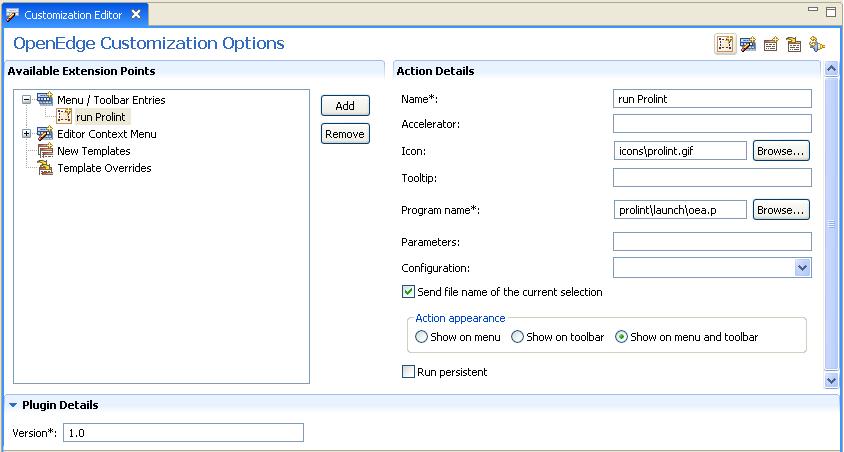
- 4. Don't forget to make sure if the parent-directory of Prolint is in the Propath
That's all!
Now, as you may have guessed, this is very early work. It is not finished. I release it because of the Open Source law "Release Often, Release Early" and because I hope you will help me with some of the following issues:
Issues
Resizing the Results view sucks. I am not good at resizing, in fact I am not good at GUI at all. I always get stuck in those "widget does not fit in frame" errors.
Open file in editor. What I want is that you can double-click on a row in the grid, and that the sourcefile (which is mentioned on that grid row) is opened in an editor and scrolls to the right line number. I don't have a clue how to do that!
Is there anything we can do to make installation easy? What and how?
Prolint/Eclipse
John has started some initial work on a Java/Eclipse variant of Prolint. This variant of Prolint has the advantage of easy access to ProRefactor's output - especially its symbol tables and scoping information.
Questions about getting the original Prolint into Eclipse, and other "project direction" type questions, are completely unanswered. It's all very open for you to dive in, write some code, and help determine how best to make Prolint an integral part of working with 4GL/ABL in Eclipse and OpenEdge Architect.
Here's what has been done so far:
- Eclipse "problem markers"
- Prolint sub-menu in the Navigation view
- "lint" menu item
- "clear problem markers" menu item
- a couple of lint rules
The Prolint actions in the Navigation view's menu can be executed against any combination of projects, folders, and files.
Since it relies heavily on ProRefactor, it is currently kept in the ProRefactor project repository.
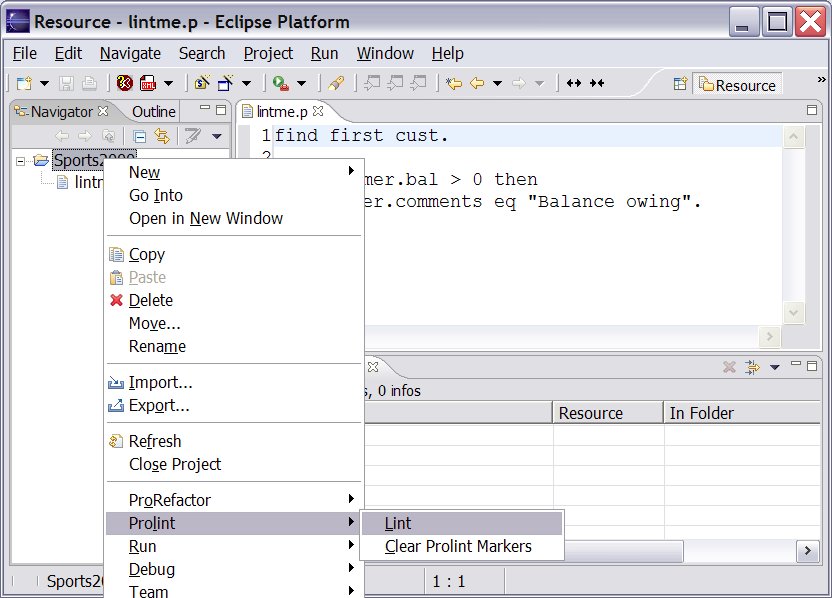 Prolint/Eclipse menu choices: There are two simple menu items for Prolint: one to find problems, and the other to clear the problem markers. Any combination of files, folders, and projects can be selected for these.
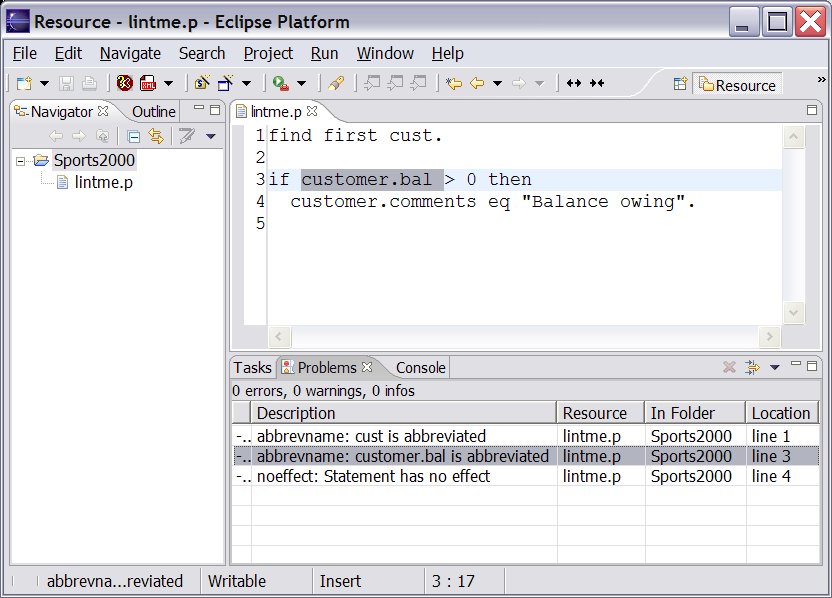 Prolint/Eclipse Problems View: Once Prolint problems have been found, problem markers are created in Eclipse. These markers can be sorted and filtered. Clicking on a marker in the Problems view opens an editor to the right line and highlights the problem code.
Roundtable integration
Prolint and Roundtable are integrated in several ways:
- Populate the "select files to lint" dialog with sourcefiles from the current RTB task
- Custom menu-items and button on the Roundtable Tabletop enable you to easily invoke Prolint.
- Prolint can validate sourcefiles before they are checked-in, and disallow check-in if the sourcefile contains specific lint warnings
Notes:
The sourcefiles where the integration is implemented are located in directory "prolint/roundtable" with subdirs for each different Roundtable version
dialog "Select files to lint"
This dialog contains a button "RTB task", which is only visible if the Roundtable database is connected. When you choose this button, the browse widget
will be populated with all the objects in your currently selected Roundtable-task.
(finding those objects is implemented in source prolint/roundtable/x/taskfiles.p)
Menu-items and button on Roundtable Tabletop
Three new menu-items have been added to the "Tool"-menu in Roundtable:
- "Prolint selected object": launches Prolint and have it analyze the currently selected object
- "Prolint selected task": launches Prolint and analyze all the objects in the currently selected task
- "Configure Prolint": launches the Prolint Configuration window so you can adjust settings before you analyze any sourcefiles
A new button is added to the Tabletop, next to the "Visual Diff" button. This new button behaves similar to menu-item "Prolint selected object".
These buttons and menu-options invoke Prolint using a profile named "roundtable run".
Except when the Roundtable Check-in Validation feature is also enabled, because then it will invoke Prolint using the "roundtable check-in" profile.
For this to work, you need to customize the event handler in Roundtable. This is easy, but the procedure is different depending on which Roundtable version you are using.
When you are using Roundtable 9.1a or 9.1b or 9.1c then go to the Roundtable directory, find sourcefile rtb_evnt.p and add this single line to it:
{prolint/roundtable/91c/custom_evnt.i}
When you are using Roundtable 10.1b then go to the Roundtable directory, find sourcefile rtb_events.p and add this line to it:
{prolint/roundtable/101b/custom_events.i}
Please see prolint/roundtable/custom for working samples of modified rtb_events.p.
Roundtable Check-in Validation
This powerfull feature allows you to enforce that objects meet specific standards, implemented in Prolint rules.
If the feature is enabled, Prolint will validate objects whenever they are checked-in, and will abort the check-in process if specific warnings are discovered.
More information about this feature on page Roundtable Check-in Validation
Roundtable Check-in Validation
Each time you want to check-in an object, or when you want to complete a task,
Prolint will validate the objects.
When Prolint finds errors (not just warnings) it will tell Roundtable to abort the operation.
Errors must be fixed before the object can be checked-in. This way you can enforce that objects conform to specific standards.
Not every Prolint warning is an error. You can define in much detail which Prolint warnings will be upgraded to errors.
These definitions can be different for each workspace, if you want.
When the object you want to check in is an includefile, Prolint will randomly select three objects that depend on this includefile and lint them instead. The number of includefiles (default 3) can also be configured.
Read more on setup and configuration.
When Prolint finds errors, it will show the following message box:
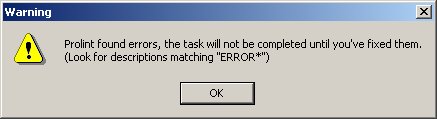
All errors and warnings are displayed in the regular Prolint Results Window. Errors can be recognized because their descriptions begin with "ERROR: ". You can easily sort by description, or even filter:

The "Filter" dialog has a toggle-box to easily set and clear the filter:
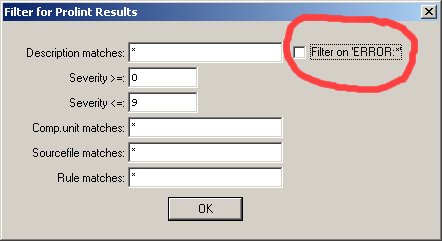
Upgrading to Prolint 71: repair Roundtable integration
When you upgrade to Prolint 71 from an older Prolint release and you were already using the Roundtable integration, then you will experience errors until you make the following fix:
Locate in your Roundtable directory the compiled file "rtb_evnt.r" and delete it.
Locate in your Roundtable directory the sourcefile "rtb_evnt.p" and open it in your editor.
Find the line where prolint/rtb/custom_evnt.i is included:
{prolint/rtb/custom_evnt.i}
and change it to
{prolint/roundtable/91c/custom_evnt.i}
Optionally compile+save rtb_evnt.p.
That's all, you are ready now.
You may have noticed that directory "prolint/rtb" has been deleted and replaced by a new directory "prolint/roundtable" with subdirectories for several Roundtable versions.
"91c" should probably work for Roundtable versions 9.1a to 9.1c.
"101b" is made for Roundtable 10.1b and may work for other Roundtable versions too.
Configuration of Roundtable Check-in Validation
Validation is disabled by default
To enable validation, create a directory "prolint/custom/rtb-check-in" and then copy file "prolint/roundtable/version/prolint-rtb-check-in.ini" to "prolint/custom/rtb-check-in/default.ini".
The ini file contains several tuning options for the validation.
The validation will read the options in file "prolint/custom/rtb-check-in/default.ini".
If a specific workspace requires specific validation options, you can also create a specific ini-file. For example: for workspace "MAINT" you can create a file named "prolint/custom/rtb-check-in/ws-MAINT.ini" (that is "ws-" + wspace-id + ".ini").
Fine-tuning the validation
Prolint runs every rule specified in profile "roundtable check-in". But not every warning from these rules should be an "error"; only errors will abort the Roundtable check-in procedure.
So you will have to define errors, and that is what file prolint-rtb-check-in.ini is for.
Includefiles versus CompilationUnits
When you want to check-in an includefile, Prolint will randomly select 3 compilation units (using the "where-used" XREF stored in Roundtable) and lint those instead. In this case, Prolint will only upgrade warnings to errors if those warnings are found in the includefile.
Other warnings from the selected compilation units will simply be skipped.
When you want to check-in a compilation unit, and Prolint discovers warnings in includefiles used by that compilation unit,
Prolint may or may not upgrade those warnings to errors based on settings in the following sections.
Warnings from the compilation unit will simply be upgraded to errors, unless the rule is not listed in section [error-rules].
section [error-rules]
[error-rules]
compiler=all
strattrib=all
substitute=module,my
noundo=module,my
varusage=module,my
ifindent1=module,my
dotcomment=module,my
noeffect=module,my
The first section, [error-rules] contains a list of rules. These are the rules whose warnings can be upgraded to errors. If profile "roundtable check-in" contains more rules they will run, but their warnings will just be warnings.
Prolint treats includefiles different from compilation units. After all, the programmer who is working on a compilation unit might not be responsible for the includefiles, and blocking errors from includefiles is counter-productive so you may want to tune that.
Each rule in the section can have attributes: "all", "module", "my" or any combination of these three. These attributes affect how warnings from includefiles are treated.
If attribute "all" is set, warnings from any includefile will be raised to errors.
"module" : warnings from an includefile will not be raised to errors, if the includefile is not located in the same module as the object you are about to check-in.
"my": warnings from an includefile will not be raised to errors, unless you "own" the includefile.
"module,my" : the includefile will cause an error if it is located in the current module OR if you "own" the includefile.
So when do you "own" an includefile? This is determined in the remaining sections.
section [behaviour]
[behaviour]
number-where-used=3
my-inc=programmer,manager,compltd-by
If Prolint finds a warning in an includefile, and "my" is specified in section [error-rules], then we have to decide if you "own" the includefile. Prolint assumes you "own" the file when you have ever worked on it.
Prolint reads the tasks list from Roundtable, and checks in each task if you were the manager, or the programmer, or if you were the person who completed the task.
key "my-inc" can have any combination of "programmer", "manager" or "compltd-by". This specifies which task fields are evaluated.
section [wildcards:not-my-includes]
[wildcards:not-my-includes]
src/adm/*.i=jurjen,john
src/adm2/*.i=*
Lost ownership? Suppose you were involved with an includefile in the past, but are not responsible anymore...
This section can contain a list of wildcard patterns for filenames. Each wildcard has a CAN-DO like list of user-names.
If the includefile matches any of these patterns, and you match the userlist, you are assumed to not "own" the includefile.
This overrides the outcome of key "my-inc" in section [behaviour]
section [wildcards:my-includes]
[wildcards:my-includes]
sports/*.i=john,bill
Same idea, but this time the other way around: If the includefile matches any of these patterns, and you match the userlist, you are assumed to "own" the includefile.
This overrides the outcome of section [wildcards:not-my-includes]
the GUI manual
Some help for the GUI screens
Find Lint Session
[Procedure: prolint/prolintdb/findsessions.w invoked by either prolint/core/selectfiles.w or prolint/outputhandlers/logwin.w]
The Find Sessions window presents a browse of all sessions matching the filter criteria (by default, today and your userid).
When you fill in filter criteria and select "Find", the browse will be refreshed with sessions that match the filter criteria. Any session where the User ID begins with the user filter characters, the date is the same as the date filter (or the date filter is blank), and the name filter exists within the session name (it does a match comparison) will be displayed.
The window is displayed when you select "Find Session" from the Select Files to Lint window, and from the Load Results button in the Results window.
When invoked from Select Files to Lint, it places the selected session in memory so that you can use it to add lint results. If you re-lint a program on a session where it had been linted before, the previous results are deleted and the new results take its place. If you want to compare the lint results of two different versions of the same program, you want to lint them on different sessions. You can set a single session as a baseline, and compare it against the most recent session using the Lint Stats window (see that page).
When you want to review the results of a session at some later point in time, you can go to the results window and select the Load Results button. This same screen will appear. When you select a session, all the results from that session are reloaded (republished) to the results window as if you had just re-run the lint module for it, so that you can filter, export, etc. as you would have done originally.
Once you have located the session that interests you, select the button that says OK or Load, depending on which window you came from. You will return to that window.
Prolint configuration window
[procedure: prolint/core/lintcfg.w, invoked from anywhere]
This dialog helps you switch rules on/off, override default severities and select outputhandlers.
See "profiles" for a general discussion about profiles.
The combo-box contains a list of profiles found in directories "prolint/settings" and "local-prolint/settings", and it also contains a profile named "<none>" which is the default profile. The settings for "<none>" are stored in directory "prolint/settings", instead of in one of its subdirectories.
When you select a profile (using the combo-box), you will see a text next to the combo-box
indicating if this profile is a shared profile or a private profile. Shared profiles are found in "prolint/settings", private profiles are found in "local-prolint/settings".
You can create a directory "local-prolint/settings" anywhere in your propath.
If a profile with a particular name exists in both "prolint/settings" and "local-prolint/settings", then the local profile takes precendence unless the shared profile contains a file named "no-local-settings.lk", in which case the local profile is ignored.
There is a toolbar near the top of the window. The buttons are:

|
Create a new profile. A dialog will pop up, asking for the name of the new profile. The program will try to create a subdirectory with this name in "prolint/settings" or in "local-prolint/settings", the contents of the new profile equals the contents of the default profile. | |

|
Make a local copy of this shared profile. This button is only enabled if the current profile is a shared profile, and if directory "local-prolint/settings" exists, and if the shared profile does not contain a file named "no-local-settings.lk". | |

|
Delete this local profile. This button is only enabled if the profile was found in "local-prolint/settings". The profile is deleted from "local-prolint/settings". The local profile reverts to a shared profile if an equally named profile exists in "prolint/settings". | |

|
Delete this shared profile. This button is only enabled if the profile was found in "prolint/settings" and if this profile does not contain file "no-local-settings.lk". The profile is deleted from "prolint/settings". |
Prolint Desktop
The Prolint Desktop is simply a window with a couple of buttons on it, to launch several Prolint features from.
It is not exactly state of the art but comfortable.
It is especially comfortable when the Desktop is added to the PRO*Tools palette. There is a button near the bottom of the Prolint Desktop, labelled "Add to protools". Just press it and restart the PRO*Tools palette.
The button becomes invisible if there is already a program-name matching "*prolint*desktop*" in protools.dat.
If you have not added the Desktop to PRO*Tools yet, just run the following statement from a Progress procedure editor:
RUN prolint/desktop.w.
button "Lint files..."
run prolint/launch/start.p
This button opens a dialog where you can select one or more files, and/or one or more directories to lint. You can also select a "Profile".
button "Configure"
run prolint/core/lintcfg.w("")
This button opens the window where you can do Profile maintenance.
button "Results Window"
run prolint/outputhandlers/logwin.w
The Results Window is where most of your Prolint sessions will send their output to. It is also
a convenient window to have around, because it contains a lot of command options.
button "Lint Active AB"
This button determines which file is currently active in the AppBuilder, and will lint that file.
button "Lint Open AB"
This button determines which files are currently open in the AppBuilder, and will lint those files.
button "Check for updates"
run prolint/core/checkrelease.p
This button does a HTTP GET using Progress V9 sockets, to get the online copy of http://www.oehive.org/files/prolintrelease.txt. This is a very small file.
It then compares it with file prolint/core/release.ini on your PC. If they are equal, you already have the latest release. Else you will be prompted to browse to http://oehive.org/prolint/download to download the newest release.
buttons "Query Prolintdb"
Browse results that are stored in the (optional) Prolint database. See prolintdb for more info.
button "Add New Rule"
run prolint/core/dnewrule.w
This dialog is a convenient way to add a new entry to prolint/rules/rules.d, the list of default rules. If you do not use this dialog please refer to how to create a new rule for a description of file rules.d.
button "Regression-test"
run prolint/launch/test.p
If you are modifying Prolint sources you may want to do some regression-testing. This action performs a Lint on directory "prolint/regrtest" and "prolint/regrtest-oo" which contain collections of correct and ugly 4GL-statements. The results are compared to a list of expected results. The outcome should be a window that says "FC: no changes".
Before you can run the regression test, you will first need to create a test database. Please see Regression testing for details.
button "Proparse launcher"
run proparse/launcher.w
Starts a window similar to the Prolint Desktop, but now for Proparse utilities.
The Tokenlister is what you will be using a lot, if you are writing rules for Prolint.
Select files to lint
[procedure: prolint/core/selectfiles.w, invoked from prolint/launch/start.p]
This dialog allows to select one or more sourcefiles
to lint. You can also select one or more directories:
Prolint will automatically scan directory-contents
looking for *.p and *.w (recursing into subdirectories
as well).
editor widget:
Type a list of filenames to lint, one filename on each line.
If you are using Progress 9 GUI you can use drag/drop to throw a bunch of sourcefiles into the editor widget.
toggle-box "Clear Outputhandlers":
When on (true), then all existing results will be cleared from the Results window. Other outputhandlers will also start a new, empty output.
When off (false), then new results will be appended to already existing results in the Results window. Other outputhandlers are also supposed to append results to existing output.
button "RTB task":
This button is invisible unless the Roundtable database is connected (visible=CONNECTED("rtb")).
When pressed, the editor widget will be populated with all sourcefiles for the currently selected Roundtable task.
The Prolint Result window
[procedure: prolint/outputhandlers/logwin.w]
The Prolint Result window shows a browse widget containing all warnings from the most recent Prolint run.
When Prolint is working, the statusbar shows:
- sourcefile where Prolint is working on
- which action Prolint is currently doing
- total number of warnings
- the name of the current profile
- percentage done, if more than one file is to be processed
When Prolint is ready, the statusbar shows:
- total elapsed time of last Prolint run
- empty
- total number of warnings, or if a filter is set: visible warnings / total warnings
- the name of the current profile
- empty, or "filtered" when a filter is set
Window features:
- The browse can be sorted by any column by clicking on a column header.
- Double-click on a row opens the currently selected sourcefile in an external editor, if file prolint/settings/exteditor.cfg is correctly set up
- Right-click on a row opens a popup-menu, which gets help for the currently selected warning.
- Button "Desktop" opens the Prolint Desktop window
- Button "Lint files" opens dialog "Select files to lint" for selecting a number of files to run Prolint on.
- Button "Save log As" saves all warnings to a tab-delimited logfile, using outputhandler "tabfile.p". Only warnings that match the current filter will be saved.
- Button "Import log" allows you to import a tab-delimited logfile that was previously saved by outputhandler "tabfile.p". This will reset the filter.
- Button "Filter" allows you to specify a WHERE-clause for the browse widget. This same WHERE-clause is also used by "Save log as", by "Delete" and by export to Ed4Win.
- Button "Delete" will delete all warnings that match the current filter, and will reset the filter. What's left are warnings that did not match the filter.
- Button "Help" shows the page you are reading now.
- Button "Lint this c.u. again" lints the currently selected compilation unit in the browse again; if the browse is empty the dialog "Select files to lint" will open. This will also reset the filter.
- Button "Open sourcefile in editor" launches your favourite text-editor and loads the currently selected sourcefile.
- Button "Help on this rule" shows help on the rule that caused the currently selected warning.
Export to ED for Windows:
(this feature works only if you have ED for Windows and Progress version 9).
You will probably want to edit the sourcefiles where Prolint found warnings.
This is very easy when the warnings are listed in the "Build"-window of ED for Windows instead of the Prolint Results window.
There is a relatively easy way to export the warnings from the Results window to ED's Build window, if you have
installed proed4w :
- make sure that the "Proed4w Server" is started in your current Progress session.
- open ED for Windows and go to menu-item "Tool | Build Setup.."
- run title "Prolint-logwin" and watch how all warnings from the Results window are copied to the Build window
The advantage of this method, over just running Prolint from within ED for Windows, is that this
will use the filter and sorting from the Result window.
How it works:
ED starts proed4w.exe with the "-c prolint-logwin" parameter.
proed4w.exe makes a TCP/IP connection with proed4w.p and passes it the "-c prolint-logwin" parameter.
proed4w.p publishes a "Prolint_SendLogWin_Ed4Win" event.
The Results window receives the event and passes all selected warnings on to outputhandlers/ed4win.p
Outputhandler ed4win.p publishes lines to proed4w.p
Proed4w.p sends lines through TCP/IP back to proed4w.exe
proed4w.exe writes those same lines to stdout, where ED will read them.
More setup details: see page Integrating Prolint and ED for Windows
Compare Lint Sessions
[Procedure: prolint/prolintdb/lintstats.p invoked by prolint/outputhandlers/logwin.w]
The Session Statistical Comparison window is divided into three sections. On the top is the session browse where you locate the 2 sessions you want to compare against each other. There are filters at the top for user id (compared with a 'begins' operator), start date (greater than or equal operator), and session name (matches operator, the program adds two * wildcards for you). When they are set, choose filter and the matching sessions appear in the browse below. Note that a blank date means exclude the date field from the filter.
When you locate a session in which you are interested, you will make it either the 'Base' or the 'Curr'[ent] session. Typically the 'Base' is the older Baseline session that you want to use to show improvement. The newer session is the one you would typically want to select as Curr[ent].
As you select a Base or a Current session, the basic session information appears in the lower right section of the window so you can be sure which sessions you are comparing against each other. When you have both a Base and a Current, you would select Analyze. This populates the comparison browse in the lower left. This browse displays one row per compilation unit and rule, showing how many alerts were found in each session for that rule and compilation unit. To help you determine impact, the rule severity is shown, as well as the difference between the two sessions.
Assuming you are using the old version as the Base and the newer version of the program as the Current, a positive number in the "diff" column indicates that you have added new problems to that compilation unit. A negative number indicates that some have been cleaned up.
The lower (session comparison) browse can be filtered by Compilation Unit ("Prog" using a Matches operator with the wildcards added for you), and rule using a Begins operator. You fill in the values you wish to use as a filter, then select the lower filter button. (The upper filter button applies to the session browse at the top).
Once you have completed your analysis, click Cancel to close the window and return to the results window.
Rules
This is the list of rules, or actually the list of help-pages for each rule.
Not every rule in this list is by default available in your Prolint setup: the "Contributed rules" are not. Contributed rules can be downloaded separately to your prolint/contribs/rules directory from subversion path http://websvn.oehive.org/listing.php?repname=prolint&path=/trunk/contrib...
Click Here when you want to add a new Rule helppage.
abbrevkwd
Abbreviated [keyword] for [keyword]
Rule "abbrevkwd" gives this warning when it finds an abbreviated keyword in the source code.
Examples:
- Abbreviated MOVE-AFTER for MOVE-AFTER-TAB-ITEM
- Abbreviated SUBST for SUBSTITUTE.
the risc:
Confusion: is SUBST() actually the SUBSTRING() function or the SUBSTITUTE() function? Also, the source may compile differently in a next Progress version if the abbreviation becomes ambiguous.
how to solve this:
Don't abbreviate, just type the extra keystrokes.
How to suppress these warnings:
You can put the directive {&_proparse_ prolint-nowarn(abbrevkwd)} directly before
the statement that contains abbreviated keywords. See also: suppress warnings.
implementation:
This rule is implemented in Turbolint.
abbrevtable
Abbreviation of table &1 used (&2)"
Rule "abbrevtable" gives this warning when it finds an abbreviated table name.
FOR EACH custome NO-LOCK:  /* abbreviated "customer" to "custome" !! */
    DISPLAY custome.customer-name.
END.
|
the risc:
The abbreviated table name may become ambiguous after you add a new table to the database. In the example, imagine someone adds table "custome" to the schema...
known issues:
This rule does not run in Progress version 8. If you run Prolint in Progress 8, this rule will simply do nothing.
The rule only looks at actual table names, not field names. For example:
FOR EACH custome NO-LOCK:  /* this will be noticed */
    DISPLAY custome.customer-name.  /* but this will not be noticed!! */
END.
|
how to solve this:
Do not use abbreviated table names.
How to suppress these warnings:
You can put the directive {&_proparse_ prolint-nowarn(abbrevtable)} directly before
the statement. See also: suppress warnings.
alertmessage
MESSAGE not an Alert Box
Rule "alertmessage" gives this warning when it finds a MESSAGE statement without the VIEW-AS ALERT-BOX option.
the risc:
GUI looks bad when SESSION:APPL-ALERT-BOXES happens to be FALSE.
How to suppress these warnings:
You can put directive {&_proparse_ prolint-nowarn(alertmessage)} directly before the MESSAGE statement.
See also: suppress warnings.
allfinds
FIND|CAN-FIND FIRST|PREV|LAST|NEXT buffer
Rule "allfinds" gives this warning for every FIND or CAN-FIND that has a FIRST|PREV|NEXT|LAST qualifier. This is to warn for compatibility with Oracle dataservers: Oracle has some issues with find first, PSC recommends they get converted to
something like "for first" or "open query".
andorparens
use parentheses when mixing AND and OR
Prolint rule "andorparens" raises this warning when it finds a mix of OR and AND without parentheses.
A recent discussion at one of the PSDN forums showed that not everyone agrees what the correct execution precedence is of the logical operators, but still are confident enough to not use parentheses. As a result the program without parentheses may behave different than expected, which may lead to bugs. Using parentheses at least helps to make clear what the programmer's intentions are.
Example:
EACH customer WHERE customer.salesrep=filterSalesrep OR filterSalesrep="*" AND customer.creditlimit>1000
can be interpreted in two different ways (if there is doubt about the correct precendece rules).
So to avoid confusion please rewrite to
EACH customer WHERE (customer.salesrep=filterSalesrep OR filterSalesrep="*") AND customer.creditlimit>1000
or
EACH customer WHERE customer.salesrep=filterSalesrep OR (filterSalesrep="*" AND customer.creditlimit>1000)
backslash
backslash in string "&1" (not Unix-compatible)
Rule "backslash" gives this warning when it finds a string that contains a backslash, but ignores backslashes if they are preceeded by a tilde.
the risc:
String will behave strange on Unix, because backslash is an escape-character on Unix.
how to solve this:
Escape the backslash with a tilde, or replace the backslash by a forwardslash.
backslash in filename "&1" (not Unix-compatible)
Rule "backslash" gives this warning when it finds a filename that contains a backslash.
the risc:
Filename will not be valid on Unix.
how to solve this:
Replace the backslash by a forwardslash.
blocklabel
LEAVE/NEXT should specify a blocklabel
Rule "blocklabel" gives this warning when it finds a LEAVE or NEXT statement without a blocklabel. For example:
  DO WHILE TRUE :
     FOR EACH customer :
        FOR EACH order OF customer :
            IF order.shipped THEN DO:
               DISPLAY order.shippingdate.
               NEXT.
            END.
            ELSE
               RUN something.
        END.
     END.
  END.
|
In this example, Prolint will give the warning for NEXT on the 6th line.
the risc:
It is not really clear on which iteration you want to perform the NEXT statement. Of course the compiler will make a decision and
actually we can predict what that decision is going to be, but still, there is no way of knowing which
block the programmer had in mind and we can also not read what the intended functionality is.
how to solve this:
Add a blocklabel, like:
audit_salesrep:
  FOR EACH SalesRep :
     FOR EACH customer OF SalesRep :
        FOR EACH Order OF Customer :
            IF order.shipped THEN DO:
               DISPLAY order.shippingdate.
               NEXT audit_salesrep.
            END.
            ELSE
               RUN something.
        END.
     END.
  END.
|
How to suppress these warnings:
You can put the directive {&_proparse_ prolint-nowarn(blocklabel)} directly before
the NEXT/LEAVE statement. See also: suppress warnings.
implementation:
This rule is implemented in Turbolint.
bufdbfunc
no buffer defined for table in function
rule "bufdbfunc" requires that DEFINE BUFFER statements exist for every database buffer that appears in the code for a user-defined function.
Example:
FUNCTION SomethingStupid RETURNS LOGICAL :
    IF customer.cust-name = "jurjen" THEN
       customer.cust-name = "john".
    RETURN FALSE.
END FUNCTION.
should have its own local buffer, like for example
FUNCTION SomethingStupid RETURNS LOGICAL :
    DEFINE BUFFER customer FOR customer.
    IF customer.cust-name = "jurjen" THEN
       customer.cust-name = "john".
    RETURN FALSE.
END FUNCTION.
That way, you prevent side-effects from changing a buffer that may also be used by other internal proedures or functions. You also prevent locking issues, which are likely to happen when the procedure runs persistent.
bufdbmeth
no buffer defined for table in method
rule "bufdbmeth" requires that DEFINE BUFFER statements exist for every database buffer that appears in the code for a method (in a class).
Example:
METHOD PUBLIC VOID SomethingStupid :
    IF customer.cust-name = "jurjen" THEN
       customer.cust-name = "john".
END METHOD.
should have its own local buffer, like for example
METHOD PUBLIC VOID SomethingStupid :
    DEFINE BUFFER customer FOR customer.
    IF customer.cust-name = "jurjen" THEN
       customer.cust-name = "john".
END METHOD.
That way, you prevent side-effects from changing a buffer that may also be used by other methods. You also prevent locking issues, which are likely to happen because class files stay in memory for some time (much like persistent procedures).
Note:
The rule does not only look at methods, but also at constructors, destructor, property_getters and property_setters.
bufdbproc
no buffer defined for table in internal procedure
rule "bufdbproc" requires that DEFINE BUFFER statements exist for every database buffer that appears in the code for an internal procedure.
Example:
PROCEDURE SomethingStupid :
    IF customer.cust-name = "jurjen" THEN
       customer.cust-name = "john".
END PROCEDURE.
should have its own local buffer, like for example
PROCEDURE SomethingStupid :
    DEFINE BUFFER customer FOR customer.
    IF customer.cust-name = "jurjen" THEN
       customer.cust-name = "john".
END PROCEDURE.
That way, you prevent side-effects from changing a buffer that may also be used by other ip's or functions. You also prevent locking issues, which are likely to happen when the procedure runs persistent.
colon-t
attrib :T will trim [string]
Rule "colon-t" gives this warning when it finds a string literal that has the :T string attribute,
while the string begins or ends with whitespace. The string will be trimmed at run time.
This is most often caused by adding :T attributes to statements like:
status = "there are " + string(inventory) + " items in inventory.".
After adding :T attributes, the source looks like
status = "there are ":T + string(inventory) + " items in inventory.":T.
But the result looks pretty funny: there are5items in inventory.
how to solve this:
Try status = SUBSTITUTE ("there are &1 items in inventory.":T, string(inventory)).
How to suppress these warnings:
You can put directive {&_proparse_ prolint-nowarn(colon-t)} directly before the statement that contains string literals.
See also: suppress warnings.
implementation:
This rule is implemented in Turbolint.
compiler
Compile error
Prolint tried to compile the sourcefile but the compiler failed. Prolint only works on compilable sources.
Prolint requires a subdirectory "temp" in the current directory where it will attempt to write files "prolint.lst" and "prolint.xrf".
Please make sure this directory exists.
If the "temp" directory exists, please compile the sourcefile to see if there are any compiler messages.
contains
CONTAINS operation used to search [buffer] (word index)
Rule "contains" gives this warning when it finds a statement that contains the CONTAINS keyword. This is to warn for compatibility with Oracle dataservers: Oracle has no word indexes.
create
CREATE [tablename] table statement used in this program
This rule is for Oracle dataservers.
Rule "create" gives this warning when it finds a CREATE statement for creating a new record. The Oracle dataserver does not write the record until the end of the transaction, you have to "post" the record using VALIDATE or RELEASE if you need to read the record before the transaction ends.
For example:
  Def buffer c for customer.
  Create customer.
  Assign custnum = 100.
  /* validate customer.*/
  Find first c where custnum = 100.  /* This will fail unless the validate is uncommented*/
How to suppress these warnings:
You can put directive {&_proparse_ prolint-nowarn(create)} directly before the CREATE statement.
See also: suppress warnings.
dbtrigger
DISABLE TRIGGERS used - investigate
Rule "dbtrigger" gives this warning when it finds a DISABLE TRIGGERS statement.
the risc:
Schema triggers are defined to guarantee data consistency and are part of the data model.
An application should (normally) have no reasons to disable schema triggers, although some exceptions
are probably valid. Anyway, the use of DISABLE TRIGGERS is considered a red flag that needs to be reviewed.
How to suppress these warnings:
You can put directive {&_proparse_ prolint-nowarn(dbtrigger)} directly before
the DISABLE statement.
See also: suppress warnings.
defaultframe
undefined frame
The rule "defaultframe" gives this message when it finds instances of DISPLAY and UPDATE statements that are not using a previously defined frame.
Why use this rule?
This can be useful when you are trying to identify user interface components in your code base. It can also be helpful for applying standards.
Solution
Frames should be defined with either a DEFINE FRAME or FORMAT ... WITH statement.
In the following very simple example, the first display statement does not reference a frame and will trigger the rule.
/* myframe.p */
define frame myframe
customer.name
customer.custnum
with 1 col.
form Customer.address with frame otherframe.
find first customer no-lock no-error.
if available customer then display customer except comments.
find next customer no-lock no-error.
if available customer then display customer.name customer.custnum with frame myframe.
/* end procedure */
defaultname
[name] is not a meaningful widget name
Rule "defaultname" gives this warning when it finds a widget which still has its default name, assigned by AppBuilder.
When you are using the AppBuilder and drop a new widget on a frame,
this new widget will have a default name like
meaningful name.
the risc:
Source is difficult to understand when variables don't have meaningful names.
how to solve this:
Using AppBuilder, simply type a new name in the property sheet.
How to suppress these warnings:
You would have to put the directive {&_proparse_ prolint-nowarn(defaultname)} directly before
the DEFINE VARIABLE statement, but that is impossible because AppBuilder won't let you type in that code section. So actually you can hardly suppress this warning.
See also: suppress warnings.
do1
"DO:" contains only one statement
Rule "do1" gives this warning when it finds a DO: ... END block that contains only one statement.
The statement will work without the DO/END block around it.
Actually, the rule only looks at DO/END blocks in the THEN or ELSE branches of an IF statement:
IF condition THEN DO:
   /* this block is inspected */
END.
ELSE DO:
   /* this block is also inspected */
END.
DO:
  /* this block is not inspected because it is
     not in a THEN or ELSE branch. */
END.
Furthermore, the rule does NOT raise a warning when the DO...END block contains an IF statement. That is because an IF statement inside an IF statement is usually hard to read but adding a DO...END block improves readability. So, you get a bonus for improving readability :-)
IF condition THEN DO:
   /* only 1 statement in the DO..END block
      but no warning, because it's an IF statement */
   IF a=b THEN
      a = a + 8.
   ELSE
      a = b * b.
END.
Likewise, the rule does not warn if the only statement is a CASE, FOR, DO or REPEAT statement. This list is set in prolint.properties.p (see property "rules.do1.StatementSkipList") so you can customize it.
the risc:
The DO/END-block wastes about 60 bytes in R-code and affects run-time performance.
how to solve this:
Just remove the DO: and END.
dotcomment
PERIOD comments a statement
Rule "dotcomment" gives this warning when it finds a
statement that begins with a period, for example:
.MESSAGE "hello" VIEW-AS ALERT-BOX. |
Such a statement behaves like a comment (that is terminated by the next period).
So the MESSAGE in this example will never execute.
the risc:
The period is easily overlooked, and not too many people
know that it starts a comment. Prolint will raise a warning because it regards the dot (or period) as a
typo or as something that was accidently inserted,
perhaps by preprocessors.
how to solve this:
Remove the period, or remove the entire statement, or
use the usual /* ... */ syntax if you really want to
comment out the statement.
How to suppress these warnings:
You can put the directive {&_proparse_ prolint-nowarn(dotcomment)} directly before
the statement. See also: suppress warnings.
emptyblock
empty code block
Rule "emptyblock" searches for code blocks that do not have any code in them. For example, there may be a a repeat block where the import statement has been commented out.
REPEAT: /* CREATE customer. IMPORT customer. */ END. |
Technically speaking, this rule belongs to an existing rule that checks for code that has no effect - but in this case, the warning message is more detailed, providing info on the type of a block that is empty.
Notes:
- The program locates 'Code_block' node and checks that node's first
child. If child node is not found, then there was nothing in the
block. - The rule is really to flag 'empty' blocks, not meaningless blocks (
i.e. blocks that don't do anything, like just define local variables). - There may be a false positive when utilizing a super/persistent procedure, and a function has an input or output parameter that sets or returns a private variable or a table:
DEFINE TEMP-TABLE ttData NO-UNDO FIELD dataLine AS CHAR. FUNCTION fnGetData RETURNS LOGICAL (OUTPUT TABLE ttData): /* In this case the function is not really empty */ END FUNCTION. FUNCTION fnSetData RETURNS LOGICAL (INPUT TABLE ttData): /* Code block is not useless either */ END FUNCTION. - The rule should be enhanced to check for the input/output/input-
output function parameters at some point and suppress a warning if the
parameter refers to a global object (temp-tables are always global).
Not sure what to do about buffer parameters ... - It also needs to be enhanced to read the contents of non-empty
blocks that have only local variables defined and no other code at
all.
endtype
Type of END statement not qualified in PROCEDURE, FUNCTION, or CASE
Rule "endtype" gives this warning when it finds END statements for procedure, function, or case statements that do not have the end type specified. For example:
PROCEDURE pTest:
   ....
END. /* Rewrite to END PROCEDURE. */
CASE x:
    WHEN '1' THEN MESSAGE x.
END. /* Rewrite to END CASE. */
the risc:
None. This is really more of a question of company standards or coding style, where we want to be explicit in identification of END type.
errortext
RETURN ERROR should have a string argument
Rule "errortext" gives this warning when it finds a "RETURN ERROR" statement without a string argument. For example:
/* prolint raises a warning: */ IF NOT AVAILABLE customer THEN RETURN ERROR. /* this is fine with prolint: */ IF NOT AVAILABLE customer THEN RETURN ERROR "no data available". |
How to suppress these warnings:
You can put the directive {&_proparse_ prolint-nowarn(errortext)} directly before
the RETURN ERROR statement. See also: suppress warnings.
findstate
FIND statement [name] defined without qualifier [ FIRST | LAST | NEXT | PREV | CURRENT ]
Rule "findstate" gives this warning when it finds a "FIND" statement without [ FIRST | LAST | NEXT | PREV | CURRENT ] while the WHERE clause does not appear to select a unique index, and if there is no 'IF AMBIGUOUS' statement immediately following.
This rule does not look at temp-tables: those are inspected by rule "findstate-tt".
The risc:
The WHERE clause does not contain enough fields to bracket all fields in a unique index. If the FIND statement returns more than one record an error will occur when an attempt to access the record is made. Also, if not already searching on an Unique index, without the qualifier the PROGRESS engine will look to see if there is another record that matches the criteria increasing the search time.
Known issue:
The IF AMBIGUOUS statement may not directly follow the find statement but it could be in the code before the record is accessed.
How to solve this:
Use more fields in the WHERE clause or check the data dictionary to find out which fields are in a unique index. Make a habit of adding IF AMBIGUOUS immediately after the find statement.
How to suppress these warnings:
findstate-tt
FIND statement [name] defined without qualifier [ FIRST | LAST | NEXT | PREV | CURRENT ]
Rule "findstate-tt" gives this warning when it finds a "FIND" statement without [ FIRST | LAST | NEXT | PREV | CURRENT ] and has no 'IF AMBIGUOUS' statement immediately following.
This rule only looks at temp-tables. Database tables are inspected by rule "findstate"
The risc:
If the FIND statement returns more than one record an error will occur when an attempt to access the record is made. Also, if not already searching on an Unique index, without the qualifier the PROGRESS engine will look to see if there is another record that matches the criteria increasing the search time. However, even in the case of searching on an Unique index, it is better coding practice to add the qualifier as it indicates to other developers what your intent is.
Known issue:
The IF AMBIGUOUS statement may not directly follow the find statement but it could be in the code before the record is accessed.
How to solve this:
Make a habit of adding IF AMBIGUOUS immediately after the find statement.
How to suppress these warnings:
fnusage
Function name() [is prototyped but] not called in current program
Rule "fnusage" gives this warning when it finds a function or function-prototype that is never called. The function can be removed from the
source (but before you do, check if the function is not called
dynamically because dynamic calls are invisible to Prolint).
fortranoper
Rule fortranoper searches for the use of Fortran-style operators like:
EQ, GT, LT, GE, LE, NE (for =, >, <, >=, <=, <>).
I know some people may like this or are used to this, but others don't.
forwardparams
parameters in function don't match with forward declaration
Rule "forwardparams" gives this warning when it finds that a function implementation has different parameters than its forward declaration.
For example:
function myfunction returns logical(input something as character) forward.

function myfunction returns logical:
    if something>"" then
       return true.
    else
       return false.
end function.
Why
It is partly a matter of style and taste. It is also a possible source for confusion which may lead to errors: when you read the implementation (where no parameters are defined) it is not clear that 'something' is a parameter instead of a wide-scoped variable.
This is a contributed rule, not by default available in the Prolint setup. You can download it separately to your prolint/contribs/rules directory from http://websvn.oehive.org/listing.php?repname=prolint&path=/trunk/contrib...
groupassign
Possibly group ASSIGN with line ...
Rule "groupassign" gives this warning when it finds several ASSIGN
statements that could have been grouped together into one single
ASSIGN statement.
Notes:
Possible issues with this rule that may need to be fixed or not:
- You can't have call a UDF an assign after writing to a key field.
- Sometimes a large assign statement is split on purpose, because there is a compiler limit for the number of characters in a single statement.
- It could be argued that intentional ASSIGN splits should all use the ASSIGN keyword. Then a variation of the rule could just report on cases where the ASSIGN keyword isn't used.
- sometimes you want separate ASSIGN statements for its NO-ERROR option.
- AppBuilder generated ASSIGN statements are not always grouped and would lead to false positives.
- Possible assign grouping within BUFFER-COPY is not checked:
BUFFER-COPY customer TO ttCustomer.
ASSIGN ttCustomer.customer-name = 'Old Name'. /* May be grouped with Buffer-Copy statement */
i18nlength
LENGTH, OVERLAY, or SUBSTRING called without TYPE parameter
Rule "i18nlength" gives this warning when it finds a call to
LENGTH, OVERLAY, or SUBSTRING which did not provide the
"type" parameter: "CHARACTER," "RAW," or "COLUMN".
(the SUBSTRING function can also take a value of "FIXED")
the risc:
The source is not ready to support Unicode.
how to solve this:
Provide the "type" parameter.
How to suppress these warnings:
You can put directive {&_proparse_ prolint-nowarn(i18nlength)}
directly before the statement that contains the offending function.
See also: suppress warnings.
idiskeyword
name of [variable|parameter|temp-table|field] &1 is a keyword
Rule "idiskeyword" gives this warning when you define a variable (or parameter, or anything else) and give it a name which is also a valid Progress keyword.
Some examples:
   /* x is a keyword */
   define variable x as integer no-undo.
   /* object, code and width are keywords */
   define temp-table object
      field code as character
      field width as decimal.
|
the risc:
Well, I just don't like it. It is confusing to code editors with syntax highlighting.
how to solve this:
rename the object.
How to suppress these warnings:
You would have to put the directive {&_proparse_ prolint-nowarn(idiskeyword)} directly before
the DEFINE statement.
See also: suppress warnings.
ifindent details
ifindent1: IF statement with indenting that could indicate a bug
ifindent2: IF statement with questionable indenting or couldn't check
These two rules share the same code base, but the warnings are separated into
major warnings (from ifindent1) and
minor warnings (from ifindent2).
This allows the more important warnings to have a higher severity.
If you want to run both rules "ifindent1" and "ifindent2", you might as well run rule ifindent instead to double the performance.
The rules output a variety of warnings for different situations. The major,
or 100-level, warnings will generally indicate either possible bugs or bad
indenting, and the minor, or 200-level, warnings generally do not indicate
bugs, but rather are IF statements which for various reasons cannot be checked
for potential bugs.
how these rules work
These rules have a somewhat complicated implementation. What they do is assess
your code in the same manner that the compiler will with regard to the grouping
of IF and ELSE blocks. What the compiler does may not be what you intended,
but at runtime, that is what will happen. Your indentation suggests how you
intended for your code to work, so we compare how the compiler will look at
it versus what your indentation implies, and report the differences.
This rule tests that all children nodes of an IF node have a greater than
or equal indent to the IF node, and also tests the next statement after
the IF to make sure it has an indent equal to the IF's indent. These two
checks ensure that the statements controlled by the IF block (as determined
by the compiler) are indented from it, and the statements outside and
following the IF block (as determined by the compiler) are not controlled
by the IF block. Note that this approach can occasionally result in more
than one warning being given for a particular line.
An example of the kinds of bugs found by this rule:
IF ok = TRUE THEN ASSIGN c1 = "correct". IF other = TRUE THEN RETURN. ELSE /* Should be for "ok = TRUE" but actually is for "other = TRUE" */ ASSIGN c1 = "oops". IF other THEN ASSIGN v1 = "Hello". |
In this example, Prolint will give three warnings:
- "#101: Node IF has greater indent than IF on line 1. Expected to be 0, is 2."
TheIFat line 3 is not controlled by theIF ok = TRUE
on line 1, but the code indenting implies that it is. - "#102: More indent expected for node ELSE. Node's indent should be at least 2, is 0."
This refers to theELSEon line 4. It occurs because theIF other
on line 3 is theIFthat theELSEon line 4 is paired
to, and given theIF other's current
indent of 2, the rule says that theELSEon line 4 for it should also
have an indent of 2. This is where the code bug is - adding the missing
DO... END.statements to theIF ok = TRUEon line 1 will result in
theELSEbeing correctly paired to theIFon line 1. - "#202: Node IF has less indent than IF on line 3. Expected to be 2, is 0."
This warning follows on from the current situation - theIFon
line 7 is not controlled by either of the previousIFs, so its' indent
should be equal to the previous statement. Unfortunately, this previous
statement is (incorrectly) theIFon line 3. This warning
will be resolved simply by fixing the real problem, the missingDO.
the risc:
It is not really clear that the ELSE on line 4 is paired to the IF
on line 3, which causes a bug by changing the conditional execution of the code.
how to solve this:
If the programmer fixes the blocking by adding in the missing DO...END, all
of these messages will go away without any changes to the indenting. Alternately,
the programmer could try fixing the first indent to the recommended amount,
then rerunning the rule to see if this has removed the rest of the warnings.
The corrected code:
IF ok = TRUE THEN DO: ASSIGN c1 = "correct". IF other = TRUE THEN RETURN. END. ELSE /* Is now for "ok = TRUE" as intended */ ASSIGN c1 = "oops". IF other THEN ASSIGN v1 = "Hello". |
After this correction, all warnings are prevented.
indent suggestions
These rules' suggested indents aren't enforcing a particular indenting
standard, but are simply the suggestions which would result in the indenting
being consistent with the blocking the compiler will use. It is assumed that
the program's indenting reflects the following model:
the IF. (as it is not controlled by the IF - it is a sibling of the IF and
so should have the same indent level).
more than the IF, as it is controlled by the IF.
warning messages given
- 101: important: indicates possible code bug. Next statement node has greater indent than the IF, falsely implying that it is controlled by the IF.
- 102: important: indicates possible code bug. A subnode of the IF has less indent than the IF, implying that it is NOT controlled by the IF.
- 201: informational. The next statement after the IF isn't in the same file as the IF,
so we can't meaningfully compare indents. - 202: informational. The next statement node after the IF has less indent than the IF.
- 203: informational. A subnode of the IF is in a different file, so no meaningful
indent comparison can be made on this node. Only one of these warnings are
output per IF statement, as an indicator.
If it's hard to see why the rules are giving a certain warning, try changing
the code's indent as it suggests which may cause the problem/possible
bug to become obvious.
Alternately, you can run the program through COMPILE...PREPROCESS
then have a look at the code where the warning comes up - the problem
may then become apparent.
known problems
Tabs:
Prolint treats Tab characters as only one single character, although they should contribute to a larger indent. We can fix that if you want.
false positives
Preprocessing:
As with all rules which use Proparse, this rule operates against code
which is effectively preprocessed. Code which contains preprocessor
directives will frequently cause false positives, due to the
programmer's indenting in from the &IF etc. for readability. In the
resulting preprocessed code, these just look like their indents are
wrong. The number of false positives is reduced by omitting indent
checks on AppBuilder-generated code, but some will still remain.
Preprocessors can also cause false positives when a preprocessor
is defined to contain more than one Progress statement. If the rule
tries to calculate the indent of the second statement in the preprocessor,
it will have some huge indent like 497, and this may cause warnings.
For example:
&scop PART1 IF TRUE THEN FIND FIRST order NO-LOCK NO-ERROR.
&scop PART2 IF AVAILABLE order THEN MESSAGE "avail order" VIEW-AS ALERT-BOX.
&scop ALLPARTS {&PART1} {&PART2}
IF TRUE THEN DO:
  MESSAGE "TRUE" VIEW-AS ALERT-BOX.
END.
ELSE DO:
  {&ALLPARTS}
END.
|
The IF statement contained in &PART2 has an indent of about 50,
because after the preprocessing has been done, this IF is on the
same line as the IF from &PART1.
Bad Indenting:
These are probably when the developer didn't notice the indenting wasn't quite right.
Tabs:
(As above) Prolint treats Tab characters as only one single character, although they appear much wider to the user. We can fix that if you want.
Include Files:
Occasional false positives occur on nodes either at the beginning of,
or immediately after, include files. This occurs because of the way
the white space is handled when entering or leaving includes.
more examples
An example of a warning from the rules that doesn't quite tell you the correct problem,
just that there is one here:
    RUN myProg(var1,var2,OUTPUT retvar).
        IF retvar <> 0 THEN MESSAGE("Failed.")
                       VIEW-AS ALERT-BOX.
    RUN yourProg (var3, OUTPUT retvar).
|
The warning given for this code is that the indent is expected to be 8 but is 4,
for node RUN on line 4. This is because we're only checking
indents on IF nodes, their subnodes, and their next statement node after.
We aren't checking that the IF has a sensible indent in the first place,
but we're able to see that the second RUN (IF's
next statement following) doesn't have a sensible indent when compared to
the IF.
what's not checked by the rule
IF functions. This rule only checks IF statements.
Indents of nodes in different files:
It's pretty meaningless to try to check any indents of subnodes which are
in a different file. If they're subnodes of the IF, they're in some
include and could have any indenting scheme, and since they may
not be stand-alone statements, there's nothing to compare indents
to. Also, some programmers will write portions of a statement in one
include and other portions in another include or the main procedure.
Therefore, indents are not checked across files - if an IF is in
one file and some of its' children statements in the block are
in another file (an include), these children are ignored.
In this example, we can check the indent of the ASSIGN node, but not of any of the nodes inside the {someinclude.i}.
     IF ... THEN DO:
       ASSIGN var = "blue".
       {someinclude.i}
     END.
|
How to suppress these warnings:
You can put the directive {&_proparse_ prolint-nowarn(ifindent1)} or
directly before {&_proparse_ prolint-nowarn(ifindent2)}
the statement. See also: suppress warnings.
ifindent
ifindent: IF statement with inconsistent indenting
This page is only a quick overview of this rule, for more details see "ifindent-details".
Rule "ifindent" will by default not run, because it is not listed in file prolint/rules/rules.d.
Instead, the rules ifindent1 and
ifindent2 are listed by default, these two rules include the entire source of "ifindent".
If you plan to use both "ifindent1" and "ifindent2", you may consider to use "ifindent" instead because it will perform better.
In that case, follow these steps:
- copy prolint/rules/ifindent1.p to prolint/custom/rules/ifindent1.p
- remove all of the contents from prolint/custom/rules/ifindent1.p but be sure to keep the parameters: include
{prolint/core/ruleparams.i} - create a file prolint/custom/rules/rules.d similar to prolint/rules/rules.d and make sure it contains a reference to "infindent1".
You now have a stub override for ifindent1.p. - Repeat steps 1-3 for ifindent2.p
- copy prolint/rules/ifindent1.p to prolint/custom/rules/ifindent.p
- include {prolint/rules/ifindent.p} in prolint/custom/rules/ifindent.p, remove all other lines.
- add "ifindent" to file prolint/custom/rules/rules.d
How to suppress warnings:
You can put the directive {&_proparse_ prolint-nowarn(ifindent)} directly before
the IF statement. See also: suppress warnings.
implementation:
This rule is implemented in Turbolint.
ifindent1
ifindent1: IF statement with indenting that could indicate a bug
This page is only a quick overview of this rule, for more details see "ifindent-details".
When you run rule "infindent1", you are actually running rule "infindent" but without the informational warning messages.
Rule "ifindent1" gives this warning when it finds an IF statement with confusing indentation.
  IF ready THEN
     ASSIGN
        a = x
        b = y.
c = z. |
It looks like the second statement ( "c = z." ) will only be executed when the IF-condition is true.
the risc:
Confusing layout, the compiler may not do what the programmer intended
how to solve this:
In the given example, the statement "c = z." should have less indentation - same as the IF keyword.
How to suppress these warnings:
You can put the directive {&_proparse_ prolint-nowarn(ifindent1)} directly before
the IF statement. See also: suppress warnings.
implementation:
This rule is implemented in Turbolint.
ifindent2
ifindent2: IF statement with questionable indenting or couldn't check
This page is only a quick overview of this rule, for more details see "ifindent-details".
When you run rule "infindent2", you are actually running rule "infindent" but only for the informational warning messages.
warning messages given
- 201: informational. The next statement after the IF isn't in the same file as the IF,
so we can't meaningfully compare indents. - 202: informational. The next statement node after the IF has less indent than the IF.
- 203: informational. A subnode of the IF is in a different file, so no meaningful
indent comparison can be made on this node. Only one of these warnings are
output per IF statement, as an indicator.
How to suppress these warnings:
You can put the directive {&_proparse_ prolint-nowarn(ifindent2)} directly before
the IF statement. See also: suppress warnings.
implementation:
This rule is implemented in Turbolint.
ifparens
IF function is confusing, use parentheses
Rule "ifparens" gives this warning when it finds an IF function (not
an IF statement) where ELSE is followed by an operator. This may cause
confusion, which can be solved by putting parentheses around the IF
function.
ASSIGN answer = IF x>0
                   THEN 10
                   ELSE 20
                + 3000.
DISPLAY answer.
|
'answer' will be 3020 when x<=0.
'answer' will be 10 (not 3010) when x>0. The programmer may have
been confused and intended the value of 'answer' to be 3010.
the risc:
The IF function can be very confusing, depending on how the code is indented.
There is a good chance that the statement containing the IF function does not
behave how the programmer intended. Parentheses around the IF fuction
can make a huge difference and will certainly make the statement easier to
understand.
how to solve this:
/* simply add parentheses around the IF function: */ ASSIGN answer = (IF x>0 THEN 10 ELSE 20) + 3000. /* or: */ ASSIGN answer = IF x>0 THEN 10 ELSE (20 + 3000). |
How to suppress these warnings:
You can put the directive {&_proparse_ prolint-nowarn(ifparens)} directly before
the statement that contains the IF function. See also: suppress warnings.
inclowercase
Compile will fail on Unix, use only lower-case includefiles
Rule "inclowercase" will raise this warning when it finds an include directive that has uppercase characters. For example:
{subdirectory/IncludeFile.i}
The reason for this warning is that this sourcefile will not compile on Unix. Change the name to all lowercase so the source can be compiled on Unix and on Windows.
The assumption is of course, that sourcefiles are FTP'd to Unix with the "lowercase name conversion" option set in the FTP program.
Compiled r-code used to be platform indepedent: you could develop on Windows, compile on Windows and simply FTP the r-code to Unix and it would just run fine (even though Progress did not actually guarantee that).
But this breaks if you develop on 32-bit Windows and deploy to 64-bit Unix: you just have to compile on the target platform to get working r-code. This rule helps to locate include directives that won't compile on Unix in your new and existing code.
incslash
Compile will fail on Unix, don't use backslash in includefiles
Rule "incslash" will raise this warning when it finds an include directive with backslashes. For example:
{subdirectory\includefile.i}
The reason for this warning is that this sourcefile will not compile on Unix. Change the backslash into a forward slash so the source can be compiled on Unix and on Windows.
Compiled r-code used to be platform indepedent: you could develop on Windows, compile on Windows and simply FTP the r-code to Unix and it would just run fine (even though Progress did not actually guarantee that).
But this breaks if you develop on 32-bit Windows and deploy to 64-bit Unix: you just have to compile on the target platform to get working r-code. This rule helps to locate include directives that won't compile on Unix in your new and existing code.
leavemodal
Modal Leave Trigger -- has RETURN NO-APPLY
Rule "leavemodal" gives this warning when it finds a LEAVE trigger in the user-interface code that contains a RETURN NO-APPLY statement.
"return no-apply" in a leave trigger is bad because it creates a modal UI, where the user isn't free to
enter data in the order they choose. 99% of the time it can be fixed by just removing the line. You need to have code later (e.g. at save time) to validate the data anyway, since you can't guarantee that the user will put focus in every field.
lexcolon
block header should terminate with a COLON
Rule "lexcolon" identifies any block header that does not terminate with a colon. It checks PROCEDURE, FUNCTION, FOR, REPEAT, and DO.
Examples of such headers would be:
FOR EACH customer NO-LOCK. /* Rewrite to FOR EACH customer NO-LOCK: */
    DISPLAY customer.
END.

PROCEDURE.  /* Rewrite to PROCEDURE: */
   MESSAGE 'HELLO'.
END PROCEDURE.
|
This is purely an issue of style, not substance - and in some cases increases readability of the source code.
matches
MATCHES statement used in this program
Rule "matches" gives this warning when it finds a MATCHES keyword.
the risc:
MATCHES is generally bad for indexing.
How to suppress these warnings:
You can put directive {&_proparse_ prolint-nowarn(matches)} directly before
the the statement that contains the MATCHES keyword.
See also: suppress warnings.
maxchar
String constant too long for Tranman
Rule "maxchar" gives this warning when it finds a string constant that is longer that 188 characters,
unless the string has the :U attribute (untranslatable).
the risc:
"Translation Manager" can not import those long strings. It has an index on string value, and indexes in Progress are
limited to 188 chars max.
how to solve this:
Cut the string constant in smaller pieces.
implementation:
This rule is implemented in Turbolint.
message
use MESSAGE only in debug-mode
Rule "message" gives this warning when it finds a MESSAGE statement, except if the MESSAGE statement is found in ADM or ADM2 includefiles or
if the MESSAGE statement was generated by the Application Builder (like the message that says that the specified .wrx could not be found).
the risc:
Many frameworks are using alternative error handling functions not including the MESSAGE ... VIEW-AS ALERT-BOX statement, like dialogs with context-sensitive help or built-in logging functionality.
In organizations where such frameworks are used, it is usually forbidden to use the MESSAGE statement and use the alternative instead; this rule helps to enforce this.
While debugging a program it is common practice to place some MESSAGE statements in the source. Unfortunately, programmers sometimes forget to remove some of those MESSAGE statements
at deployment.
how to solve this:
If it's a MESSAGE statement used for debugging, just delete the statement.
Else, replace the MESSAGE statement by a call to your error handling function.
How to suppress these warnings:
You can put directive {&_proparse_ prolint-nowarn(message)} directly before
the MESSAGE statement.
See also: suppress warnings.
messagetype
ALERT BOX is missing alert type
Rule "messagetype" gives this warning when it finds a MESSAGE VIEW-AS ALERT-BOX statement that does not specify a messagetype like ERROR, WARNING, INFORMATION, QUESTION or MESSAGE.
the risc:
Not really a risc, but the MessageBox does not have an icon.
How to suppress these warnings:
You can put directive {&_proparse_ prolint-nowarn(messagetype)} directly before
the MESSAGE statement.
See also: suppress warnings.
mustincludepcf
Batch Programs Must Include PCF
The PCF rule gives a warning whenever the following include is not found in the compilation unit: {sys/batch_api.i}. This is a rule specific to EarthLink. All batch jobs must invoke the Process Control Framework and report their status to it. This rule should be disabled by anyone not at EarthLink. If encountered in a non-batch program, this indicates that the developer is using the wrong rule profile.
The Risk:
Violation of EarthLink coding standards.
How to solve this:
Include {sys/batch_api.i} somewhere near the top of the program.
How to suppress these warnings:
Disable the rule or run a rule profile that does not have it enabled.
nameconv
VARIABLE .... should start with "..."
Rule "nameconv" looks at the names of variables (and other names like parameters, temptables and procedures) to check
for naming conventions.
How to customize this rule:
Since naming conventions are different in every organization, you
will probably want to customize this rule. To do so you only have to
override procedure "prolint/rules/namecheck.p":
Do not change procedure "prolint/rules/namecheck.p", because your changes will
be overwritten when you upgrade Prolint. Instead, copy
"prolint/rules/namecheck.p" to "prolint/custom/rules/namecheck.p" and
then change your custom copy.
nestedfunc
function is defined inside a code block
Prolint rule "nestedfunc" warns when it finds a function definition (or a procedure definition) inside a code block.
For example:
FOR EACH customer :
    FUNCTION Foo RETURNS CHARACTER (city AS CHARACTER) :
    END FUNCTION.
END.
... because it is plain silly and ugly to do that, even if the compiler accepts it.
Functions (and procedures) should not be defined inside code blocks.
nobrackets
handle:[METHODNAME] should have brackets
Rule "nobrackets" gives this warning when it finds a handle:method statement without brackets. The following methods are watched for by this rule:
     hQuery:OPEN-QUERY.
     hQuery:GET-FIRST.
     hQuery:GET-NEXT.
     hQuery:GET-PREV.
     hQuery:GET-LAST.
     hQuery:CLOSE-QUERY.
Each of these methods should really end with brackets, just like any other method. Other methods (not included in this list) will be reported by rule "noeffect" because methods without brackets look like properties.
how to solve this:
Use brackets, like in the following example:
     hQuery:OPEN-QUERY().
     hQuery:GET-FIRST().
     hQuery:GET-NEXT().
     hQuery:GET-PREV().
     hQuery:GET-LAST().
     hQuery:CLOSE-QUERY().
How to suppress these warnings:
You can put directive {&_proparse_ prolint-nowarn(nobrackets)} directly before
the offending statement.
See also: suppress warnings.
nobreakby
Unnecessary Break By encountered
The rule “nobreakby” gives a warning if it encounters a “BREAK BY” without a corresponding FIRST() FIRST-OF() LAST() or LAST-OF() function. This can be solved by removing the word “BREAK”.
The Risk:
A BREAK BY causes extra sorting before processing the selected record set. If you are writing a report that needs control breaks, this can save a bit of effort. If you do not need the break points, you are adding unnecessary overhead to your program – BY without the BREAK will give you the sort order you need.
How to solve this:
Either add a FIRST/FIRST-OF/LAST/LAST-OF() function or remove the BREAK keyword.
How to suppress these warnings:
You can put the directive {&_proparse_prolint-nowarn(nobreakby)} directly before the statement that contains the BREAK BY keyword. See also: suppress warnings.
nocomment
PROCEDURE/FUNCTION [name] is not commented
Rule "nocomment" gives this warning when it finds an internal procedure or user-defined function which does not begin with a comment.
PROCEDURE WhatAreWeDoingHere : DEFINE INPUT PARAMETER dx AS DECIMAL NO-UNDO. DEFINE INPUT PARAMETER dy AS DECIMAL NO-UNDO. DEFINE OUTPUT PARAMETER dz AS DECIMAL NO-UNDO. - a bunch of arcane code here - END PROCEDURE. |
An unmodified default UIB-generated comment is NOT accepted as a valid comment.
the risc:
Too less comments make it difficult to review code. At the least one might expect that procedures and functions document what their purposes are.
how to solve this:
Add a comment directly before the first statement inside the procedure (or function):
PROCEDURE WhatAreWeDoingHere :
/* purpose : in this procedure we will do an attempt to ....
   params  : ...  */
   DEFINE INPUT  PARAMETER dx AS DECIMAL NO-UNDO.
   DEFINE INPUT  PARAMETER dy AS DECIMAL NO-UNDO.
   DEFINE OUTPUT PARAMETER dz AS DECIMAL NO-UNDO.

   - a bunch of arcane code here -

END PROCEDURE.
|
Or write the comment directly before the procedure (or function):
/* WhatAreWeDoingHere : in this procedure we will do an attempt to ....
   params  : ...  */
PROCEDURE WhatAreWeDoingHere :
   DEFINE INPUT  PARAMETER dx AS DECIMAL NO-UNDO.
   DEFINE INPUT  PARAMETER dy AS DECIMAL NO-UNDO.
   DEFINE OUTPUT PARAMETER dz AS DECIMAL NO-UNDO.

   - a bunch of arcane code here -

END PROCEDURE.
|
How to suppress these warnings:
You can put the directive {&_proparse_ prolint-nowarn(nocomment)} directly before
the PROCEDURE/FUNCTION keyword. See also: suppress warnings.
noeffect
statement has no effect
Rule "noeffect" gives this warning when it finds a statement which does
nothing. For example, these are a valid statements, but they do nothing:
     1 + 1.
     hEditor:READ-ONLY.
These statements compile and run fine, but nothing happens. They probably don't do what the programmer intended to do, so they are probably errors.
Less obvious, and more likely to cause problems, is the following statement.
The programmer might have expected the EQ to do an assignment,
but in fact, EQ only does a comparison. This statement does
nothing other than an equality comparison between i and 12:
i eq 12.
Known issue: methods without brackets:
Progress allows to discard brackets on method calls when there are no parameters, for example:
hTT:CREATE-BUFFER
instead
hTT:CREATE-BUFFER()
The first form will raise the "Statement has no effect" warning although the statement does have effect.
The reason is that Prolint has to assume that :CREATE-BUFFER is an attribute instead of a method, simply because it doesn't see brackets.
Rule noeffect excludes warnings for the following list of methods: QUERY-OPEN,GET-NEXT,GET-FIRST,GET-PREV,GET-lAST,CLOSE-QUERY. The reason why they are excluded is that these methods are very commonly used without brackets, the enormous number of warnings from these methods obscure the more important warnings with real bug potential. To compensate for excluding these methods from "noeffect", there is another rule "nobrackets" which reports these methods only.
the risc:
The source does nothing, and is probably an programming error.
how to solve this:
Don't use statements that have no effect.
Use brackets on object methods like hTT:CREATE-BUFFER().
How to suppress these warnings:
You can put directive {&_proparse_ prolint-nowarn(noeffect)} directly before
the offending statement.
See also: suppress warnings.
noerror
FIND without NO-ERROR
Rule "noerror" gives this warning when it finds a FIND statement without NO-ERROR.
example:
FIND FIRST customer NO-LOCK.
the risc:
The program may raise a run-time error when the requested record is not found.
How to resolve this:
Do not assume that the record will be found: add NO-ERROR and IF AVAILABLE logic.
noglobaldefine
Global Defined Preprocessors are not allowed
The rule “noglobaldefine” presents a warning when it encounters an uncommented string “&GLOB”. This practice, while necessary in certain limited cases, encourages bad practices and makes code very difficult to maintain.
The Risk:
As a general rule, the average programmer cannot explain the difference between &GLOBAL-DEFINE and &SCOPED-DEFINE. As a result, they tend to use Globals much more than they should. Using a globally defined preprocessor at the top of a program is the same as a scoped defined preprocessor in the same location. Using it buried in an include (where it is intended to be used) makes it very difficult to view its impact.
How to solve this:
Change it to a &SCOPED-DEFINE if at all possible, move it to the parent file if necessary. Consider all other options prior to using it, then if you must use it for your circumstance…
How to suppress these warnings:
You can put the directive {&_proparse_prolint-nowarn(noglobaldefine)} directly before the definition of the preprocessor. See also: suppress warnings.
nohardcodeemail
Hard Coded Email Addresses are not allowed
The rule “nohardcodeemail” gives a warning when it finds what appears to be a hard coded email address within a uncommented literal. It looks for any occurrence of “x@x” where x is any string.
The Risk:
Email addresses change over time, and the proper email address should be retrieved from some database or configuration file source rather than hardcoding it in a program.
How to solve this:
Get the email address out of the database, or fool the system by stringing it together x + @ + x.
How to suppress these warnings:
See how to solve above.
nolike
LIKE is Not Allowed When Defining Variables Or Temp Table Fields
The rule “nolike” presents a warning when it encounters a definition of a variable, parameter, or temp-table field “like” a field in the database. Defining a temp table like another or like a database table is acceptable. It is variables, parameters, and fields that are not.
The Risk:
Using LIKE in code embeds the CRC of the referenced table in your program. If this is the only reference to the table in your program, it can be missed in cross-reference searches and not be noticed as needing a recompile when the table changes. It also requires the maintenance programmer to know the attributes of the table.field, and copies far more attributes into the r-code than is likely that the coder intended. It also expands the scope of any regression testing that may need to occur if the referenced table.field (or even table) is modified – often unnecessarily.
How to solve this:
Hand-write the variable/field specifications in your code.
How to suppress these warnings:
You can put the directive {&_proparse_prolint-nowarn(nolike)} directly before the statement that contains the LIKE keyword. See also: suppress warnings
nolonglines
Line is longer than 80 characters
The rule “nolonglines” provides a warning if the source line is longer than 80 characters. You may wish to customize the ‘80’ for your environment and editing tools.
The Risk:
It is sometimes difficult to understand programs with lines longer than your editor can support. Many unix editors are set to the emulator’s width, and typically that is 80.
How to solve this:
Reformat your code to <80 characters.
How to suppress these warnings:
Disable the rule or change the width.
nonestinc
Nesting Include Files is not difficult to maintain
The rule “nonestinc” provides a warning if you are including a include file within another include file (nesting include files).
The Risk:
When you have multiple levels of nested includes, the maintenance of programs becomes increasingly difficult. In addition, you can start constructs in one include file and end them in another. Imagine starting a transaction in include A, then ending it in include D. Are you even aware that you are in a transaction during includes B and C?
How to solve this:
Best answer: reorganize your program for maintainability.
How to suppress these warnings:
You can put the directive {&_proparse_prolint-nowarn(nonestinc)} directly before the embedded include line. See also: suppress warnings.
nooutputto
Instead of Output To, Use Log Manager
The rule “nooutputto” gives a warning if the program redirects output to another source (OUTPUT TO textfile.csv). This is in support of an EarthLink standard, as the primary use of OUTPUT TO is to generate log information. A Log Manager was created for this purpose, and the standard is to use it.
The Risk:
Violation of EarthLink standard, and chaotic log file management (even if you’re not EarthLink).
How to solve this:
Use Log Manager.
How to suppress these warnings:
You can put the directive {&_proparse_prolint-nowarn(nooutputto)} directly before the statement that contains the OUTPUT TO statement. See also: suppress warnings.
nopprsininclude
No Preprocessors in include
(explanation what this rule does, should go here. I don't know what the rule does)
This is a contributed rule, which means it is not part of the standard Prolint setup but you can download it separately from the Subversion reporistory and save it in your local prolint/contribs/rules path.
See http://www.oehive.org/node/1150 for more information on contributed rules.
Actually this is just an experiment, belonging to the proposal which is described in http://www.oehive.org/node/1150
noproparse
Proparse required but not found
Prolint is configured to use rules that require proparse.dll, but proparse.dll is not found.
Possible causes:
directory that is listed in PROPATH.
Not every rule requires proparse. For example, a rule that searches
"WHOLE-INDEX" in the XREF file may be able to do its work without using proparse.
These rules will still work if proparse is not found.
To suppress the warning you can modify file "prolint/rules/rules.d" to make sure that you are not trying to run rules that require proparse.
noundo
variable/temp-table/parameter [name] defined without NO-UNDO
Rule "noundo" gives this warning when it finds a "DEFINE VARIABLE" or "DEFINE TEMP-TABLE" statement without NO-UNDO.
the risc:
Slower performance, more IO to the LBI-file.
known issue:
A temp-table might be NO-UNDO without explicit definition. For example:
DEFINE TEMP-TABLE tt_testB LIKE tt_testA.
In this example, temp-table tt_testB is implicitly NO-UNDO if tt_testA was explicitly defined with NO-UNDO.
We can't verify this in this little code snippet, but Prolint might have been able to figure it out... but Prolint doesn't care. It simply
will raise the warning "temp-table 'tt_testB' defined without NO-UNDO".
Personally I don't believe this is a bug in Prolint. After all, tt_testB may be NO-UNDO but it really is defined without NO-UNDO, isn't it?
how to solve this:
Be explicit. Make a habit of adding NO-UNDO to all variables, parameters and temp-tables.
It is not necessary to add NO-UNDO to parameters for (external) DLL functions.
If you really want a temp-table to be not NO-UNDO you might also add the undocumented option UNDO, although some will argue that undocumented features should never be used:
DEFINE TEMP-TABLE ttCustomer UNDO
   FIELD CustNum AS INTEGER.
How to suppress these warnings:
You can put directive {&_proparse_ prolint-nowarn(noundo)} directly before
the DEFINE keyword.
See also: suppress warnings.
implementation:
This rule is implemented in Turbolint.
nowait
Exclusive Lock used without NO-WAIT
The rule “nowait” provides a warning if the program accesses a record with an EXCLUSIVE-LOCK and does not include a NO-WAIT. This rule is most effective for WebSpeed code.
The Risk:
A background process that attempts to get an exclusive lock on a record/row can wait until the value of the –lkwtmo parameter expires. This can cause a timeout on either the WebSpeed agent or the web server.
How to solve this:
Add a no-wait and logic to deal with the LOCKED condition, or do not use EXCLUSIVE-LOCK.
How to suppress these warnings:
You can put the directive {&_proparse_prolint-nowarn(nowait)} directly before the statement that contains the EXCLUSIVE-LOCK. See also: suppress warnings.
nowhere
no WHERE-clause on table [buffername]
Rule "nowhere" gives this warning when it finds a "FOR", "FIND" or "OPEN QUERY" statement without a WHERE-clause.
In this case Prolint should also give a "wholeindex" warning.
the risc:
Progress may fetch too many records from the table, resulting in bad performance.
how to solve this:
Rewrite the statement so that it contains a WHERE-clause.
How to suppress these warnings:
You can put directive {&_proparse_ prolint-nowarn(nowhere)} directly before the statement.
See also: suppress warnings.
obsoletenodes
[obsolete keyword] used, rewrite to [modern alternative]
Rule "obsoletenodes" gives this warning when it finds an obsolete Progress keyword in your source.
the risc:
Obsolete keywords may be removed from a future version of the 4GL compiler, although PSC is not likely to actually do that. A better reason to avoid obsolete keywords is that 4GL offers new ways to perform the same task, sometimes for better performance, sometimes for other reasons like OS-portability.
configuration:
You can configure this rule by editing file "prolint/rules/persist/obsoletenodes.d".
This file contains data for a temp-table, which is defined as follows:
   DEFINE TEMP-TABLE tt-Obsolete NO-UNDO
          FIELD obsoleteNode   AS CHAR
          FIELD severityLevel  AS INTEGER
          FIELD warningMessage AS CHAR
          INDEX obsoleteNode   IS PRIMARY obsoleteNode.
- obsoleNode : not the obsolete keyword itself, but the NodeType according to Proparse for the obsolete keyword. The NodeType is almost always the same as the keyword without dashes (for example keyword "WORK-TABLE" has nodetype "WORKTABLE").
- severitylevel : enter the unknown value (questionmark) or an integer 1..9. When the severity level is the unknown value, Prolint will report warnings using the severity level that was defined in the current profile for this rule.
- warningmessage: this character string can contain &1. &1 is substituted by the actual node text.
How to suppress these warnings:
You can put directive {&_proparse_ prolint-nowarn(obsoletenodes)} directly before the statement.
See also: suppress warnings.
oflink
OF used instead WHERE
Rule "oflink" gives this warning when it finds a statement that uses OF instead WHERE, as in "EACH order OF customer".
the risc:
If an "OF"-join is used, you risk that Progress may select the wrong index. Especially when you modify or add indexes and recompile the source in the future.
how to solve this:
Rewrite the statement so that it contains a WHERE-clause.
How to suppress these warnings:
You can put directive {&_proparse_ prolint-nowarn(oflink)} directly before the statement.
See also: suppress warnings.
prolint
File not found
Prolint did not find the file you wanted to lint.
Prolint is installed more than once
Prolint found more than one directory where Prolint is installed. The list of directories where Prolint is installed, is in registry
"HKEY_CURRENT_USER/SOFTWARE/prolint" key "found_in"
publicvar
replace public variable &1 by property
Rule "publicvar" gives this warning when it finds a DEFINE PUBLIC VARIABLE statement in a class. The statement should be replaced by a (public) PROPERTY.
Motivation
Encapsulation: a class is responsible for its own state. A public variable allows other objects and procedures outside the class to manipulate the state of the class, so that can't be right.
Replacing the variable with a PROPERTY with a SET accessor gives control back to the class: the accessor is triggered each time the property value changes. Wether or not the SET accessor is empty is beyond the scope of this rule.
Known issue
Prolint assumes that "CLASS" is the very first statement in a class file, and the implementation of this rule is based on that assumption. However in OpenEdge 10.1B the new statement "USING" can be placed before "CLASS". We will have to fix that in Prolint later.
query
GET PREV|LAST QUERY statement used without the SCROLLING keyword in the DEFINE statement
Rule "query" gives this warning when it finds a GET PREV or GET LAST statement for a query that was defined without the SCROLLING option. This is to warn for compatibility with Oracle dataservers: Oracle requires the SCROLLING option when you want to GET PREV or GET LAST.
recid
RECID used, rewrite to ROWID
This rule is obsolete and is replaced by rule obsoletenodes.
Rule "recid" gives this warning whenever it finds
the RECID keyword in the source.
Progress supports the RECID function and RECID data type mainly for backward compatibility.
For most applications, use the ROWID function instead.
How to suppress these warnings:
You can put directive {&_proparse_ prolint-nowarn(recid)} directly before
the statement.
See also: suppress warnings.
implementation:
This rule is implemented in Turbolint.
release
Release may be used incorrectly
The rule “release” provides a warning any time it runs across the RELEASE statement. This is because most programmers have a misconception of what the command actually does.
The Risk:
Developers typically think that RELEASE will release a lock, which does not occur until the end of the transaction. Release simply moves the cursor off the current record, making it no longer available to the remainder of the program. There are times when this is exactly the desired functionality, in which case see “How to suppress” below.
How to solve this:
Nothing to be solved, if the developer is using the RELEASE statement as intended. Remove it if not.
How to suppress these warnings:
You can put the directive {&_proparse_prolint-nowarn(release)} directly before the RELEASE statement. See also: suppress warnings.
runargs
run-time arguments in RUN statement
Rule "runargs" gives this warning when it finds a run
statement with run-time arguments.
the risc:
The program will not be able to execute when it gets
deployed to a site with only a runtime license.
How to resolve this:
It is often just a typo, some common examples are:
- lost count of parentheses. The extra parens are
interpreted as run-time parameters:RUN something ("","")). - forgot to put a period at the end of the line. The
next line (up to the period) is a runtime argument.RUN something ("","") a = b + c.
How to suppress these warnings:
You can put directive {&_proparse_ prolint-nowarn(runargs)} directly before
the RUN statement.
See also: suppress warnings.
implementation:
This rule is implemented in Turbolint.
runasnotfound
proc [procname] not found on server [handle]
Rule "runasnotfound" gives this warning when it finds a RUN statement
for an external procedure on an Appserver, while this external procedure can not be
found. It tries to prevent Progress run-time error 293.
The rule can only work if the source for the appserver partition is
available in the Propath of the Prolint session.
.
/* Prolint will check for runs in appserver context: */
RUN subdir/filename.p ON hAppServer.

/* Prolint will NOT check if subdir/filename.p exists: */
RUN subdir/filename.p.
See also rule runnotfound to check for
"RUN" statements that don't have the "ON [SERVER]" option.
the risc:
The rule was initially designed to prevent run-time error 293.
How to suppress these warnings:
You can put the directive {&_proparse_ prolint-nowarn(runasnotfound)} directly before
the RUN statement. See also: suppress warnings.
runname
progname in RUN-statement is not UNIX-compatible
Rule "runname" gives this warning when it finds a "RUN program" statement where the name of the program
contains backslashes instead of forwardslashes or when the name contains uppercase characters.
Prolint also looks at RUN VALUE(expression) statements, but then it can only raise the warning if the expression
contains one or more string literals, and one of these strings contains backslashes or uppercase characters.
RUN-statement does not end with period
Prolint performs this extra test while it is running rule "runname". Every statement has to end in a period, but
when running on a Provision license it is sometimes possible to have a RUN statement that doesn't end with a period.
Such a program won't work when deployed to a site with a runtime license.
the risc:
It may lead to "file not found"-errors if programs are copied to Unix.
how to solve this:
Replace backslashes by forwardslashes, make sure to use only lowercase characters in program names.
How to suppress these warnings:
You can put directive {&_proparse_ prolint-nowarn(runname)} directly before the RUN statement.
See also: suppress warnings.
implementation:
This rule is implemented in Turbolint.
runnotfound
proc [procname] not found
Rule "runnotfound" gives this warning when it finds a RUN statement
for an external procedure, while the external procedure can not be
found. It tries to prevent Progress run-time error 293.
.
/* Prolint will check if subdir/filename.p exists: */ RUN subdir/filename.p. /* Prolint will NOT check for runs in appserver context: */ RUN subdir/filename.p ON hAppServer. |
See also rule runasnotfound to check for
"RUN ... ON SERVER ..." statements.
the risc:
The rule was initially designed to prevent run-time error 293.
It turns out that the rule mostly detects 'dead code': RUN statements in
conditional code that never gets executed, probably because it is obsolete.
CASE menu-choice: WHEN "something obsolete" THEN RUN old/obsolete.p. |
false positives:
The rule cannot follow program flow and will raise a warning in the
following example, although it should not:
CustomOptionsAvailable = SEARCH("custom/options.r")<>?.

IF CustomOptionsAvailable THEN
   RUN custom/options.p.
|
How to suppress these warnings:
You can put the directive {&_proparse_ prolint-nowarn(runnotfound)} directly before
the RUN statement. See also: suppress warnings.
sepdbui
Separate UI from DB-access (UI in line nnn of <filename>)
Rule "sepdbui" gives this warning when it finds statements for User-Interface and also statements for database access in the same compilation-unit.
The text of the warning contains the first line number where a User-Interface statement was encountered.
The first occurence of a database access is found on the line number listed in the "line" column of the Results window.
Statements for User-Interface include keywords such as ENABLE, DISABLE, MESSAGE, DISPLAY, APPLY or references to form widgets like buttons or fill-ins.
Statements for database acces include any reference to a record buffer, unless it's a buffer for a temp-table record.
the risc:
The program is not ready for n-tier deployment; it is not easily possible to reuse the database logic with a different user-interface.
implementation:
This rule is implemented in Turbolint.
sequence
CURRENT-VALUE|NEXT-VALUE [sequencename] statement used
Rule "sequence" gives this warning when it finds a CURRENT-VALUE or NEXT-VALUE statement. This is to test for Oracle compatibility:
- With Oracle you can't use "current-val" until you have run "next-value" at least once.
- The following is invalid via Oracle: "current-value(seq) = 1."
Sequence name [sequencename] has an invalid ending (_SEQ).
In Oracle, the name of a sequence can not end with "_seq"
shared
avoid SHARED on {variable|temp-table|buffer} name
Rule "shared" gives this warning when it finds a "DEFINE" statement that contains a SHARE phrase (like SHARED, NEW SHARED, NEW GLOBAL SHARED).
Shared objects are generally considered as "not done", especially in a non-modal application since procedures may be run in random order and in multiple instances.
In general it is much better to avoid SHARED objects and replace them by parameters, or have those objects stored in persistent procedures and maintained by its internal procedures.
exceptions:
- shared streams are allowed, because they cannot easily be replaced by parameters and because you can't get a handle to a stream object.
- NEW GLOBAL SHARED procedure-handles are allowed, for the purpose of running persistent super-procedures (or so-called libraries like windows.p).
Well, to be honest, the rule can't tell if a handle is really a procedure-handle, so
it actually allows all new global shared handles.
the risc:
Confusion and bugs when multiple instances of the procedure are running.
how to solve this:
If it's just a simple variable replace it by parameters.
If it's a more complex object like a temp-table, store it in a persistent procedure (perhaps a super-procedure) and have it maintained by
internal procedures in that 'super', or create the object where you would normally define it as NEW SHARED and access it by its object-handle where you would normally define the SHARED object.
How to suppress these warnings:
You can put directive {&_proparse_ prolint-nowarn(shared)} directly before
the DEFINE keyword.
See also: suppress warnings.
sharelock
FIND/FOR/OPEN QUERY [recordname] has no NO-LOCK/EXCLUSIVE-LOCK
Rule "sharelock" gives this warning when it finds a "FIND", "FOR" or "OPEN QUERY" statement where no explicit NO-LOCK or EXCLUSIVE-LOCK is specified.
the risc:
Progress will use the default lock, which is SHARE-LOCK (unless the program is compiled using the -NL session parameter).
SHARE-LOCK is more expensive than NO-LOCK in terms of server resources. Anyway it's always better to explicitly specify the lock type and not rely on default behavior for this matter.
how to solve this:
Specify the type you want: NO-LOCK, SHARE-LOCK or EXCLUSIVE-LOCK.
How to suppress these warnings:
You can put directive {&_proparse_ prolint-nowarn(sharelock)} directly before the statement.
See also: suppress warnings.
sortaccess
SORT-ACCESS found in xref on table [tablename]
Rule "sortaccess" scans the XREF file and gives this warning when it finds "SORT-ACCESS".
This happens when you use the BY option in a query, while the specified
BY order is such that Progress can not select an existing index that completely fits. This means that Progress will
have to sort the result-set "on the fly" before it presents the results to the program.
the risc:
Sorting is noticeable slow if the result-set contains many records.
how to solve this:
Make sure the result-set is small by specifying a really restrictive WHERE-clause. Or: change the design of
the program so you can accept the sort order of an already existing index. Or: add a new index to the table.
note:
When Prolint gives this warning and also a "no WHERE-clause used" warning for the same line (see rule nowhere), then you
are pretty sure that performance will be bad.
Even worse: when Prolint gives this warning and also a "WHOLE-INDEX" warning (see rule wholeindex), then you
should really worry about performance.
How to suppress these warnings:
Directive {&_proparse_ prolint-nowarn(sortaccess)} does not help, because this rule only reads the XREF file and is not based on proparse.
You might use file "nowarn.lst" in directory prolint/settings or one of its subdirectories.
See also: suppress warnings.
strattrib
wrong/no string attributes on [string]
Rule "strattrib" gives this warning when it finds a string literal that has no string attributes or wrong string attributes.
String attributes are used primarily by the Translation Manager. Examples of strings with attributes are: "welcome":T, "prolint/rules":U.
NO string attributes is just that: no string attributes.
WRONG string attributes are all string attributes except :U and :T (you will probably want to modify this, take a look at the source in prolint/rules/strattrib.p)
the risc:
The program is not ready for Translation Manager.
how to solve this:
Simply add string attributes to every string literal.
How to suppress these warnings:
You can put directive {&_proparse_ prolint-nowarn(strattrib)} directly before the statement that contains string literals.
See also: suppress warnings.
implementation:
This rule is implemented in Turbolint.
streamclose
purpose : examine all named or unnamed streams, defines and usage, and warn if:
1. A stream is defined but not used
2. A stream is opened but not closed
3. A stream is opened for INPUT/OUTPUT but not closed before it's used for OUTPUT/INPUT
Reasons:
1. Obvious, defining something that's not used is useless
2. This will leave you with output on places you don't want it or with system resources not freed.
3. This will probably give you a runtime-error about conflicting use (99).
Fixes:
1. Delete the define.
2. Close the stream after you are done with it.
3. Close the stream after you are done with it. Perhaps better to not reuse the same stream for input and output use?
define stream s1.

define stream s2.

define stream sUnused.                 /* Error, stream defined but not used */

output to c:\temp\test1.txt.

output stream s1 to value(value1).     /* Error, stream s1 opened for output but not closed */

output close.

input through ls.                      /* Error, unnamed-input opened for input but not closed */

output stream s2 to "c:/temp/1.txt".

input stream s2 from "c:/temp/1.txt".  /* Error, stream s2 opened for input before closed for output */
substitute
replace string concatenation by SUBSTITUTE
Rule "substitute" gives this warning when it finds a
concatenation of several strings. For example :
MESSAGE "customer " + fill-in-1:screen-value + " already
exists".
the risc:
A translator will only get to see the separate
strings, e.g. "customer " and " already exists" and will
have a hard time understanding in which context these
two fragments are used.
how to solve this:
use the SUBSTITUTE() function:
MESSAGE SUBSTITUTE("customer &1 already exists", fill-
in-1:screen-value).
How to suppress these warnings:
You can put directive {&_proparse_ prolint-nowarn(
substitute)} directly before the offending statement.
See also: suppress warnings.
implementation:
This rule is implemented in Turbolint.
tablename
field [fieldname] must be qualified with tablename
Rule "tablename" gives this warning when it finds a filedname that is not qualified with a tablename.
FOR EACH customer : DISPLAY cust-num. /* should be customer.cust-num */ END. /* typo in variable: should be "name" instead "nane" */ DEFINE VARIABLE nane AS CHARACTER NO-UNDO. ASSIGN name = "Bill". /* expect to assign variable, but assigns customer.name instead! */ |
the risc:
Humans cannot see if "cust-num" is a variable or a database fieldname. Hard to find run-time bugs can result from small typos as illustrated in the example.
tableusage
TEMP-TABLE|BUFFER [name] is not used
Rule "tableusage" is a rule that identifies unused TEMP-TABLE, WORK-TABLE, and BUFFER definitions.
Notes:
The author, Igor Natanzon says:
- Line number for the END keyword is not a reliable block indicator (
ie. END. END. on one line). However, as each block is processed
separately, I haven't noticed any problems yet. I suspect it should
not be a problem because procedures, functions, and event triggers
cannot be nested (or can they??). - Blocks I consider local for buffer define purpose are PROCEDURE,
FUNCTION, METHOD, and ON event trigger. Any more? Any other define is
considered global.
ttlock
[NO-]LOCK on TEMP-TABLE|WORK-TABLE has no effect
Rule "ttlock" is part of an effort to clean up source code by eliminating useless commands.
A locking statement (NO-LOCK, EXCLUSIVE-LOCK, SHARE-LOCK) has no effect when applied to temp-table and work-tables, so perhaps it should be taken out.
def temp-table tttest no-undo
    field x as char.

def temp-table tttest1 no-undo
    field y as char.

/* All statements below will be reported by ProLint */
repeat preselect each tttest no-lock, each tttest1 where tttest1.y = tttest.x exclusive-lock:
    find next tttest1.
    display y.
end.

find first tttest exclusive-lock.

if not can-find(first tttest1 share-lock) then return.
|
Notes:
- Dynamic queries (bufferHandle:FIND-FIRST()) are not checked at this point.
- Operations checked are FOR, FIND, CAN-FIND, PRESELECT
- Does not look at OPEN QUERY yet.
ttnoindex
TempTable [name] defined like [table] has no index defined.
Rule "ttnoindex" gives this warning when it finds a DEFINE TEMPTABLE statement that is defined LIKE another table but doesn't contain the USE-INDEX statement and hasn't defined an index.
The risc:
If the LIKE table has a large list of indexes then the temptable will inherit all those indexes, thereby increasing the overhead.
Known issue:
The TempTable definition may be like another temptable or table definition that has only the indexes that are needed.
How to solve this:
Make a habit of specifying the exact indexes that the program will be using regardless of whether they are the same as the LIKE table.
How to suppress these warnings:
You can put directive {&_proparse_prolint-nowarn(ttnoindex)} directly before the DEFINE keyword. See also: suppress warnings.
undoretry
"UNDO" defaults to "UNDO, RETRY"
Rule "undoretry" gives this warning when it finds an UNDO statement without options like RETRY/LEAVE/UNDO/NEXT.
the risc:
"UNDO" behaves like "UNDO, RETRY" but RETRY is almost never desired.
How to suppress these warnings:
You should specify at least something like "UNDO, LEAVE labelname", or even "UNDO, RETRY" to confirm the default.
See also: suppress warnings.
uninproc
internal procedure [name] is not used
Rule "uninproc" gives this warning when it finds an internal procedure that is never called from inside the compilation unit.
the risc:
Internal procedures that are never called, obscure the sourcefile and waste memory at run-time.
known issues:
The rule can not really know for sure if an internal procedure is never called: because a rule can only look at one compilation unit at a time, it can not see if the I.P. is called from an other external procedure.
unquoted
unquoted string
Rule "unquoted" gives this warning when it finds a string literal without quotes.
Strings "w1" and "w2" are not quoted:
DEFINE VARIABLE RADIO-SET-2 AS INTEGER VIEW-AS RADIO-SET VERTICAL RADIO-BUTTONS w1, 0, w2, 1, "w3", 2 SIZE 19 BY 2 NO-UNDO. |
Progress will create a file named "logfile" in the current directory:
DEFINE VARIABLE logfile AS CHARACTER INITIAL "c:\temp\errorlog.txt". OUTPUT TO logfile. |
the risc:
The OUTPUT TO example shows a possible bug, the RADIO-SET example shows strings that should have been translatable.
How to suppress these warnings:
You can put the directive {&_proparse_ prolint-nowarn(unquoted)} directly before
the IF statement. See also: suppress warnings.
upcasepreproces
Preprocessors should be in UPPERCASE
The rule “upcasepreproces” gives a warning if a &GLOBAL-DEFINE or &SCOPED-DEFINE preprocessor is not all upper case. This is simply a standard that you can choose to follow or not. Using upper case for constants is a broad industry standard, and preprocessors are routinely used as constants. Even when used for other purposes, it helps readability and understanding if the preprocessor name is upper case.
The Risk:
No risk, this is a style/maintainability issue.
How to solve this:
Change your preprocessor to upper case.
How to suppress these warnings:
Just turn it off if this is not your standard. There is never a good reason to suppress, if it is your standard.
use-index
avoid using USE-INDEX
Rule "use-index" gives this warning whenever it finds
the USE-INDEX keyword in the source.
the risc:
If you specify USE-INDEX, Progress will not
automatically select an index for you. The automatic
index selector is believed to be very good.
Even if you manually picked the best index there is
still a risc: this index will still be used after the
database schema gets changed, even if another index would
be better at that time.
As I understand it (correct me if I am wrong) there
are two query engines in Progress: the "old" one (already existed in V6) and the "new" one which is highly
optimized for joins and supports multi-bracketing.
If you specify USE-INDEX you
force Progress to use the "old" query engine, so
performance may actually be worse than without the USE-INDEX
option. There are even folks who say that if Progress would
automatically pick a different index than you would,
then either you picked the wrong one or the indexes
in the database schema are not well-defined...
how to solve this:
Delete the USE-INDEX option, then compile and look at the
XREF output: Progress shows here which index (or
indexes) it has selected.
How to suppress these warnings:
You can put directive {&_proparse_ prolint-nowarn(use-index)} directly before
the statement.
See also: suppress warnings.
usingpkg
USING package, replace by USING type (without wildcards)
Rule "usingpkg" warns when it finds a USING statement with package globs. In other words:
USING package.ClassName
is recommended instead of:
USING package.*
The use of fully qualified class names, rather than package globs, seems to be a commonly preferred practice in other languages with similar language features.
varusage
Variable usage
Rule "varusage" tests for two different events:
- variable [identifier] is never accessed
- variable [identifier] in procedure [procname] hides object in program scope
variable [identifier] is never accessed
This means your program defines a variable and perhaps assigns a value to that variable,
but the value of that variable is never accessed. It does not necessarily mean that the variable
itself appears nowhere in the source.
Let's have a look at a small example program:
DEFINE VARIABLE var_1 AS DECIMAL NO-UNDO. DEFINE VARIABLE var_2 AS DECIMAL NO-UNDO. DEFINE VARIABLE var_3 AS DECIMAL NO-UNDO. var_1 = SQRT(var_2 * var_2 + var_3 * var_3). |
In this example, variable var_1 is never accessed.
It has a value, but this value is never used for output or assignment to another field/variable. It may be a left-over from a piece of obsolete code that was
supposed to be deleted.
the risc:
variable var_1 is a waste of space, both in the sourcefile as in memory at runtime, and assigning a value to it is also a waste of time.
how to solve this:
You can simply delete the definition of variable var_1.
This may cause a compile error if the variable appears anywhere in the source like in the given example.
Disclaimer: read the source carefully before you delete the variable, Prolint may have reported a false positive!
variable [identifier] in procedure [procname] hides object in program scope
This means that a local variable inside an internal procedure has the same name as a variable which is defined at the program scope.
An example:
DEFINE VARIABLE firstname AS CHARACTER NO-UNDO.
PROCEDURE FindSalesRep :
   DEFINE VARIABLE firstname AS CHARACTER NO-UNDO.
   DEFINE VARIABLE lastname  AS CHARACTER NO-UNDO.

   FIND FIRST salesrep EXCLUSIVE-LOCK NO-ERROR.
   ASSIGN
      firstname = ENTRY(1,salesrep.repname," ":U)
      lastname  = ENTRY(2,salesrep.repname," ":U)
      salesrep.repname = lastname + ", ":U + firstname.

END PROCEDURE.
|
Because procedure FindSalesRep defines a local variable firstname, there is no way it can access the variable firstname which was
defined at the program level.
the risc:
Well, technically this is not a bad thing, but a programmer could easily get confused when he/she reads the sourcecode.
One might argue that the variable at the program level should not have been
defined at all, or should at least have been defined with a different name that indicates its large scope.
how to solve this:
Remove one of the variables, or rename one of them. It is usually preferred to remove the variable at the program level; keep the scope of variables as short as possible.
How to suppress these warnings:
You can put the directive {&_proparse_ prolint-nowarn(varusage)} directly before
the DEFINE statement that defines the variable (or parameter). See also: suppress warnings.
Be careful though, because in this particular case the directive may cause confusion. Example:
DEFINE VARIABLE firstname AS CHARACTER NO-UNDO.
PROCEDURE FindSalesRep :
   {&_proparse_ prolint-nowarn(varusage)}
   DEFINE VARIABLE firstname AS CHARACTER NO-UNDO.
   DEFINE VARIABLE lastname  AS CHARACTER NO-UNDO.

   FIND FIRST salesrep EXCLUSIVE-LOCK NO-ERROR.
   ASSIGN
      firstname = ENTRY(1,salesrep.repname," ":U)
      lastname  = ENTRY(2,salesrep.repname," ":U)
      salesrep.repname = lastname + ", ":U + firstname.

END PROCEDURE.
|
In this example the directive was placed at the local variable. As a result, this definition is now completely invisible to Prolint, so Prolint
will:
Same source, different placement of the directive:
{&_proparse_ prolint-nowarn(varusage)}
DEFINE VARIABLE firstname AS CHARACTER NO-UNDO.
PROCEDURE FindSalesRep :
   DEFINE VARIABLE firstname AS CHARACTER NO-UNDO.
   DEFINE VARIABLE lastname  AS CHARACTER NO-UNDO.

   FIND FIRST salesrep EXCLUSIVE-LOCK NO-ERROR.
   ASSIGN
      firstname = ENTRY(1,salesrep.repname," ":U)
      lastname  = ENTRY(2,salesrep.repname," ":U)
      salesrep.repname = lastname + ", ":U + firstname.

END PROCEDURE.
|
In this case the large-scoped definition is hidden for Prolint. Prolint will not check if this large-scoped variable is ever accessed.
The difference between these two placements may not be clear until there are more internal procedures and functions, some of which actually do access the variable at the program-level.
implementation:
This rule is implemented in Turbolint.
version
Expected proparse version X, found version Y
Prolint was tested on version X of proparse.dll but you have version Y. There is no way of predicting how Prolint will behave, but Prolint will try to continue anyway.
If version X is newer than Y you can upgrade proparse, see download proparse.
If version X is older than Y you should download the matching version of Prolint.
weakchar
the "Weak Character" test
Rule "weakchar" gives this warning when it finds an ' IF charvar="" '
test that does not take into consideration that charvar might also
have the UNKNOWN value.
   IF AVAILABLE customer THEN
      IF customer.e-mail <> "" THEN
         RUN SendMail (customer.e-mail, subject, body).
      ELSE
         IF customer.fax <> "" THEN
            RUN SendFax (customer.fax, subject, body).
|
Trouble will happen if customer.e-mail happens to have the UNKNOWN value. The IF
condition did not check that.
So what is the proper way to check if a character field is not blanc
or unknown? You can think of several solutions, it is a matter of
taste or style, or perhaps even code-religion to pick the best. Here are a couple of
possible solutions:
IF customer.e-mail > "" THEN ... IF NOT (customer.e-mail LE "") THEN ... IF NOT (customer.e-mail="" or customer.e-mail=?) THEN ... IF customer.e-mail<>"" AND customer.e-mail<>? THEN ... |
This prolint rule gives probably many false positives and false negatives, it
needs improvement. One difficult issue is: what about the ELSE branche
of the IF statement?
How to suppress these warnings:
You can put the directive {&_proparse_ prolint-nowarn(weakchar)} directly before
the IF statement. See also: suppress warnings.
when
wrong usage of ASSIGN..WHEN.. statement
Rule "when" gives this warning when it finds an ASSIGN statement with a WHEN clause, if the WHEN clause reads variables that are assigned to in that same ASSIGN statement.
DEFINE VARIABLE a AS INTEGER INITIAL 1. DEFINE VARIABLE b AS INTEGER INITIAL 2. DEFINE VARIABLE c AS INTEGER INITIAL 3. DEFINE VARIABLE d AS INTEGER INITIAL 4. ASSIGN a = b c = 100 WHEN (a = b). /* c is now still 3 */ ASSIGN a = b c = 200 WHEN (d = 4). |
You might expect that (a = b) is True after executing the first line, so c will be assigned the value 100.
It doesn't work that way. All WHEN clauses are evaluated first (a = b is still False) before any assigments take place.
Prolint will not complain about the second ASSIGN statement because the WHEN clause does not access any variables that are on the left-hand side of any of the = signs.
the risc:
It is not commonly known that the boolean values of WHEN clauses are evaluated before the assignments take place. Either the program will not do what the programmer intended, or the program is confusing to most other programmers.
how to solve this:
Try to avoid using WHEN in an ASSIGN statement; rewrite to IF.
How to suppress these warnings:
You can put the directive {&_proparse_ prolint-nowarn(when)} directly before
the ASSIGN statement. See also: suppress warnings.
where-cando
CAN-DO Functions used in WHERE clause
Rule "where-cando" gives this warning when it finds a WHERE clause that contains a CAN-DO function.
the risc:
Performance is bad
How to suppress these warnings:
You can put the directive {&_proparse_ prolint-nowarn(where-cando)} directly before
the statement that contains the WHERE clause. See also: suppress warnings.
where-udf
User Defined Function used in WHERE clause
Rule "where-udf" gives this warning when it finds a user defined funtion in a WHERE clause.
the risc:
If the user defined function accesses the database (contains FIND, FOR, QUERY) then you may get run-time error 7254 (in Progress 9) or may corrupt your database (in Progress 8). See also knowledge base articles 19561 and 20031.
how it works:
Prolint first tries to find the name of the function in your "whitelist" to see if the function must be regarded as harmless. If the name is not in the whitelist, Prolint tries to find the implementation of the function in the current compilation-unit. If the implementation is found and contains no statements that can possibly access the database, then the function is regarded as harmless. Otherwise, the function is regarded as possibly dangerous and Prolint will raise its warning.
How to suppress these warnings:
You can maintain a "whitelist" of user defined functions for which you know they are harmless: create a file named "where-udf.lst" in directory "prolint/settings" and/or in directory "local-prolint/settings" (both lists will be imported if they exist). File where-udf.lst is a normal text-file, each line contains one function-name (without quotes or other delimiters).
You can put directive {&_proparse_ prolint-nowarn(where-udf)} directly before
the DEFINE keyword.
See also: suppress warnings.
wholeindex
WHOLE-INDEX found in xref on table [tablename]
Rule "wholeindex" scans the XREF file and gives this warning when it finds "WHOLE-INDEX".
This happens when you did not specify a WHERE-clause in your query, or a WHERE-clause with fields that
did not make it possible for Progress to set good index brackets.
The result can be that all records in [tablename] must be fetched and evaluated to check the WHERE-criteria. This is
bad for performance if there are many records in the table.
WHOLE-INDEX is not always slow. In the following example, Progress will report WHOLE-INDEX on the "FIND NEXT"
statement only because there is no WHERE-clause specified:
FIND customer WHERE customer.cust-num = 5 NO-LOCK NO-ERROR. IF AVAILABLE customer THEN FIND NEXT customer NO-LOCK NO-ERROR. |
In this particular example the FIND NEXT statement will perform pretty good despite the WHOLE-INDEX warning.
By the way, Prolint will also raise warning "no WHERE-clause used on customer" in this example (see rule nowhere).
Performance indicator:
- on "wholeindex" and "nowhere", performance may not be so bad (but you should rewrite the statement anyway)
- on "wholeindex" without "nowhere", performance is probably bad
- on "sortaccess" and "nowhere", performance is probably horrible
- on "sortaccess" plus "wholeindex" without "nowhere" performance is a potential nightmare.
the risc:
Possibly slow
how to solve this:
How to suppress these warnings:
Put directive {&_proparse_ prolint-nowarn(wholeindex)} in the source just before the line that causes the warning.
You might also use file "nowarn.lst" in directory prolint/settings or one of its subdirectories.
See also: suppress warnings.