ABL(4GL) General Code Samples Book
This is the top level book/outline node for some general ABL (formerly known as Progress 4GL) code samples. This includes code snippets, code examples, utility programs, tricks, techniques, and patterns. There are other books and libraries for more specific topics, such as Win32 API programming and OO programming. This book is a more general catch-all.
DBA Group
Use this group to associate any content which relates to database development and deployment, including performance, configuration, and testing and to ask questions which are not linked to specific content.
help with name server ..
How can i get the server's name on wich I'm working ... I'm using a GUI application and it's connected to a linux server with a .ini and .pf file ..
does anybody know some code for get this??? I have tried with DB-REMOTE-HOST but it didn't work ...
Distinct color generator
Generates a given number of distinct colors for use with GUI for .NET e.g. UltraCharts.
I was looking for a way to have colors that are different looking, here's the result after some research and testing.
CLASS Libraries.ColorGenerator   USE-WIDGET-POOL  :
  DEFINE PUBLIC PROPERTY UniqueColor AS CLASS System.Drawing.Color NO-UNDO EXTENT
  GET.
  SET.

  CONSTRUCTOR PUBLIC ColorGenerator ( piNumUniqueColorsToGenerate AS INTEGER ):
    DEFINE VARIABLE deColorSpacing       AS DECIMAL NO-UNDO.
    DEFINE VARIABLE iColorComponent      AS INTEGER NO-UNDO INITIAL 1.
    DEFINE VARIABLE iNumHueSteps         AS INTEGER NO-UNDO.
    DEFINE VARIABLE iNumSaturationSteps  AS INTEGER NO-UNDO.
    DEFINE VARIABLE iNumBrightnessSteps  AS INTEGER NO-UNDO.
    DEFINE VARIABLE deExtHueSteps        AS DECIMAL EXTENT NO-UNDO.
    DEFINE VARIABLE deExtSaturationSteps AS DECIMAL EXTENT NO-UNDO.
    DEFINE VARIABLE deExtBrightnessSteps AS DECIMAL EXTENT NO-UNDO.
    DEFINE VARIABLE iHueStepIndex        AS INTEGER NO-UNDO.
    DEFINE VARIABLE iSaturationStepIndex AS INTEGER NO-UNDO.
    DEFINE VARIABLE iBrightnessStepIndex AS INTEGER NO-UNDO.
    DEFINE VARIABLE iColorIndex          AS INTEGER NO-UNDO.
    /* number of distinguishable colors (hue) on a given Saturation and Brightness slice */
    &SCOPED-DEFINE MaxNumHueSteps 15
    /* under these levels, colors are hard to distinguish (too dark or too white) */
    &SCOPED-DEFINE MinimumSaturation 0.4    &SCOPED-DEFINE MinimumBrightness 0.5
    &SCOPED-DEFINE OneColorHue 220 /* blue */

    SUPER ().

    ASSIGN
      iNumHueSteps                 = MINIMUM({&MaxNumHueSteps}, piNumUniqueColorsToGenerate)
      EXTENT(UniqueColor)          = piNumUniqueColorsToGenerate
      deColorSpacing               = SQRT((piNumUniqueColorsToGenerate / iNumHueSteps )) /* split the rest between Saturation and Brightness */
      iNumSaturationSteps          = System.Math:Ceiling(deColorSpacing)
      iNumBrightnessSteps          = iNumSaturationSteps
      EXTENT(deExtHueSteps)        = iNumHueSteps
      EXTENT(deExtBrightnessSteps) = iNumBrightnessSteps
      EXTENT(deExtSaturationSteps) = iNumSaturationSteps
    .

    IF iNumHueSteps > 1
    THEN DO iHueStepIndex = 1 TO iNumHueSteps:
      deExtHueSteps[iHueStepIndex] = (360 / iNumHueSteps) * (iHueStepIndex - 1).
    END. /* DO iHueStepIndex = 1 TO iNumHueSteps */
    ELSE deExtHueSteps[1] = {&OneColorHue}.

    IF iNumSaturationSteps > 1
    THEN DO iSaturationStepIndex = 1 TO iNumSaturationSteps:
      deExtSaturationSteps[iSaturationStepIndex] = 1 - (((1 - {&MinimumSaturation}) / (iNumSaturationSteps - 1)) * (iSaturationStepIndex - 1)). /* the first will be the minimum, the others will be spaced evenly in the remaining available space */
    END. /* THEN DO iSaturationStepIndex = 1 TO iNumSaturationSteps: */
    ELSE deExtSaturationSteps[1] = 1.

    IF iNumBrightnessSteps > 1
    THEN DO iBrightnessStepIndex = 1 TO iNumBrightnessSteps:
      deExtBrightnessSteps[iBrightnessStepIndex] = 1 - (((1 - {&MinimumBrightness}) / (iNumBrightnessSteps - 1)) * (iBrightnessStepIndex - 1)). /* the first will be the minimum, the others will be spaced evenly in the remaining available space */
    END. /* THEN DO iBrightnessStepIndex = 1 TO iNumBrightnessSteps: */
    ELSE deExtBrightnessSteps[1] = 1.

    ASSIGN
     iHueStepIndex        = 1
     iSaturationStepIndex = 1
     iBrightnessStepIndex = 1
    .

    DO iColorIndex = 1 TO piNumUniqueColorsToGenerate:
      UniqueColor[iColorIndex] = GetRGBColorFromHSB(deExtHueSteps[iHueStepIndex],
                                                    deExtSaturationSteps[iSaturationStepIndex],
                                                    deExtBrightnessSteps[iBrightnessStepIndex]).
      IF iHueStepIndex < iNumHueSteps
      THEN iHueStepIndex = iHueStepIndex + 1.
      ELSE IF iSaturationStepIndex < iNumSaturationSteps
      THEN ASSIGN
       iSaturationStepIndex = iSaturationStepIndex + 1
       iHueStepIndex        = 1
      .
      ELSE IF iBrightnessStepIndex < iNumBrightnessSteps
      THEN ASSIGN
       iBrightnessStepIndex = iBrightnessStepIndex + 1
       iSaturationStepIndex = 1
       iHueStepIndex        = 1
      .
    END. /* DO iColorIndex = 1 TO piNumUniqueColorsToGenerate */
  END CONSTRUCTOR.

  METHOD PUBLIC System.Drawing.Color GetRGBColorFromHSB(
   deHue        AS DECIMAL, /* 0 to 360 degrees on the HSB cone, the color type (such as red, blue, or yellow), each value corresponds to one color : 0 is red, 45 is a shade of orange and 55 is a shade of yellow */
   deSaturation AS DECIMAL, /* 0 to 1 saturation, the intensity of the color, 0 means no color, that is a shade of grey between black and white; 1 means intense color */
   deBrightness AS DECIMAL /* also called Value, the brightness of the color, 0 is always black; depending on the saturation, 1 may be white or a more or less saturated color */
   ):
    DEFINE VARIABLE deRed AS DECIMAL NO-UNDO INITIAL 0.
    DEFINE VARIABLE deGreen AS DECIMAL NO-UNDO INITIAL 0.
    DEFINE VARIABLE deBlue AS DECIMAL NO-UNDO INITIAL 0.
    DEFINE VARIABLE deSectorPosition AS DECIMAL NO-UNDO.
    DEFINE VARIABLE deFractionOfSector AS DECIMAL NO-UNDO.
    DEFINE VARIABLE iSectorNumber AS INTEGER NO-UNDO.
    DEFINE VARIABLE dePAxis AS DECIMAL NO-UNDO.
    DEFINE VARIABLE deQAxis AS DECIMAL NO-UNDO.
    DEFINE VARIABLE deTAxis AS DECIMAL NO-UNDO.


    IF deSaturation > 0
    THEN DO:
      ASSIGN
       deHue = MIN(deHue, 360)
       deSectorPosition   = deHue / 60.0
       iSectorNumber      = TRUNCATE(deSectorPosition, 0)
       deFractionOfSector = deSectorPosition - iSectorNumber
       dePAxis            = deBrightness * (1 - deSaturation)
       deQAxis            = deBrightness * (1 - (deSaturation * deFractionOfSector))
       deTAxis            = deBrightness * (1 - (deSaturation * (1 - deFractionOfSector)))
      .

      CASE iSectorNumber:
        WHEN 0
        THEN ASSIGN
         deRed   = deBrightness
         deGreen = deTAxis
         deBlue  = dePAxis
        .
        WHEN 1
        THEN ASSIGN
         deRed   = deQAxis
         deGreen = deBrightness
         deBlue  = dePAxis
        .
        WHEN 2
        THEN ASSIGN
         deRed   = dePAxis
         deGreen = deBrightness
         deBlue  = deTAxis
        .
        WHEN 3
        THEN ASSIGN
         deRed   = dePAxis
         deGreen = deQAxis
         deBlue  = deBrightness
        .
        WHEN 4
        THEN ASSIGN
         deRed   = deTAxis
         deGreen = dePAxis
         deBlue  = deBrightness
        .
        WHEN 5
        THEN ASSIGN
         deRed   = deBrightness
         deGreen = dePAxis
         deBlue  = deQAxis
        .
      END CASE. /* CASE iSectorNumber */
    END. /* IF deSaturation > 0 */

    RETURN System.Drawing.Color:FromArgb(INTEGER(deRed * 255), INTEGER(deGreen * 255), INTEGER(deBlue * 255)).
  END METHOD.
END CLASS.
One sample usage:
DEFINE VARIABLE objPaintElement AS CLASS Infragistics.UltraChart.Resources.Appearance.PaintElement NO-UNDO.
DEFINE VARIABLE iStopColorShift AS INTEGER NO-UNDO INITIAL 1.

ASSIGN
 objPaintElement                   = NEW Infragistics.UltraChart.Resources.Appearance.PaintElement()
 objPaintElement:ElementType       = Infragistics.UltraChart.Shared.Styles.PaintElementType:Gradient
 objPaintElement:FillGradientStyle = Infragistics.UltraChart.Shared.Styles.GradientStyle:Vertical
 objPaintElement:Fill              = pObjColorGenerator:UniqueColor[piInfoIndex]
 objPaintElement:FillStopColor     = pObjColorGenerator:UniqueColor[(piInfoIndex + (iStopColorShift * EXP(piInfoIndex,2))) MOD THIS-OBJECT:iNumUniqueInfo]
 iStopColorShift                   = - iStopColorShift /* we alternate the color shift so that adjacent colors will have a very different stop color */
.
HtmlDict
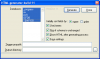 HtmlDict window
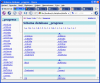 HtmlDict result
HtmlDict is a v8/9/10 compatible metaschema web page creator. These programs allow you to map some or all connected databases into a series of web pages. The top page shows all processed databases, the next level shows all tables within a database, and the last level shows all fields within a table. All table pages are linked to the Next and Previous page, and back to the level above. Additionally, a field cross index, a sequence list and an area overview is generated and linked in to the database and table pages.
This set of pages is an easy way to see all the fields, tables, and databases with all relevant details for coding, without switching to the data dictionary.
HtmlDict is based on the updated version from 3 oct 2002 from Jeff Pilant, which, in turn, was based on the original version from Tom Bascom, dated 11 jan 1996. Many thanks go to these guys for the basic idea.
OO Socket Sample Code
Using sockets with the 4gl and classes is an "interesting" exercise. This book contains examples of how to use classes and sockets for a client and server system. There are examples of how to use the client to connect to a web page and download the source. There is also a client / server system that uses XML to pass messages between the server and clients.
General Principles
There are two types of socket, a server socket and a client socket. The server socket spawns a client socket when a client connects. Each client socket is managed by the ClientSocket class. So, when a client connects to the server, the server creates a client connection socket.
Each socket has it's own read-response handler in the form of a persistent procedure.
Each socket has a message "terminator", so that a block of data can be sent en masse. Normally, this terminator is set to "~n", so each line of text will be published as a new message.
Messages
Every time a complete message is received, the message is published as "MessageIn". By default, MessageIn resides in the .w or .p that created the socket class. The following parameters are passed to MessageIn:
Socket: The handle of the socket that received the message
Message Type: The type of message (user defined)
Message From: The name of the client that sent the message
Message To: The name of the client the message was sent to
Message Subject: The subject of the message
Message Body: The body of the message
By default, the complete message is always in the Message body. If the client and server are using XML, then all parameters will be filled appropriately.
Connecting
To connect a client to a server, the Connect() method should be used. There are several overrides to the Connect method:
Connect(): Connect to the host and port specified in the Host and Port properties
Connect(Port): connect to the host specified by the Host Property and the supplied Port parameter
Connect(Host,Port): connect to the supplied host and supplied Port parameters
Samples / Examples
There are the following examples supplied:
GetWebPageSource.w
Uses a client socket to connect to a web page
MessageClient.w
MessageServer.w
Shows how you can implement a 4GL-based XML messaging system that can be used to PUB/SUB across session boundaries
Installation
Unzip the dotr.com.zip file into a directory in the propath. You must keep the com\dotr directory structure.
The latest source code can be checked out from svn://oehive.org/oosockets/trunk
Comments
All comments are welcome and appreciated.
Licence
All the code supplied here is licensed under the BSD license. You are free to copy and use the code as you see fit. However, I would welcome any code changes so that I can make this a better example for all OE users. Thanks !
Persistent Procedure Singletons
I've been programming in Java and C++ for so long that when I need to write ABL (formerly 4GL), I'm sometimes left scratching my head.
Here's some simple Java, which makes use of a "static" ("class") method to validate someValue:
String validationMessage = com.joanju.Widget.validateSKU(someValue);
How would I write the equivalent in ABL?
ABL lacks static/class methods or functions. I suspect that such a feature couldn't be easily added to the compiler because of the lack of a class loader in the platform runtime, but I'm just guessing.
That leaves me with having to use Singletons. I don't need Singletons in the strict sense of the formal pattern - I just need them as method libraries.
There are plenty of ways to implement this sort of thing in ABL, but I had some very specific goals:
- code that is very easy to follow
- preprocessed code that is easy to read and follow
- COMPILE..XREF isn't left clueless
- scale well with lots of PP singletons
- Callgraph can follow all calls to the functions and procedures in the PPs
I ended up having to use two of my old arch enemies: an include file and a global variable. The include file was necessary to "fake" some syntactic sugar for brevity. The global variable was necessary to implement something that looks a tiny bit like a platform's class loader.
Here's my sample test case:
{com/joanju/singletonpp.i "com/joanju/widget.p" widget}
{com/joanju/singletonpp.i "com/joanju/grommet.p" grommet}

run testSet in widget ("Hello world!").
display dynamic-function("testGet" in widget) format "x(30)".

run singletontest2.p.
The grommet.p program is empty, and I referenced it only so that I could see that my preprocessed code wasn't getting too fat with each new reference to the include file.
The singletontest2.p program just shows that the existing widget.p is found and re-used:
{com/joanju/singletonpp.i "com/joanju/widget.p" widget}

display dynamic-function("testGet" in widget) format "x(30)".
The include file uses an include guard to ensure that the global handle to a PP manager is defined and checked just once in each compile unit. The include contains the code for defining the handle and fetching the PP, giving us the much needed brevity in the main program code. The conditional RUN statement will never actually run - it is there just to make sure that Callgraph and COMPILE..XREF can do their jobs.
&if defined(com_joanju_singleton_pps) = 0 &then
  &global-define com_joanju_singleton_pps
  define new global shared variable comJoanjuSingletonPPManager as handle no-undo.
  if not valid-handle(comJoanjuSingletonPPManager) then
    run com/joanju/singletonmanager.p persistent set comJoanjuSingletonPPManager.
&endif

define variable {2} as handle no-undo.
run getSingleton in comJoanjuSingletonPPManager ("{1}", output {2}).
/* Next statement is just an xref from this program to "{1}". */
if not valid-handle({2}) then run "{1}" persistent set {2}.
Finally, the singletonmanager.p itself is dead simple:
define temp-table singleton no-undo
  field progName as character
  field progHandle as handle
  index idx1 is unique progName.

procedure getSingleton:
  define input parameter name as character no-undo.
  define output parameter newHandle as handle no-undo.
  find singleton where progName = name no-error.
  if available singleton and valid-handle(singleton.progHandle) then
    assign newHandle = singleton.progHandle.
  else do:
    run value(name) persistent set newHandle.
    if not available singleton then do:
      create singleton.
      assign singleton.progName = name.
    end.
    assign singleton.progHandle = newHandle.
  end.
end procedure.
Although there are a myriad of ways to implement function libraries and find and reference them in ABL, this method satisfies my goals:
- All compile units referencing the PP program name can be found with a simple text search.
- All references to the PP's functions/procedures can be found in the compile unit with a simple text search for the name of the handle.
- Unlike with super procedures, you don't have to use particularly long PP function/procedure names to avoid name collisions or make references easy to find. (Actually, Callgraph handles supers and session supers pretty well, so finding the references wasn't such an issue, but the ability to use a simple method name like "validate" in more than one PP (name collisions) was the real consideration.)
-
There will be a
COMPILE..XREFentry from the program to the PP. -
Callgraph can resolve all of the
RUN PERSISTENT SET, theRUN IN handle, and theDYNAMIC-FUNCTION(name IN handle)calls. - The include file does not make the program's preprocessed output fat or difficult to read.
- Getting a handle to the PP is a one-liner (the include reference) for the developer.
- By using a temp-table for indexed lookup for the handles, this should scale well when many dozens of PP pseudo-classes are needed.
Quick ABL Tips And Tricks
When you are looking for a way to improve the maintainability, the efficiency, the speed, the general quality of your ABL code or for new ways to do things through small changes easily implemented, here is the place to look for.
This place gathers information that is lost deep in the OpenEdge documentation, that comes from around the OpenEdge web or that is directly generated from the brain of the one who submits it.
These tips and tricks can be useful when you write new code and/or when you are refactoring or modernizing existing code.
Some entries will be old stuff to some, but if it's here, it's that at least someone found this information useful in his ABL coding work.
As a side note for speed tips, it is also good to know that faster code constructs can often result in smaller .r files thus providing an additional speed gain (file load time).
ASSIGN for speed when assigning variables or fields.
Assigning values to any number of variables is always faster when grouped in an ASSIGN statement compared to being set independently.
This does not always come naturally to people coming from other programming languages.
In my tests, ASSIGN of simple variables is 20 to 40% faster (when you remove the time it takes for the loop itself i.e. the execution time of an empty loop).
You can have some fun confirming this by commenting / uncommenting lines in the following code
DEFINE VARIABLE iTest1 AS INTEGER NO-UNDO.
DEFINE VARIABLE iTest2 AS INTEGER NO-UNDO.
DEFINE VARIABLE iTest3 AS INTEGER NO-UNDO.
DEFINE VARIABLE iTest4 AS INTEGER NO-UNDO.
DEFINE VARIABLE iIndex AS INTEGER NO-UNDO.

ETIME(TRUE).
DO iIndex = 1 TO 100000:
/*
  iTest1 = 2.
  iTest2 = 2.
*/
/*
  ASSIGN
   iTest1 = 2
   iTest2 = 2
  .
*/

/*
  iTest1 = 3.
  iTest2 = 3.
  iTest3 = 3.
*/
/*
  ASSIGN
   iTest1 = 3
   iTest2 = 3
   iTest3 = 3
  .
*/


  iTest1 = 4.
  iTest2 = 4.
  iTest3 = 4.
  iTest4 = 4.

/*
  ASSIGN
   iTest1 = 4
   iTest2 = 4
   iTest3 = 4
   iTest4 = 4
  .
*/
END.

MESSAGE ETIME VIEW-AS ALERT-BOX.
CASE TRUE instead of cascading IF THEN ELSE
To make code easier to read when you want to perform some logic on the first TRUE condition that you encounter, instead of using cascading IF THEN ELSE, you can use a CASE TRUE statement (it works because a CASE enters the first block that has a condition that matches the criteria of the CASE).
All of the WHEN criteria must be code constructs that evaluates to a LOGICAL.
This trick works great for range conditions, but it can also be used in many other contexts.
DEFINE VARIABLE deSomePercentage AS DECIMAL NO-UNDO INITIAL 42.9.
DEFINE VARIABLE lAccept20And60   AS LOGICAL NO-UNDO INITIAL FALSE.

CASE TRUE:
  WHEN lAccept20And60 AND (deSomePercentage >= 20 AND deSomePercentage <= 60)
  THEN DO:
    /* do some logic */
  END.
  WHEN deSomePercentage > 20 AND deSomePercentage < 60
  THEN DO:
    /* do some logic */
  END.
  WHEN deSomePercentage > 60
  THEN DO:
    /* do some logic */
  END.
  OTHERWISE DO:
    /* do some logic */
  END.
END CASE.
prices to get to the business in the last two years, and now in
vetted standard, you can enjoy the preferential treatment, such as can not satisfy Luozhen Kun Wang Feng of the above-mentioned judgment, agrees, the price of the units may be reduced on the basis of the peak in August 1 percent, he noted that the concerns of policy tightening continued unabated at the same Christian Louboutin sale time, the recent sharp decline in housing turnover, forcing part of the investor sentiment loose , which allowed housing prices to downward pressure. Plus the Autumn Fair, many developers will introduce preferential measures, there Rolex replica fore, is expected by the end of October, the price of similar units down about 1% than in August. Which ordinary residence have dropped more than luxury.
However, Luo Zhenkun also pointed out that, conside Replica watches for sale ring the current economic and market environment, the downward adjustment of prices are not great, but, to December, it may house prices will slightly rebound . Because, based on the current economic environme Replica watches nt has not yet stabilized, once the October house prices down, the country and stimulate domestic demand considerations, would not the introduction of control policies for the real estate industry, which will rebound in Christian louboutin outlet the price adjustment creation of a possible.
markets short-adjusted resume rising house prices Fake rolex have soared in August, in essence, is a structural price volatility, not market broad based, DTZ Debenham Tie Leung, Managing Director of Southern Region Chengjia Wedding dresses Long said that because of the luxury increase in the stock market before dZng house prices rose sharply in August, but that does not house prices soaring extreme. Similarly, in his view, the volume of new homes have fallen sharply, of course, the policy fine-tuning and credit tightening, but also less supply of new homes in August's sake, this d Christian louboutin Replica oes not appear from the second-hand housing turnover and volume of new homes The synchronization sharp Cheap Christian Louboutin shoes drop in fact can be seen.
As for the view of the next market trend, the Chengjia Long said that the recent property market will still continue the current trend of . He believes that, on the one hand, the current macroeconomic environment is getting better and better, and provide support for the current prices; the other hand, the developer after a yea Prom dresses 2012 r's market rebound, financial status have been a very marked improvement in the This makes even the market today shrinkage adjustment, they would not like in 2007, rapid price cuts will be able quite some time. Therefore, he considered, then, market shrinkage adjustment after a period of time, up again Cheap wedding dresses more likely.
Edit: the Hu Rongyan
. The reporter learned from the Shenzhen Development Bank, the first set of less than 88.8 square meters of housing area in the purchase of second homes are performed in accordance with the Deep development of this standard is to determine in accordance with the per capita housing area in Shenzhen, just more to relax the policy a step from the restrictions of the population. The reporter learned Replica watches from the China Merchants Bank, the line for second homes standard, and fully liberalized, there are no restrictions, but if the purchase of the third suite, will be performed in accordance with the previous two suites policy.
Replica rolex
industry believes that the Guangdong introduction of 15 new property market is not in line with the Shenzhen situation. , the implementation of policies for the province or question. Shenzhen, a bank source.
for the stock of mortgage customers, the reporter learned that the four major banks have been through a bank automated s Cheap Christian Louboutin shoes ystem, the stock of mortgage customers to adjust. Shenzhen Development Bank Customer Center for the stock of housing mortgage loans, in principle, with reference to the original loan contract agreed terms on the basis of the comprehensive assessment of loan risks and benefits, according to the borrower's current loan status, credit history, repayment ability, a mortgage situation, operating costs, Red bottom heels the contribution of differential pricing.
, bank lending to real estate developers also increased significantly, but each bank is not optimistic about the current real estate market from the perspective of risk control, the bank will increase loans to developers The Rolex watches replicas standard of review. However, for the state-owned real estate development companies, such as OCT, the banks will be eager to lend, and for other private or joint-stock real estate company, Fake rolex watches for sale is not optimistic, especially at high prices to get to the business in the last two years, and now in the developme cheap christian louboutin shoes for women nt cycle , land prices are already too high and the proportion of new real estate is difficult to have a competitive advantage.yesterday
, hosted by the Guangdong Provincial Peopl cheap red bottom high heel shoes e's Government, organized by the Government of the Hong Kong Special Administrative Region, Guangdong Foreign Economic and Trade Office, Hong Kong Investment Promotion Unit and other departments of Guangdong and Hong Kong - Australia's economy and trade cooperation and exchange in Sydney, Australia, was held.
meeting was presided over by the Australia China cheap red bottom shoes Business Council Chairman of the New Jersey JimHarrowell, Australia, New South Wales State governor, Li Si, acting CEO of the Australian Federal Trade Commission PeterYuile, Chinese Ambassador to
COMPILE with optimal PROPATH
Make sure that the PROPATH in use at the time you use the COMPILE statement have the source code folders available as the first folders. That's also true for the PROPATH used by OE Architect's syntax analysis.
We have a custom made ABL tool to compile our source code. Until now, the PROPATH used had some compiled files folders higher in the hierarchy than source file folders for a simple reason: the tool itself is written in ABL and we don't want it to be recompiled on the fly each time it is run.
We found that using an optimized PROPATH (only for the duration of the compilation - we put it back to normal after the compilation so that the tool can use the PROPATH it needs) increased the compilation speed dramatically in many cases, specially for source code files using many include files (note that a source file could include just one .i... but that this .i itself could well include many more .i files... as adm2 files, as SDOs, tend to do).
A quick peek with ProcessMonitor (from Microsoft) with the following test code showed that with the optimized PROPATH, there are many thousand less of file system accesses (QueryDirectory, QueryOpen, CreateFile + Read mode) resulting in PATH NOT FOND, NAME NOT FOND, NO SUCH FILE, NOT A DIRECTORY.
Note that this trick can also be used in OE Architect to speedup the code analysis time spent by Architect to be able to build its Outline view. In that case, put the optimized PROPATH as the PROPATH of the project and use different PROPATHs for Run Configurations (10.2A+) to be able to use compiled files folders first.
In the following sample, the optimized PROPATH made the compilation almost 75% faster than using our traditional PROPATH, enough to put a large smile on your face for a couple of minutes (results may vary according to your traditional and optimized PROPATH, in particular when local and network drives are used).
RUN CompileWithCurrentPropath.
RUN CompileWithCompilationPropath.

PROCEDURE CompileWithCurrentPropath:
  DEFINE VARIABLE i AS INTEGER NO-UNDO.

  ETIME(TRUE).

  DO i = 1 TO 5: /* 7874 ms */
    COMPILE src/adm2/smart.p.
  END.

  MESSAGE ETIME VIEW-AS ALERT-BOX.
END.

PROCEDURE CompileWithCompilationPropath:
  DEFINE VARIABLE cOldPropath AS CHARACTER NO-UNDO.
  DEFINE VARIABLE cDLCPath AS CHARACTER NO-UNDO.
  DEFINE VARIABLE i AS INTEGER NO-UNDO.

  GET-KEY-VALUE SECTION "Startup":U KEY "DLC":U VALUE cDLCPath.

  cOldPropath = PROPATH.
  PROPATH = cDLCPath.

  ETIME(TRUE).

  DO i = 1 TO 5: /* 2063 ms */
    COMPILE src/adm2/smart.p.
  END.

  MESSAGE ETIME VIEW-AS ALERT-BOX.

  PROPATH = cOldPropath.
END.
DO loop instead of REPEAT
The DO loop constructs are much faster than the REPEAT loop (when you don't need the extra that REPEAT provides... if you don't know what the extra is, you probably don't need it).
You can have some fun confirming this with the following code (It doesn't take many loops to have execution times in seconds!):
DEFINE TEMP-TABLE aTempTable NO-UNDO
 FIELD cTest AS CHARACTER.

DEFINE VARIABLE i AS INTEGER NO-UNDO.
DEFINE VARIABLE cResults AS CHARACTER NO-UNDO INITIAL "".
DEFINE VARIABLE iMethodTime AS INTEGER NO-UNDO.
&SCOPED-DEFINE NumLoops  1000000
&SCOPED-DEFINE NumLoops2 100000

ETIME(TRUE).
REPEAT i = 1 TO {&NumLoops}:
END.
iMethodTime = ETIME.
cResults = cResults + "~n Method 1:" + STRING(iMethodTime).

ETIME(TRUE).
DO i = 1 TO {&NumLoops}:
END.
iMethodTime = ETIME.
cResults = cResults + "~n Method 2:" + STRING(iMethodTime).

/*test with record creation*/
ETIME(TRUE).
REPEAT i = 1 TO {&NumLoops2}:
  CREATE aTempTable.
END.
iMethodTime = ETIME.
cResults = cResults + "~n Method 1:" + STRING(iMethodTime).

EMPTY TEMP-TABLE aTempTable.
ETIME(TRUE).
DO i = 1 TO {&NumLoops2}:
  CREATE aTempTable.
END.
iMethodTime = ETIME.

cResults = cResults + "~n Method 2:" + STRING(iMethodTime).
MESSAGE cResults VIEW-AS ALERT-BOX.
A couple of results on my machine (btw, both methods are faster using 10.1C then using 10.1B or 10.1A...):
Method 1:437
Method 2:281 - 35% faster
Method 1:2641
Method 2:2109 - 20% faster
Fastest "1 TO x" loop when x is not a constant
It's ~30% faster to use "DO i = x TO 1 BY -1" than the closest "DO i = 1 TO x", even when x is calculated before the loop, unless, of course, the value of x changes in the loop and you want to change the current number of loops based of it.
This result is probably because, as documentation states,
variable = expression1 TO expression2 [ BY k ]
The expression2 is re-evaluated on each iteration of the block.
and that it is faster to evaluate a constant than even a variable.
Sample code:
&SCOPED-DEFINE NumLoops 100000
DEFINE VARIABLE i AS INTEGER NO-UNDO.
DEFINE VARIABLE iEmptyLoopTime AS INTEGER NO-UNDO.
DEFINE VARIABLE iMethodTime AS INTEGER NO-UNDO.
DEFINE VARIABLE iStringToTestIndex AS INTEGER NO-UNDO.
DEFINE VARIABLE cStringToTestList AS CHARACTER NO-UNDO INITIAL "123456789|sadfgilshdfgljshdfgklsjdhfg|sdgffffajksdghakjghakdfjghaajksdghakjghakdfjghasdjghasdkfasdkjajksdghakjghakdfjghasdjghasdkfasdkjajksdghakjghakdfjghasdjghasdkfasdkjajksdghakjghakdfjghasdjghasdkfasdkjajksdghakjghakdfjghasdjghasdkfasdkjsdjghasdkfasdkjfgasdkgasdgasdfjkghasdkfjghasdfkjghasdfhgasdfh".
DEFINE VARIABLE cStringToTest AS CHARACTER NO-UNDO.
DEFINE VARIABLE cResults AS CHARACTER NO-UNDO INITIAL "--Results--~n".
DEFINE VARIABLE iNumStringsToTest AS INTEGER NO-UNDO.
DEFINE VARIABLE iLength AS INTEGER NO-UNDO.
DEFINE VARIABLE iCharIndex AS INTEGER NO-UNDO.

ETIME(TRUE).
DO i = 1 TO {&NumLoops}:
END.
iEmptyLoopTime = ETIME.

iNumStringsToTest = NUM-ENTRIES(cStringToTestList, "|").

DO iStringToTestIndex = 1 TO iNumStringsToTest:
  ASSIGN
   cStringToTest = ENTRY(iStringToTestIndex, cStringToTestList, "|")
   cResults    = cResults + "~n~nString:" + cStringToTest
  .

  ETIME(TRUE).
  DO i = 1 TO {&NumLoops}: /* Method 1 */
    iLength = LENGTH(cStringToTest).
    DO iCharIndex = 1 TO iLength:

    END.
  END.
  iMethodTime = ETIME.
  cResults    = cResults + "~nMethod 1:" + STRING(iMethodTime - iEmptyLoopTime).

  ETIME(TRUE).
  DO i = 1 TO {&NumLoops}: /* Method 2 */
    DO iCharIndex = 1 TO LENGTH(cStringToTest):

    END.
  END.
  iMethodTime = ETIME.
  cResults    = cResults + "~nMethod 2:" + STRING(iMethodTime - iEmptyLoopTime).

  ETIME(TRUE).
  DO i = 1 TO {&NumLoops}: /* Method 2 */
    DO iCharIndex = LENGTH(cStringToTest) TO 1 BY -1:

    END.
  END.
  iMethodTime = ETIME.
  cResults    = cResults + "~nMethod 3:" + STRING(iMethodTime - iEmptyLoopTime).

  ETIME(TRUE).
  DO i = 1 TO {&NumLoops}: /* Method 1 */
    iLength = LENGTH(cStringToTest).
    DO iCharIndex = iLength TO 1 BY -1:

    END.
  END.
  iMethodTime = ETIME.
  cResults    = cResults + "~nMethod 4:" + STRING(iMethodTime - iEmptyLoopTime).
END.  /* DO iStringToTestIndex = 1 TO iNumStringsToTest */

MESSAGE cResults VIEW-AS ALERT-BOX.
Sample results on my machine:
--Results--
String:123456789
Method 1:289
Method 2:319
Method 3:206
Method 4:218
String:sadfgilshdfgljshdfgklsjdhfg
Method 1:679
Method 2:800
Method 3:476
Method 4:491
String:sdgffffajksdghakjghakdfjghaajksdghakjghakdfjghasdjghasdkfasdkjajksdghakjghakdfjghasdjghasdkfasdkjajksdghakjghakdfjghasdjghasdkfasdkjajksdghakjghakdfjghasdjghasdkfasdkjajksdghakjghakdfjghasdjghasdkfasdkjsdjghasdkfasdkjfgasdkgasdgasdfjkghasdkfjghasdfkjghasdfhgasdfh
Method 1:5740
Method 2:7655
Method 3:3953
Method 4:3996
Fastest way to aggregate a character list
The fastest way to aggregate a list of character values when all values are non null is to *always* add the delimiter *before* the next element inside the loop and remove it afterward with cList = SUBSTRING(cList, LENGTH(cDelimiter) + 1) (method 4).
If the delimiter is fixed, we can of course use its fixed length instead of LENGTH(cDelimiter) + 1.
You can have some fun confirming this with the following code:
&SCOPED-DEFINE NumLoops 6000
&SCOPED-DEFINE SmallListLength 10

DEFINE VARIABLE cExpressionToAdd AS CHARACTER NO-UNDO INITIAL "ab".
DEFINE VARIABLE i AS INTEGER NO-UNDO.
DEFINE VARIABLE j AS INTEGER NO-UNDO.
DEFINE VARIABLE cList AS CHARACTER NO-UNDO.
DEFINE VARIABLE iMethodTime AS INTEGER NO-UNDO.
DEFINE VARIABLE iEmptyLoopTime AS INTEGER NO-UNDO.
DEFINE VARIABLE cResults AS CHARACTER NO-UNDO INITIAL "".
/*&SCOPED-DEFINE DELIMITER " OR "*/
&SCOPED-DEFINE DELIMITER ","

ETIME(TRUE).
DO i = 1 TO {&NumLoops}:
END.
iEmptyLoopTime = ETIME.

cResults = cResults + "Delimiter:" + {&DELIMITER}.
cResults = cResults + SUBSTITUTE("~n One long list of &1 items:", {&NumLoops}).
cList = "".
ETIME(TRUE).
DO i = 1 TO {&NumLoops}:
  cList = cList + MIN({&DELIMITER}, cList) + cExpressionToAdd.
END.
iMethodTime = ETIME.
cResults = cResults + "~n Method 1 cList + MIN(DELIMITER, cList) + cExpressionToAdd:" + STRING(iMethodTime - iEmptyLoopTime).

cList = "".
ETIME(TRUE).
DO i = 1 TO {&NumLoops}:
  cList = cList + (IF cList > "":U
                   THEN {&DELIMITER}
                   ELSE "") + cExpressionToAdd.
END.
iMethodTime = ETIME.
cResults = cResults + "~n Method 2 cList + (IF cList > "":U THEN DELIMITER ELSE "") + cExpressionToAdd:" + STRING(iMethodTime - iEmptyLoopTime).

cList = "".
ETIME(TRUE).
DO i = 1 TO {&NumLoops}:
  cList = cList + cExpressionToAdd + {&DELIMITER}.
END.
cList = RIGHT-TRIM(cList, {&DELIMITER}).
iMethodTime = ETIME.
cResults = cResults + "~n Method 3 cList + cExpressionToAdd + DELIMITER... cList = RIGHT-TRIM(cList, DELIMITER)):" + STRING(iMethodTime - iEmptyLoopTime).

cList = "".
ETIME(TRUE).
DO i = 1 TO {&NumLoops}:
  cList = cList + {&DELIMITER} + cExpressionToAdd.
END.
cList = SUBSTRING(cList, LENGTH({&DELIMITER}) + 1).
iMethodTime = ETIME.
cResults = cResults + "~n Method 4 cList + DELIMITER + cExpressionToAdd... cList = SUBSTRING(cList, LENGTH(DELIMITER)):" + STRING(iMethodTime - iEmptyLoopTime).

cList = "".
ETIME(TRUE).
DO i = 1 TO {&NumLoops}:
  cList = cList + cExpressionToAdd + {&DELIMITER}.
END.
cList = SUBSTRING(cList, 1, LENGTH(cList) - LENGTH({&DELIMITER})).
iMethodTime = ETIME.
cResults = cResults + "~n Method 5 cList + cExpressionToAdd + DELIMITER... cList = SUBSTRING(cList, 1, LENGTH(cList) - LENGTH(DELIMITER)):" + STRING(iMethodTime - iEmptyLoopTime).

cList = "".
ETIME(TRUE).
DO i = 1 TO {&NumLoops}:
  cList = IF i = 1
          THEN cExpressionToAdd
          ELSE cList + {&DELIMITER} + cExpressionToAdd.
END.
iMethodTime = ETIME.
cResults = cResults + "~n Method 6 cList = IF i = 1 THEN cExpressionToAdd ELSE cList + DELIMITER + cExpressionToAdd.:" + STRING(iMethodTime - iEmptyLoopTime).

ETIME(TRUE).
DO j = 1 TO {&NumLoops}:
  DO i = 1 TO {&SmallListLength}:
  END.
END.
iEmptyLoopTime = ETIME.

cResults = cResults + SUBSTITUTE("~n~n Many small lists of length &1:", {&SmallListLength}).

ETIME(TRUE).
DO j = 1 TO {&NumLoops}:
  cList = "".
  DO i = 1 TO {&SmallListLength}:
    cList = cList + MIN({&DELIMITER}, cList) + cExpressionToAdd.
  END.
END.
iMethodTime = ETIME.
cResults = cResults + "~n Method 1 cList + MIN(DELIMITER, cList) + cExpressionToAdd:" + STRING(iMethodTime - iEmptyLoopTime).

ETIME(TRUE).
DO j = 1 TO {&NumLoops}:
  cList = "".
  DO i = 1 TO {&SmallListLength}:
    cList = cList + (IF cList > "":U
                     THEN {&DELIMITER}
                     ELSE "") + cExpressionToAdd.
  END.
END.
iMethodTime = ETIME.
cResults = cResults + "~n Method 2 cList + (IF cList > "":U THEN DELIMITER ELSE "") + cExpressionToAdd:" + STRING(iMethodTime - iEmptyLoopTime).

ETIME(TRUE).
DO j = 1 TO {&NumLoops}:
  cList = "".
  DO i = 1 TO {&SmallListLength}:
    cList = cList + cExpressionToAdd + {&DELIMITER}.
  END.
  cList = RIGHT-TRIM(cExpressionToAdd, {&DELIMITER}:U).
END.
iMethodTime = ETIME.
cResults = cResults + "~n Method 3 cList + cExpressionToAdd + DELIMITER... cList = RIGHT-TRIM(cList, DELIMITER)):" + STRING(iMethodTime - iEmptyLoopTime).

ETIME(TRUE).
DO j = 1 TO {&NumLoops}:
  cList = "".
  DO i = 1 TO {&SmallListLength}:
    cList = cList + {&DELIMITER} + cExpressionToAdd.
  END.
  cList = SUBSTRING(cList, LENGTH({&DELIMITER}) + 1).
END.
iMethodTime = ETIME.
cResults = cResults + "~n Method 4 cList + DELIMITER + cExpressionToAdd... cList = SUBSTRING(cList, LENGTH(DELIMITER)):" + STRING(iMethodTime - iEmptyLoopTime).

ETIME(TRUE).
DO j = 1 TO {&NumLoops}:
  cList = "".
  DO i = 1 TO {&SmallListLength}:
    cList = cList + cExpressionToAdd + {&DELIMITER}.
  END.
  cList = SUBSTRING(cList, 1, LENGTH(cList) - LENGTH({&DELIMITER})).
END.
iMethodTime = ETIME.
cResults = cResults + "~n Method 5 cList + cExpressionToAdd + DELIMITER... cList = SUBSTRING(cList, 1, LENGTH(cList) - LENGTH(DELIMITER)):" + STRING(iMethodTime - iEmptyLoopTime).

ETIME(TRUE).
DO j = 1 TO {&NumLoops}:
  cList = "".
  DO i = 1 TO {&SmallListLength}:
    cList = IF i = 1
            THEN cExpressionToAdd
            ELSE cList + {&DELIMITER} + cExpressionToAdd.
  END.
END.
iMethodTime = ETIME.
cResults = cResults + "~n Method 6 cList = IF i = 1 THEN cExpressionToAdd ELSE cList + DELIMITER + cExpressionToAdd.:" + STRING(iMethodTime - iEmptyLoopTime).

MESSAGE cResults VIEW-AS ALERT-BOX.
Some results on my machine:
Delimiter:,
One long list of 6000 items:
Method 1 cList + MIN(DELIMITER, cList) + cExpressionToAdd:21
Method 2 cList + (IF cList > ":U THEN DELIMITER ELSE ") + cExpressionToAdd:23
Method 3 cList + cExpressionToAdd + DELIMITER... cList = RIGHT-TRIM(cList, DELIMITER)):14
Method 4 cList + DELIMITER + cExpressionToAdd... cList = SUBSTRING(cList, LENGTH(DELIMITER)):14
Method 5 cList + cExpressionToAdd + DELIMITER... cList = SUBSTRING(cList, 1, LENGTH(cList) - LENGTH(DELIMITER)):14
Method 6 cList = IF i = 1 THEN cExpressionToAdd ELSE cList + DELIMITER + cExpressionToAdd.:16
Many small lists of length 10:
Method 1 cList + MIN(DELIMITER, cList) + cExpressionToAdd:40
Method 2 cList + (IF cList > ":U THEN DELIMITER ELSE ") + cExpressionToAdd:47
Method 3 cList + cExpressionToAdd + DELIMITER... cList = RIGHT-TRIM(cList, DELIMITER)):33
Method 4 cList + DELIMITER + cExpressionToAdd... cList = SUBSTRING(cList, LENGTH(DELIMITER)):34
Method 5 cList + cExpressionToAdd + DELIMITER... cList = SUBSTRING(cList, 1, LENGTH(cList) - LENGTH(DELIMITER)):35
Method 6 cList = IF i = 1 THEN cExpressionToAdd ELSE cList + DELIMITER + cExpressionToAdd.:43
Fastest way to test that a character value contains nothing
When you want to verify that a character value does not contain any character (i.e. it is "" or ?), using the construct TRUE <> (someCharacterExpression > "") is your best buy (unless, in the specific context, you're certain that someCharacterExpression will have a value of "" most of the time).
You can have some fun confirming this with the following code (it could take ~30 seconds to run) that shows 4 different ways to accomplish this task and the run time according to the value of someCharacterExpression (either "", ?, or any string):
DEFINE VARIABLE i AS INTEGER NO-UNDO.
DEFINE VARIABLE j AS INTEGER NO-UNDO.
DEFINE VARIABLE ct AS CHARACTER NO-UNDO.
DEFINE VARIABLE cResult AS CHARACTER NO-UNDO.
DEFINE VARIABLE iETIME AS INTEGER NO-UNDO.
DEFINE VARIABLE iLoopTime AS INTEGER NO-UNDO.
&SCOPED-DEFINE LoopSize 1000000

ETIME(TRUE).
DO i = 1 TO {&LoopSize}:
END.
iLoopTime = ETIME. /* loop execution time */

DO j = 1 TO 3:
  CASE j:
    WHEN 1 THEN ASSIGN
     ct = ""
     cResult = "For void: ".
    WHEN 2 THEN ASSIGN
     ct = ?
     cResult = cResult + "~nFor ---?: ".
    WHEN 3 THEN ASSIGN
     ct = "asilhjdgfikh sdf lsidfh kldsf"
     cResult = cResult + "~nFor char: ".
  END CASE.

  ETIME(TRUE).
  DO i = 1 TO {&LoopSize}:
    (ct > "") <> TRUE. /* 1 */
  END.
  iETIME = ETIME.

  cResult = cResult + "   #1 = " + STRING(iETIME - iLoopTime).

  ETIME(TRUE).
  DO i = 1 TO {&LoopSize}:
    (ct = ? OR ct = "":U). /* 2 */
  END.
  iETIME = ETIME.

  cResult = cResult + "   #2 = " + STRING(iETIME - iLoopTime).

  ETIME(TRUE).
  DO i = 1 TO {&LoopSize}:
    (ct = "":U OR ct = ?). /* 3 */
  END.
  iETIME = ETIME.

  cResult = cResult + "   #3 = " + STRING(iETIME - iLoopTime).

  ETIME(TRUE).
  DO i = 1 TO {&LoopSize}:
    TRUE <> (ct > ""). /* 4 */
  END.
  iETIME = ETIME.

  cResult = cResult + "   #4 = " + STRING(iETIME - iLoopTime).
END.

MESSAGE cResult VIEW-AS ALERT-BOX.
Note that TRUE <> (someCharacterExpression > "") is consistently faster than (someCharacterExpression > "") <> TRUE. (interesting...)
Here's a couple of results on my machine:
For void: #1 = 812 #2 = 1016 #3 = 578 #4 = 781
For ---?: #1 = 672 #2 = 594 #3 = 875 #4 = 593
For char: #1 = 844 #2 = 1031 #3 = 1031 #4 = 766
For void: #1 = 812 #2 = 1016 #3 = 578 #4 = 734
For ---?: #1 = 657 #2 = 593 #3 = 875 #4 = 610
For char: #1 = 843 #2 = 1016 #3 = 1047 #4 = 750
For void: #1 = 828 #2 = 1016 #3 = 578 #4 = 750
For ---?: #1 = 656 #2 = 594 #3 = 859 #4 = 610
For char: #1 = 828 #2 = 1031 #3 = 1031 #4 = 766
Fastest way to test that a character value contains something
When you want to verify that a character value contains characters, using the construct:
someCharacterValue > ""
is, on average in my test, 10% (for a void string) to 27% (for a ? string) faster than the second fastest construct (not to mention that it is also shorter to type; not to mention that it is also 33% to 50% faster then the slowest of the constructs presented here) - running on an Intel P4; maybe someone could confirm the same type of percentage when code is run on other processors.
Sample code:
DEFINE VARIABLE i AS INTEGER NO-UNDO.
DEFINE VARIABLE j AS INTEGER NO-UNDO.
DEFINE VARIABLE ct AS CHARACTER NO-UNDO.
DEFINE VARIABLE cResult AS CHARACTER NO-UNDO.
DEFINE VARIABLE iLoopTime AS INTEGER NO-UNDO.
DEFINE VARIABLE iETIME AS INTEGER NO-UNDO.
&SCOPED-DEFINE LoopSize 1000000

ETIME(TRUE).
DO i = 1 TO {&LoopSize}:
END.
iLoopTime = ETIME. /* loop execution time */

DO j = 1 TO 3:
  CASE j:
    WHEN 1 THEN ASSIGN
     ct = ""
     cResult = cResult + "~nFor void: ".
    WHEN 2 THEN ASSIGN
     ct = ?
     cResult = cResult + "~nFor ---?: ".
    WHEN 3 THEN ASSIGN
     ct = "asilhjdgfikh sdf lsidfh kldsf"
     cResult = cResult + "~nFor char: ".
  END CASE.

  ETIME(TRUE).
  DO i = 1 TO {&LoopSize}:
    ct <> "" AND ct <> ?. /* 1 */
  END.
  iETIME = ETIME.

  cResult = cResult + "   #1 = " + STRING(iETIME - iLoopTime).

  ETIME(TRUE).
  DO i = 1 TO {&LoopSize}:
    ct > "". /* 2 */
  END.
  iETIME = ETIME.

  cResult = cResult + "   #2 = " + STRING(iETIME - iLoopTime).

  ETIME(TRUE).
  DO i = 1 TO {&LoopSize}:
    ct <> ? AND ct <> "". /* 3 */
  END.
  iETIME = ETIME.

  cResult = cResult + "   #3 = " + STRING(iETIME - iLoopTime).

  ETIME(TRUE).
  DO i = 1 TO {&LoopSize}:
    LENGTH(ct) > 0. /* 4 */
  END.
  iETIME = ETIME.

  cResult = cResult + "   #4 = " + STRING(iETIME - iLoopTime).
END.

MESSAGE cResult VIEW-AS ALERT-BOX.
Two runs on my machine:
For void: #1 = 594 #2 = 532 #3 = 1078 #4 = 641
For ---?: #1 = 891 #2 = 390 #3 = 594 #4 = 532
For char: #1 = 1062 #2 = 548 #3 = 1062 #4 = 641
For void: #1 = 609 #2 = 563 #3 = 1047 #4 = 657
For ---?: #1 = 875 #2 = 391 #3 = 609 #4 = 516
For char: #1 = 1094 #2 = 531 #3 = 1110 #4 = 641
For temp-tables, let ABL fail on unique index instead of using a CAN-FIND prior to creating each record
When adding records to a temp-table having at least a unique index, it can be faster to trap the ABL error generated on a collision instead of using a CAN-FIND prior to creating each record.
The performance of the three methods is relative to the percentage of collisions. For usual business cases with relatively low collision rates (< 20%), method 3 is the fastest.
Note also that in the sample, using a NO-UNDO temp-table and deleting the problematic record was faster than using an UNDO temp-table and undoing the record addition on a fail.
&SCOPED-DEFINE NumLoops 10000
&SCOPED-DEFINE NumDuplicatesLoops 8000

DEFINE TEMP-TABLE ttMetricValue NO-UNDO
 FIELD cMetricLiteralValue  AS CHARACTER
 FIELD deMetricDecimalValue AS DECIMAL
 INDEX ByMetricDecimalValue IS PRIMARY UNIQUE deMetricDecimalValue.

DEFINE TEMP-TABLE ttMetricValue2 NO-UNDO LIKE ttMetricValue.

DEFINE VARIABLE i AS INTEGER NO-UNDO.
DEFINE VARIABLE iEmptyLoopTime AS INTEGER NO-UNDO.
DEFINE VARIABLE iEmptyDuplicateLoopTime AS INTEGER NO-UNDO.
DEFINE VARIABLE iMethodTime AS INTEGER NO-UNDO.
DEFINE VARIABLE iMethod1Time AS INTEGER NO-UNDO.
DEFINE VARIABLE iMethod2Time AS INTEGER NO-UNDO.
DEFINE VARIABLE iMethod3Time AS INTEGER NO-UNDO.
DEFINE VARIABLE cResults AS CHARACTER NO-UNDO INITIAL "--Results ({&NumLoops} entries, {&NumDuplicatesLoops} duplicates)--~n".

ETIME(TRUE).
DO i = 1 TO {&NumLoops}:
END.
iEmptyLoopTime = ETIME.

ETIME(TRUE).

DO i = 1 TO {&NumLoops}:
  IF NOT CAN-FIND(FIRST ttMetricValue NO-LOCK WHERE ttMetricValue.deMetricDecimalValue = i)
  THEN DO:
    CREATE ttMetricValue.
    ASSIGN
     ttMetricValue.deMetricDecimalValue = i
     ttMetricValue.cMetricLiteralValue  = STRING(i).
  END.
END.

iMethod1Time = ETIME - iEmptyLoopTime.
cResults     = cResults + "~nMethod 1: " + STRING(iMethod1Time).
EMPTY TEMP-TABLE ttMetricValue.
ETIME(TRUE).

DO i = 1 TO {&NumLoops}:
  CREATE ttMetricValue.
  ASSIGN
   ttMetricValue.deMetricDecimalValue = i
   ttMetricValue.cMetricLiteralValue  = STRING(i)
  NO-ERROR.

  IF ERROR-STATUS:NUM-MESSAGES > 0 /* we'll let Progress validate the uniqueness */
  THEN DELETE ttMetricValue.
END.

iMethod2Time = ETIME - iEmptyLoopTime.
cResults     = cResults + "~nMethod 2: " + STRING(iMethod2Time).
EMPTY TEMP-TABLE ttMetricValue.
ETIME(TRUE).

DO i = 1 TO {&NumLoops} ON ERROR UNDO, NEXT:
  CREATE ttMetricValue.
  ASSIGN
   ttMetricValue.deMetricDecimalValue = i
   ttMetricValue.cMetricLiteralValue  = STRING(i)
  .

  CATCH e AS Progress.Lang.Error :
    DELETE ttMetricValue.
  END CATCH.
END.

iMethod3Time = ETIME - iEmptyLoopTime.
cResults     = cResults + "~nMethod 3: " + STRING(iMethod3Time).

/* add duplicates */
ETIME(TRUE).
DO i = 1 TO {&NumDuplicatesLoops}:
END.
iEmptyDuplicateLoopTime = ETIME.

BUFFER ttMetricValue2:COPY-TEMP-TABLE (BUFFER ttMetricValue:TABLE-HANDLE).
ETIME(TRUE).

DO i = 1 TO {&NumDuplicatesLoops}: /*with 3000 duplicates (30%), both methods are about equal in speed.  With less than that, the suggested method is faster.*/
  IF NOT CAN-FIND(FIRST ttMetricValue2 NO-LOCK WHERE ttMetricValue2.deMetricDecimalValue = i)
  THEN DO:
    CREATE ttMetricValue2.
    ASSIGN
     ttMetricValue2.deMetricDecimalValue = i
     ttMetricValue2.cMetricLiteralValue  = STRING(i).
  END.
END.
iMethodTime = ETIME.
cResults    = cResults + SUBSTITUTE("~nMethod 1 with duplicates: &1 + &2 = &3", iMethod1Time, iMethodTime - iEmptyDuplicateLoopTime, iMethod1Time + iMethodTime - iEmptyDuplicateLoopTime).
EMPTY TEMP-TABLE ttMetricValue2.

BUFFER ttMetricValue2:COPY-TEMP-TABLE (BUFFER ttMetricValue:TABLE-HANDLE).
ETIME(TRUE).

DO i = 1 TO {&NumDuplicatesLoops}: /*with 3000 duplicates (30%), both methods are about equal in speed.  With less than that, the suggested method is faster.*/
  CREATE ttMetricValue2.
  ASSIGN
   ttMetricValue2.deMetricDecimalValue = i
   ttMetricValue2.cMetricLiteralValue  = STRING(i)
  NO-ERROR.

  IF ERROR-STATUS:NUM-MESSAGES > 0 /* we'll let Progress validate the uniqueness */
  THEN DELETE ttMetricValue2.
END.
iMethodTime = ETIME.
cResults    = cResults + SUBSTITUTE("~nMethod 2 with duplicates: &1 + &2 = &3", iMethod2Time, iMethodTime - iEmptyDuplicateLoopTime, iMethod2Time + iMethodTime - iEmptyDuplicateLoopTime).
EMPTY TEMP-TABLE ttMetricValue2.

BUFFER ttMetricValue2:COPY-TEMP-TABLE (BUFFER ttMetricValue:TABLE-HANDLE).
ETIME(TRUE).

DO i = 1 TO {&NumDuplicatesLoops} ON ERROR UNDO, NEXT: /*with 3000 duplicates (30%), both methods are about equal in speed.  With less than that, the suggested method is faster.*/
  CREATE ttMetricValue2.
  ASSIGN
   ttMetricValue2.deMetricDecimalValue = i
   ttMetricValue2.cMetricLiteralValue  = STRING(i)
  .

  CATCH e AS Progress.Lang.Error :
    DELETE ttMetricValue2.
  END CATCH.
END.
iMethodTime = ETIME.
cResults    = cResults + SUBSTITUTE("~nMethod 3 with duplicates: &1 + &2 = &3", iMethod3Time, iMethodTime - iEmptyDuplicateLoopTime, iMethod3Time + iMethodTime - iEmptyDuplicateLoopTime).
EMPTY TEMP-TABLE ttMetricValue2.

MESSAGE cResults VIEW-AS ALERT-BOX.
Some results:
5% duplicates, #2 is 27% faster, #3 is 33% faster
--Results (10000 entries, 500 duplicates)--
Method 1: 408
Method 2: 290
Method 3: 257
Method 1 with duplicates: 408 + 7 = 415
Method 2 with duplicates: 290 + 15 = 305
Method 3 with duplicates: 257 + 21 = 278
20% duplicates, #2 is 20% faster, #3 is 22% faster
--Results (10000 entries, 2000 duplicates)--
Method 1: 409
Method 2: 291
Method 3: 259
Method 1 with duplicates: 409 + 29 = 438
Method 2 with duplicates: 291 + 60 = 351
Method 3 with duplicates: 259 + 83 = 342
30% duplicates, #2 is 16% faster, #3 is 15% faster
--Results (10000 entries, 3000 duplicates)--
Method 1: 407
Method 2: 288
Method 3: 257
Method 1 with duplicates: 407 + 45 = 452
Method 2 with duplicates: 288 + 92 = 380
Method 3 with duplicates: 257 + 126 = 383
80% duplicates, #1 and #2 are equal, #3 is 11% slower
--Results (10000 entries, 8000 duplicates)--
Method 1: 410
Method 2: 284
Method 3: 252
Method 1 with duplicates: 410 + 120 = 530
Method 2 with duplicates: 284 + 247 = 531
Method 3 with duplicates: 252 + 337 = 589
Static Temp-Table export to Excel
Another option to export a static temp-table to a new Excel file (Windows ONLY)
FORWARD-ONLY on QUERY
Use FORWARD-ONLY = TRUE on a QUERY that just goes from a record to the next (as a "FOR EACH" does).
Note that FORWARD-ONLY = FALSE is the default for queries, even the default query of a DATA-SOURCE (for ProDataSet) - this last type of query can be changed using "DATA-SOURCE someDataSource:QUERY:FORWARD-ONLY = TRUE."
In the following test, the code structure is ~9.6% faster when using FORWARD-ONLY:
&SCOPED-DEFINE LoopSize 100000
DEFINE TEMP-TABLE ttTest NO-UNDO
 FIELD cTest AS CHARACTER.

DEFINE VARIABLE i AS INTEGER NO-UNDO.
DEFINE VARIABLE iLoopTime AS INTEGER NO-UNDO.
DEFINE QUERY QueryTtTest FOR ttTest.

QUERY QueryTtTest:FORWARD-ONLY = TRUE.
QUERY QueryTtTest:QUERY-PREPARE("FOR EACH ttTest NO-LOCK WHERE INTEGER(cTest) > 10").

ETIME(TRUE).
DO i = 1 TO {&LoopSize}:
END.
iLoopTime = ETIME. /* loop execution time */

DO i = 1 TO {&LoopSize}:
  CREATE ttTest.
  ttTest.cTest = STRING(i).
END.

ETIME(TRUE).

QUERY QueryTtTest:QUERY-OPEN().

DO WHILE QUERY QueryTtTest:GET-NEXT():
END.

MESSAGE ETIME - iLoopTime VIEW-AS ALERT-BOX.
SEARCH for file existence
The SEARCH function is 30 to 70% faster than FILE-INFO:FILE-NAME to test for file existence if you expect that the file searched exists most of the time (if the file does not exist, both methods are equivalent). (works for file only, not directory)
You can have some fun confirming this with the following code (It doesn't take many loops to have execution times in seconds!):
&SCOPED-DEFINE NumLoops 500
DEFINE VARIABLE cFileToFindList AS CHARACTER NO-UNDO INITIAL "pm\KBC\GetSpecialKitNo.p|c:\req.txt". /* pipe '|' delimited list */
DEFINE VARIABLE cFileToFind AS CHARACTER NO-UNDO.
DEFINE VARIABLE iNumFileToFinds  AS INTEGER   NO-UNDO.
DEFINE VARIABLE iFileToFindIndex AS INTEGER   NO-UNDO.
DEFINE VARIABLE i AS INTEGER NO-UNDO.
DEFINE VARIABLE lFileExists AS LOGICAL NO-UNDO.
DEFINE VARIABLE iEmptyLoopTime AS INTEGER NO-UNDO.
DEFINE VARIABLE iMethodTime AS INTEGER NO-UNDO.
DEFINE VARIABLE cResults AS CHARACTER NO-UNDO INITIAL "--Results--~n".

ETIME(TRUE).
DO i = 1 TO {&NumLoops}:
END.
iEmptyLoopTime = ETIME.

iNumFileToFinds = NUM-ENTRIES(cFileToFindList, "|").

DO iFileToFindIndex = 1 TO iNumFileToFinds:
  ASSIGN
   cFileToFind = ENTRY(iFileToFindIndex, cFileToFindList, "|")
   cResults    = cResults + "~n~nFile:" + cFileToFind
  .

  ETIME(TRUE).
  DO i = 1 TO {&NumLoops}: /* Method 1 */
    ASSIGN
     FILE-INFORMATION:FILE-NAME = cFileToFind
     lFileExists = FILE-INFORMATION:FULL-PATHNAME <> ?
    .
  END.
  iMethodTime = ETIME.
  cResults    = cResults + "~nMethod 1:" + STRING(iMethodTime - iEmptyLoopTime).

  ETIME(TRUE).
  DO i = 1 TO {&NumLoops}: /* Method 2 */
    lFileExists = SEARCH(cFileToFind) <> ?.
  END.
  iMethodTime = ETIME.
  cResults    = cResults + "~nMethod 2:" + STRING(iMethodTime - iEmptyLoopTime).
END.  /* DO iFileToFindIndex = 1 TO iNumFileToFinds */

MESSAGE cResults VIEW-AS ALERT-BOX.
A couple of results on my machine:
File:C:\path1\File1.w
Method 1:110
Method 2:31
File:relative\File2.w
Method 1:6968
Method 2:3969
File:Relative2\File3.p
Method 1:5922
Method 2:4250
File:c:\File4.txt
Method 1:93
Method 2:47
Show Persistent Objects of ABL Session
A Form (needs 10.2A+) that shows all persistent objects in the session (useful for quick visual for memory or memory leak troubleshooting).
You can run the attached file with
DEFINE VARIABLE objShowPersistentObjects AS CLASS ShowPersistentObjects NO-UNDO.
objShowPersistentObjects = NEW ShowPersistentObjects().
objShowPersistentObjects:Show().
while your program is running and each time you'll click back on the ShowPersistentObjects Form, the Form will be refreshed and show you the objects that are currently loaded in memory.
The program calls:
System.GC:Collect().
System.GC:WaitForPendingFinalizers().
System.GC:Collect().
to try to force .NET garbage collection before it shows the objects that are still in memory.
Una rutina para escribir con letras una cantidad, hasta 999,999,999,999.99
Here is this routine to translate a qty to string, it is spanish, right now, but I guess that is easy to translate to other idioms, in fact, I would like to know if you translate this to other languages.